Join us at FabCon Atlanta from March 16 - 20, 2026, for the ultimate Fabric, Power BI, AI and SQL community-led event. Save $200 with code FABCOMM.
Register now!Get Fabric Certified for FREE during Fabric Data Days. Don't miss your chance! Request now
I've merged two tables together, as a result of the merge some records have come back as null... which is expected. Given one of my tables has >1,000,000 rows of data, I would like to delete/remove all rows from my newly merged table where null is found. I'm sure this is really simple... for the life of me I can't find how to do it Thanks in advance
In the example found below... I would like any line item listed as null within the Assignment Code column to be completedly removed from table.
Newly merged table
| Account # | Assignment Code |
| 1234 | A001 |
| 2345 | A001 |
| 4567 | null |
| 6789 | A002 |
| 8764 | null |
| 9534 | A003 |
Table would look like this after removal of null line items
| Account # | Assignment Code |
| 1234 | A001 |
| 2345 | A001 |
| 6789 | A002 |
| 9534 | A003 |
Solved! Go to Solution.
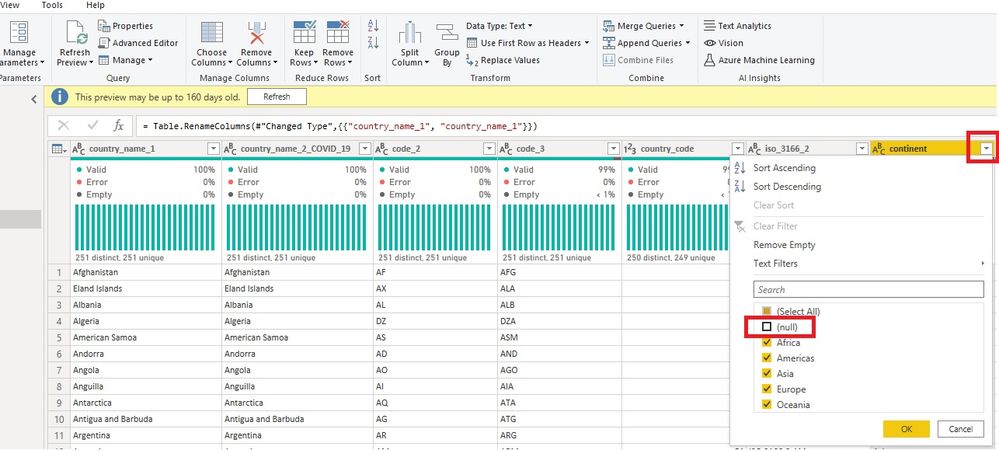
If you want to do it using Power Query:
Go to Power Query Editor (Home --> Transform Data --> Transform Data)
Click on the table and find the column with the nulls
Click on the drop down arrow button and untick null.
Image below
Using DAX formula you can use something like the following:
NEW Table =
DISTINCT (
FILTER (
UNION (
Table 1,
Table 2,
Table 3
),
[Assignment Code] <> null
)
)
If you want to do it using Power Query:
Go to Power Query Editor (Home --> Transform Data --> Transform Data)
Click on the table and find the column with the nulls
Click on the drop down arrow button and untick null.
Image below
Using DAX formula you can use something like the following:
NEW Table =
DISTINCT (
FILTER (
UNION (
Table 1,
Table 2,
Table 3
),
[Assignment Code] <> null
)
)
Check out the November 2025 Power BI update to learn about new features.
Advance your Data & AI career with 50 days of live learning, contests, hands-on challenges, study groups & certifications and more!