Learn from the best! Meet the four finalists headed to the FINALS of the Power BI Dataviz World Championships! Register now
I have a table with deliveries and items in each delivery. I want to get the cost for each delivery but each item has the cost for the delivery. How do I create a measure to get the cost for a delivery. My data looks like this:
| Deliver | Item | Delivery Cost |
| A | 1 | $1 |
| A | 2 | $1 |
| A | 3 | $1 |
| A | 4 | $1 |
| A | 5 | $1 |
| B | 6 | $20 |
| B | 7 | $20 |
| B | 8 | $5 |
| C | 9 | $5 |
Solved! Go to Solution.
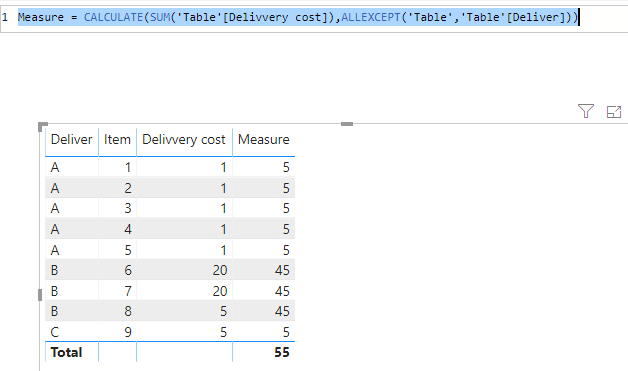
Hi @TomSinAA ,
Here we go 🙂
Measure = CALCULATE(SUM('Table'[Delivvery cost]),ALLEXCEPT('Table','Table'[Deliver]))
Hi @TomSinAA ,
Here we go 🙂
Measure = CALCULATE(SUM('Table'[Delivvery cost]),ALLEXCEPT('Table','Table'[Deliver]))
So, to confirm: the cost of the delivery is represented on each item line, so that the total cost for the delivery is not a SUM of the line costs, but just that one value?
You could write a measure like this:
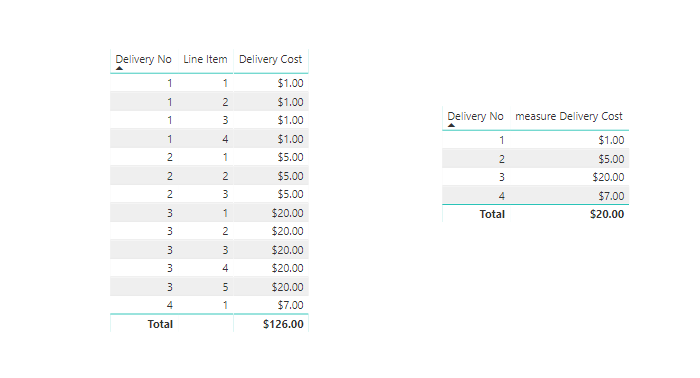
Delivery Cost = MAX( 'TableName'[Delivery Cost] )
Then build a table vizualization with your delivery field, and delivery cost measure.
A new Power BI DataViz World Championship is coming this June! Don't miss out on submitting your entry.
Share feedback directly with Fabric product managers, participate in targeted research studies and influence the Fabric roadmap.
| User | Count |
|---|---|
| 50 | |
| 34 | |
| 32 | |
| 18 | |
| 17 |
| User | Count |
|---|---|
| 64 | |
| 64 | |
| 41 | |
| 27 | |
| 24 |