Join us at FabCon Atlanta from March 16 - 20, 2026, for the ultimate Fabric, Power BI, AI and SQL community-led event. Save $200 with code FABCOMM.
Register now!The Power BI Data Visualization World Championships is back! Get ahead of the game and start preparing now! Learn more
I have a table with deliveries and items in each delivery. I want to get the cost for each delivery but each item has the cost for the delivery. How do I create a measure to get the cost for a delivery. My data looks like this:
| Deliver | Item | Delivery Cost |
| A | 1 | $1 |
| A | 2 | $1 |
| A | 3 | $1 |
| A | 4 | $1 |
| A | 5 | $1 |
| B | 6 | $20 |
| B | 7 | $20 |
| B | 8 | $5 |
| C | 9 | $5 |
Solved! Go to Solution.
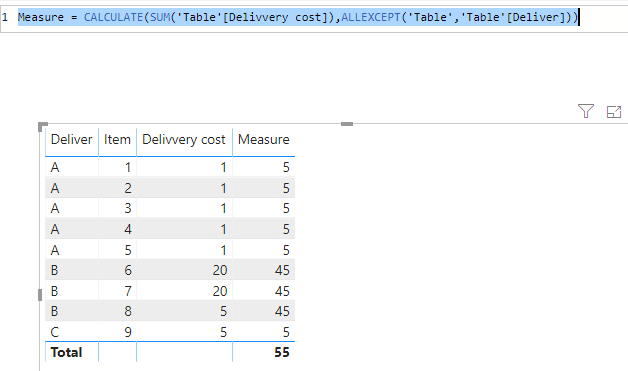
Hi @TomSinAA ,
Here we go 🙂
Measure = CALCULATE(SUM('Table'[Delivvery cost]),ALLEXCEPT('Table','Table'[Deliver]))
Hi @TomSinAA ,
Here we go 🙂
Measure = CALCULATE(SUM('Table'[Delivvery cost]),ALLEXCEPT('Table','Table'[Deliver]))
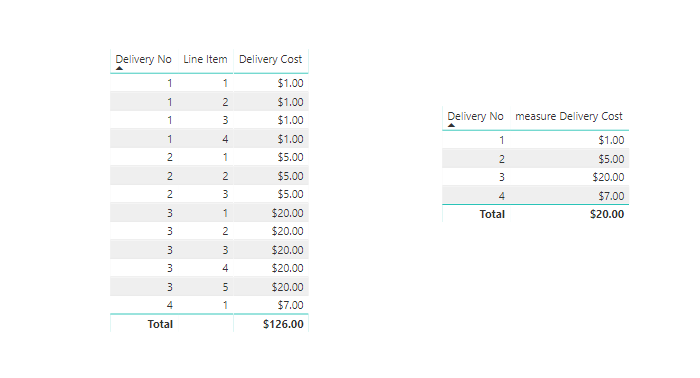
So, to confirm: the cost of the delivery is represented on each item line, so that the total cost for the delivery is not a SUM of the line costs, but just that one value?
You could write a measure like this:
Delivery Cost = MAX( 'TableName'[Delivery Cost] )
Then build a table vizualization with your delivery field, and delivery cost measure.
The Power BI Data Visualization World Championships is back! Get ahead of the game and start preparing now!
| User | Count |
|---|---|
| 40 | |
| 39 | |
| 34 | |
| 29 | |
| 24 |
| User | Count |
|---|---|
| 122 | |
| 111 | |
| 83 | |
| 69 | |
| 68 |