Join us in Barcelona for FabCon and SQLCon, September 28 - October 1, 2026.
This is best Fabric, Power BI, SQL and AI community event. How do we know? The last event sold out! Save €200 with code FABCMTY200.
Register now- Power BI forums
- Get Help with Power BI
- Desktop
- Service
- Report Server
- Power Query
- Mobile Apps
- Developer
- DAX Commands and Tips
- Custom Visuals Development Discussion
- Health and Life Sciences
- Power BI Spanish forums
- Translated Spanish Desktop
- Training and Consulting
- Instructor Led Training
- Dashboard in a Day for Women, by Women
- Galleries
- Data Stories Gallery
- Themes Gallery
- Contests Gallery
- QuickViz Gallery
- Quick Measures Gallery
- Visual Calculations Gallery
- Fabric Apps Gallery
- Notebook Gallery
- Translytical Task Flow Gallery
- TMDL Gallery
- R Script Showcase
- Webinars and Video Gallery
- Ideas
- Custom Visuals Ideas (read-only)
- Issues
- Issues
- Events
- Upcoming Events
The Fabric community is now in read-only for platform upgrade. Learn more
- Power BI forums
- Forums
- Get Help with Power BI
- Desktop
- Re: Scatter Plot sorting issue when adding legend
- Subscribe to RSS Feed
- Mark Topic as New
- Mark Topic as Read
- Float this Topic for Current User
- Bookmark
- Subscribe
- Printer Friendly Page

- Mark as New
- Bookmark
- Subscribe
- Mute
- Subscribe to RSS Feed
- Permalink
Scatter Plot sorting issue when adding legend
Hi Team,
here is my requirement:
Need to plot period on X axis (Drill down from year-qtr-month) and Amount on Y axis in a scatter plot. when we hover over the bubble the product name should appear.
For sorting of the month i have cretaed a month sort coulmn (Year*100+month_number), Qtr is sorted based on the year (Qtr value is like Qtr 1 2019, Qtr 2 2019 ...)
Same year,quarter,month can have multiple products so have added the product name in the legend, this is resulting in wrong sorting of the X axis.
Untill we add Product in the legend the sorting is perfect but as soon as we add product its sorting on the legend.
I have tried sort by year also, sort ascending descending also. 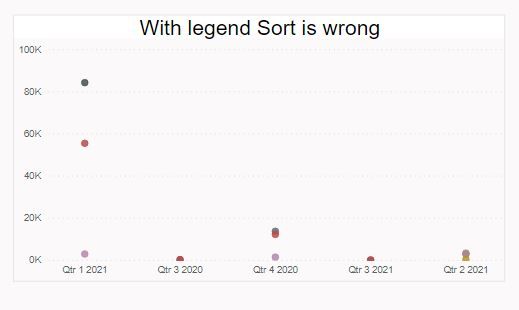

Solved! Go to Solution.


- Mark as New
- Bookmark
- Subscribe
- Mute
- Subscribe to RSS Feed
- Permalink
Hi @Anonymous ,
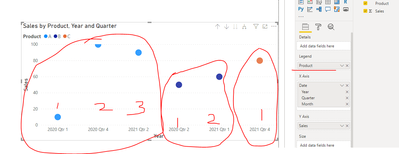
If you add ‘Legend’, visual will always sort X axis group by ‘Legend’.

Best regards,
Lionel Chen
If this post helps, then please consider Accept it as the solution to help the other members find it more quickly.

- Mark as New
- Bookmark
- Subscribe
- Mute
- Subscribe to RSS Feed
- Permalink
Sorry to dig up this subject but I have the exact same type of vizualisation and anomaly and the "solution" is juste a confirmation of the issue...


Is there somebody who has a solution to this problem ? Thanks in advance
- Mark as New
- Bookmark
- Subscribe
- Mute
- Subscribe to RSS Feed
- Permalink
HI @Anonymous
If you have a date field, I would use the date hierarchy and drill down.
If not i would create one and use as hierarchy.
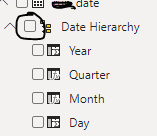
And on top of the chart check the marked button in screenshot below, click it once to get the year and quarter.

- Mark as New
- Bookmark
- Subscribe
- Mute
- Subscribe to RSS Feed
- Permalink
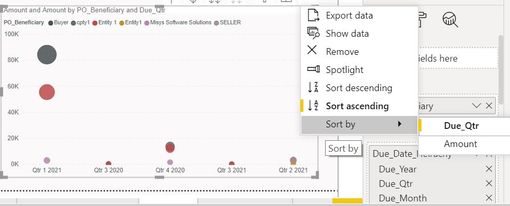
@Anonymous the issue remains the same.
- Mark as New
- Bookmark
- Subscribe
- Mute
- Subscribe to RSS Feed
- Permalink
HI @Anonymous
Observe closely the icons and names next to the image below as in my case. Bottom four icons and names are auto generated for a date data type. You don't have to do it manually.
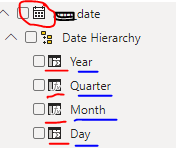
Your data type has to be of type date as in below case. You are getting the issue as you have data type other than date.



- Mark as New
- Bookmark
- Subscribe
- Mute
- Subscribe to RSS Feed
- Permalink
@Anonymous , do you have sort column defined for qtr year. this format will not sort
Qtr year sort = format([Date],"YYYYQ")
https://docs.microsoft.com/en-us/power-bi/create-reports/desktop-sort-by-column
Now you can sort your qtr column
- Mark as New
- Bookmark
- Subscribe
- Mute
- Subscribe to RSS Feed
- Permalink
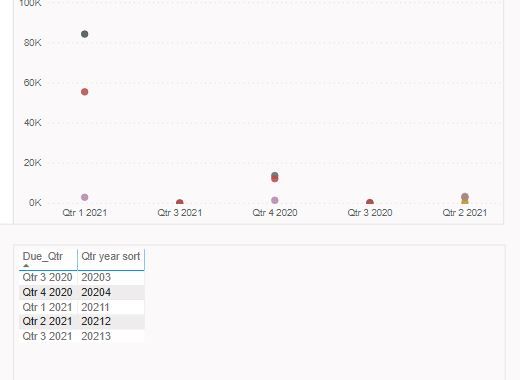
I have sorted the quarter column it works perfectly fine with Line Chart or any other chart but not with Scatter plot. I did try wat u gave still the same issue persist.
- Mark as New
- Bookmark
- Subscribe
- Mute
- Subscribe to RSS Feed
- Permalink
Hi @Anonymous ,
If you add ‘Legend’, visual will always sort X axis group by ‘Legend’.
Best regards,
Lionel Chen
If this post helps, then please consider Accept it as the solution to help the other members find it more quickly.
Helpful resources

FabCon & SQLCon – Barcelona 2026
Join us in Barcelona for FabCon and SQLCon, the Fabric, Power BI, SQL, and AI community event. Save €200 with code FABCMTY200.

Power BI DataViz World Championships - June 2026
A new Power BI DataViz World Championship is coming this June! Don't miss out on submitting your entry.

| User | Count |
|---|---|
| 21 | |
| 21 | |
| 14 | |
| 14 | |
| 13 |


| User | Count |
|---|---|
| 47 | |
| 35 | |
| 24 | |
| 20 | |
| 19 |


