Join us at FabCon Atlanta from March 16 - 20, 2026, for the ultimate Fabric, Power BI, AI and SQL community-led event. Save $200 with code FABCOMM.
Register now!The Power BI Data Visualization World Championships is back! Get ahead of the game and start preparing now! Learn more
Hello Power BI Friends,
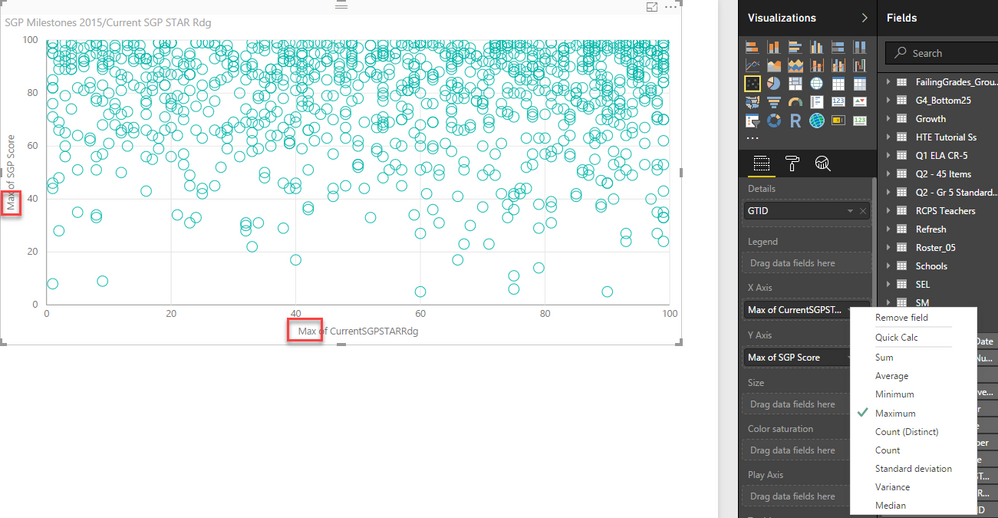
I am creating a Scatter Plot where the X-Axis and the Y-Axis are both two whole numbers in related tables. The details are a key coming from one of the tables.
However, Power BI is forcing me to summarize my X- and Y- axes and therefore, my points are not plotting as they would for a simple scatter plot.
Any suggestions are welcome!
Thank you,
Michael
Solved! Go to Solution.
Hi Micheal
You can use R script to get a scatter chart with non aggregated values. The script is simple.
You should create your dataset by dragging the fields into the values area and write the below script.
plot(dataset$SGPScore, dataset$SGPSTARRdg, xlab=”SGP Score”, ylab=”SGPSTARRdg”, xlim=c(0,300), ylim=c(0,300), main=”SGP Score Vs SGPSTARRdg”, pch=2, cex.main=1.5, frame.plot=FALSE, col=”green”)
Hi Micheal
You can use R script to get a scatter chart with non aggregated values. The script is simple.
You should create your dataset by dragging the fields into the values area and write the below script.
plot(dataset$SGPScore, dataset$SGPSTARRdg, xlab=”SGP Score”, ylab=”SGPSTARRdg”, xlim=c(0,300), ylim=c(0,300), main=”SGP Score Vs SGPSTARRdg”, pch=2, cex.main=1.5, frame.plot=FALSE, col=”green”)
Hi Bhavesh,
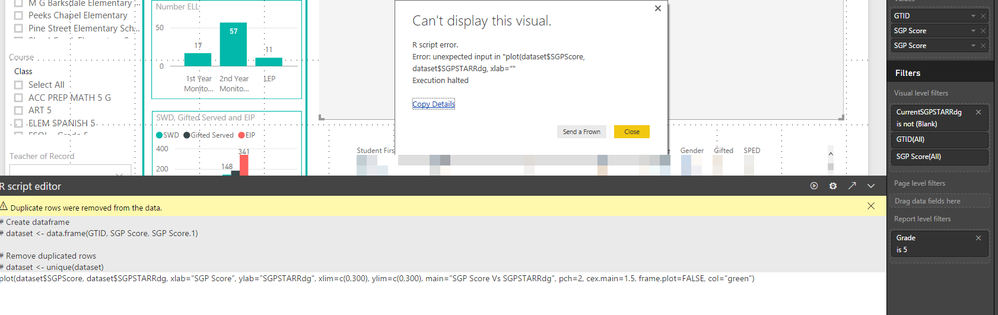
Thank you so much for your reply. I attempted running this R script, but receive the error below.
I'd appreciate any assistance with this, as I have very little experience with R.
Michael
Hi Bhavesh,
I was able to write my first R Script. Thank you for your help.
I used:
plot(dataset$SGPScore, dataset$CurrentSGPSTARRdg, xlab="SGPScore", ylab="CurrentSGPSTARRdg", main="SGP Score Vs CurrentSGPSTARRdg", pch=2, cex.main=1.5, frame.plot=FALSE, col="green")
Is there a way to have this visual interact with others, where I can click on a datapoint and then use thta to filter on a table?
Thanks!
Michael
Scatter plots on Power BI require a measure on each axis - you can't use just columns. Workarounds are discussed in this thread: https://community.powerbi.com/t5/Desktop/Scatter-plot-summarizing-data/td-p/37229
You can vote to have this issue addressed on this idea, and maybe others: https://ideas.powerbi.com/forums/265200-power-bi-ideas/suggestions/9784617-ability-to-put-categorica...
Steve,
Thank you for your reply. I have voted on the forum.
Michael
The Power BI Data Visualization World Championships is back! Get ahead of the game and start preparing now!
| User | Count |
|---|---|
| 38 | |
| 37 | |
| 33 | |
| 32 | |
| 29 |
| User | Count |
|---|---|
| 132 | |
| 88 | |
| 82 | |
| 68 | |
| 64 |