Join us at FabCon Atlanta from March 16 - 20, 2026, for the ultimate Fabric, Power BI, AI and SQL community-led event. Save $200 with code FABCOMM.
Register now!The Power BI Data Visualization World Championships is back! Get ahead of the game and start preparing now! Learn more
Hey guys,
situation is the following:
I have a sales-table containing the following columns
The linetotal represents 'Price * Quantity' for that individual product in the specific order.
It is possible for 1 ordernumber to contain multiple products and therefore also multiple linetotals.
How do I calculate the order total (so add up all linetotals per ordernumber) using a DAX measure?
Thanks!
~ Niels
Solved! Go to Solution.
Hi @Niels_NL,
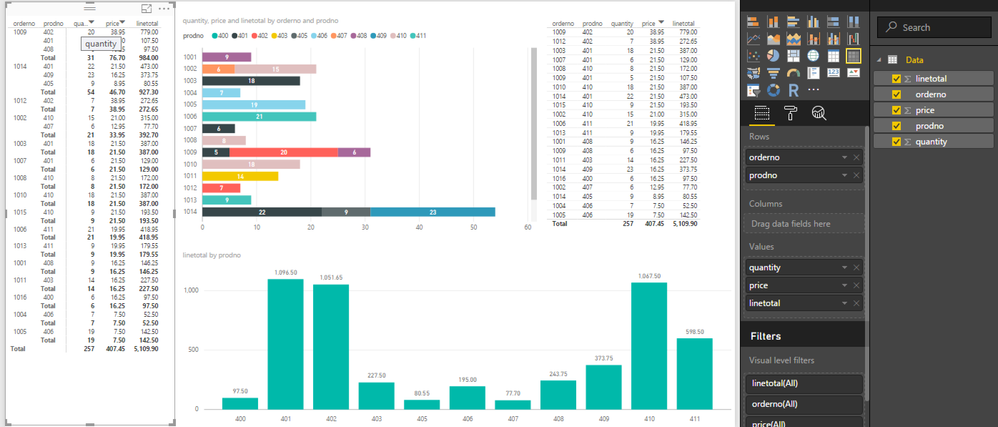
if you show these information by chart (column chart, line chart, ...) it will automatically sum and group by context(orderno/prodno) for you when you drag&drog ordernumber/productno to legend field.
And if you want to see order header and order details in same control, you should use Matrix(top left of picture) not table (top right of picture)
Hi @Niels_NL,
if you show these information by chart (column chart, line chart, ...) it will automatically sum and group by context(orderno/prodno) for you when you drag&drog ordernumber/productno to legend field.
And if you want to see order header and order details in same control, you should use Matrix(top left of picture) not table (top right of picture)
The Power BI Data Visualization World Championships is back! Get ahead of the game and start preparing now!
| User | Count |
|---|---|
| 39 | |
| 37 | |
| 33 | |
| 33 | |
| 29 |
| User | Count |
|---|---|
| 132 | |
| 90 | |
| 78 | |
| 66 | |
| 65 |