Don't miss your chance to take the Fabric Data Engineer (DP-600) exam for FREE! Find out how by attending the DP-600 session on April 23rd (pacific time), live or on-demand.
Learn moreJoin the FabCon + SQLCon recap series. Up next: Power BI, Real-Time Intelligence, IQ and AI, and Data Factory take center stage. All sessions are available on-demand after the live show. Register now
Hi There,
I have loaded a CSV into Power BI desktop. Each of the KPI's are a different row in the CSV however that means all the values are in the same column, so when i go to plot a scatter chart i cant plot one of the KPI's against another. I thought there might be a way to have different filters for the x and y axis but i cant seem to find it. Anyone got any ideas?
Cheers
Hi @alext89,
>> Each of the KPI's are a different row in the CSV however that means all the values are in the same column.
It's confusng, in your resource data table, there must have many different rows in one column, when you load it into Power BI desktop, there are still in one column. Why you said "all the values are in the same column", they should not in one column?
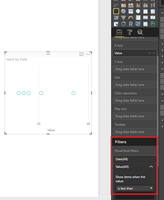
When you create a scatter chart, you can filter the value by "visual level filters" highlighted in red line.
Best Regards,
Aneglia
yes the CSV is set out like this:
| Month | Metric | Value |
| Jan | Metric 1 | 3 |
| Jan | Metric 2 | 4 |
| Jan | Metric 3 | 2 |
| Feb | Metric 1 | 5 |
| Feb | Metric 2 | 2 |
| Feb | Metric 3 | 4 |
| Mar | Metric 1 | 1 |
| Mar | Metric 2 | 4 |
| Mar | Metric 3 | 2 |
I want to be able to plot for example metric 2 as the x axis and metric 1 as the y axis for each month. Does that make more sense?
Hi @alext89,
As I testet, it we are unable to get what you want. It makes no sense in PowerBI visual.
Thanks,
Angelia
Check out the April 2026 Power BI update to learn about new features.
If you have recently started exploring Fabric, we'd love to hear how it's going. Your feedback can help with product improvements.
A new Power BI DataViz World Championship is coming this June! Don't miss out on submitting your entry.
| User | Count |
|---|---|
| 48 | |
| 40 | |
| 37 | |
| 20 | |
| 16 |
| User | Count |
|---|---|
| 68 | |
| 67 | |
| 30 | |
| 26 | |
| 26 |