cancel
Showing results for 
Search instead for 
Did you mean: 

We've captured the moments from FabCon & SQLCon that everyone is talking about, and we are bringing them to the community, live and on-demand. Starts on April 14th. Register now

Reply
Kane
Helper I
Helper I

Sample Query by Dates

Hi, PowerBI experts,


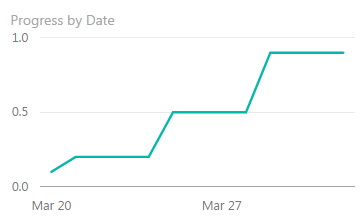
I would like to sample my query (such as SUM(Project[Progress])) by date and create a visual of "SUM(Project[Progress])  vs. the date" as below.

powerbi.PNG


i am wondering where to store the sampled values and how to generate the visual with DAX formula ?


THANKS !

Best Regards,

Kane

6 REPLIES 6
ImkeF
Community Champion
Community Champion

Have a look at the very good documentation here: https://powerbi.microsoft.com/en-us/documentation/powerbi-desktop-measures/

Imke Feldmann (The BIccountant)

If you liked my solution, please give it a thumbs up. And if I did answer your question, please mark this post as a solution. Thanks!

How to integrate M-code into your solution -- How to get your questions answered quickly -- How to provide sample data -- Check out more PBI- learning resources here -- Performance Tipps for M-queries

Thank you Imke !


Acctually, I have read most of the documentations of "PowerBI Desktop" and "PowerBI Service", and got a basic knowledge of the measures and formulas.


My question is that how to sample a query automatically by dates (not a Date collum in the query) and then creat a visual with the sampled values.


THANKS !

Kane

ImkeF
Community Champion
Community Champion

Sorry, but I don't understand what you mean with "sample by date": You need a column that for your axis.

How should the dates there be different from the "Date column in the query" that doesn't suit your needs? Could you please provide an example for it?

Imke Feldmann (The BIccountant)

If you liked my solution, please give it a thumbs up. And if I did answer your question, please mark this post as a solution. Thanks!

How to integrate M-code into your solution -- How to get your questions answered quickly -- How to provide sample data -- Check out more PBI- learning resources here -- Performance Tipps for M-queries

Hi, Imke,


Let's see a very simple case.


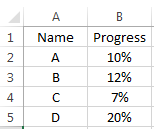
Suppose we have a project which was assigned to four persons (A,B,C,D). Each of them shares parts of the total tasks.


We use the following Excel table located in the Onedrive for Business to track the progress of the whole project.

All of the four persons are asked to update their progress into the Excel table everyday.

project.png

Therefore, we can easily transform the data to several simple PowerBI visuals, based on which we can read the latest progress of each person, as well as the total progress of the project.


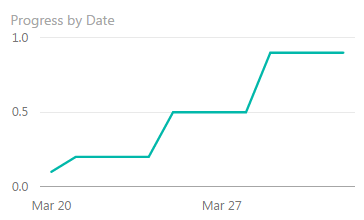
However, we need not only "the latest progress", but also the trend of the progress. So, we need a PowerBI visual which will records the progress of yesterday, today and each of the following days. In other words, we want to create a visual whose Y-Axis is the "progress value" and the X-Axis is the "real Date".


We know that the Excel table will be updated by the four persons and contains only the up to date values.

So, my question is: how could I "record" (or "sample") the latest value every day so that I can transform them into a trend chart as below?

powerbi.PNG


THANKS !


Best Regards,

Kane

ImkeF
Community Champion
Community Champion

Oh I see - sorry, English is not my native language.


Here you go: http://www.thebiccountant.com/2016/02/09/how-to-create-a-load-history-or-load-log-in-power-query-or-...


Just take a simple date instead of datetime like in my article.

Imke Feldmann (The BIccountant)

If you liked my solution, please give it a thumbs up. And if I did answer your question, please mark this post as a solution. Thanks!

How to integrate M-code into your solution -- How to get your questions answered quickly -- How to provide sample data -- Check out more PBI- learning resources here -- Performance Tipps for M-queries

thank you Imke ! I will try your solutions !

Helpful resources

Announcements
New to Fabric survey Carousel

New to Fabric Survey

If you have recently started exploring Fabric, we'd love to hear how it's going. Your feedback can help with product improvements.

Power BI DataViz World Championships carousel

Power BI DataViz World Championships - June 2026

A new Power BI DataViz World Championship is coming this June! Don't miss out on submitting your entry.

Join our Fabric User Panel

Join our Fabric User Panel

Share feedback directly with Fabric product managers, participate in targeted research studies and influence the Fabric roadmap.

March Power BI Update Carousel

Power BI Community Update - March 2026

Check out the March 2026 Power BI update to learn about new features.