cancel
Showing results for 
Search instead for 
Did you mean: 

The Power BI Data Visualization World Championships is back! Get ahead of the game and start preparing now! Learn more

Reply
jmiridium
Helper IV
Helper IV

Same Query Across Multiple Servers

I would like to run the following query on multiple servers and enter the results into one table:


SELECT
            SERVERPROPERTY('MachineName') AS [ServerName],
            SERVERPROPERTY('ServerName') AS [ServerInstanceName],
            SERVERPROPERTY('InstanceName') AS [Instance],
            SERVERPROPERTY('Edition') AS [Edition],
            SERVERPROPERTY('ProductVersion') AS [ProductVersion],
            Left(@@Version, Charindex('-', @@version) - 2) As VersionName


Is this possible?

1 ACCEPTED SOLUTION
prathy
Advocate III
Advocate III

Capture.PNG

Hi,


What you need is a query with all server names you want to get server information for. Then you can create a function in Power Query / Power BI query editor like below


let
    Source = (ServerName as any) => let
        Source = Sql.Database(ServerName, "master", [Query="SELECT#(lf)            SERVERPROPERTY('MachineName') AS [ServerName],#(lf)            SERVERPROPERTY('ServerName') AS [ServerInstanceName],#(lf)            SERVERPROPERTY('InstanceName') AS [Instance],#(lf)            SERVERPROPERTY('Edition') AS [Edition],#(lf)            SERVERPROPERTY('ProductVersion') AS [ProductVersion],#(lf)            Left(@@Version, Charindex('-', @@version) - 2) As VersionName"])
    in
        Source
in
    Source


Above query is using ServerName parameter. Once you have the function, you can invoke function in query editor, chosse servername column as the value for function. which will enable you run that function for all servers at the same time.


Hope that helps!


Thanks,

Prathy

View solution in original post

5 REPLIES 5
prathy
Advocate III
Advocate III

Capture.PNG

Hi,


What you need is a query with all server names you want to get server information for. Then you can create a function in Power Query / Power BI query editor like below


let
    Source = (ServerName as any) => let
        Source = Sql.Database(ServerName, "master", [Query="SELECT#(lf)            SERVERPROPERTY('MachineName') AS [ServerName],#(lf)            SERVERPROPERTY('ServerName') AS [ServerInstanceName],#(lf)            SERVERPROPERTY('InstanceName') AS [Instance],#(lf)            SERVERPROPERTY('Edition') AS [Edition],#(lf)            SERVERPROPERTY('ProductVersion') AS [ProductVersion],#(lf)            Left(@@Version, Charindex('-', @@version) - 2) As VersionName"])
    in
        Source
in
    Source


Above query is using ServerName parameter. Once you have the function, you can invoke function in query editor, chosse servername column as the value for function. which will enable you run that function for all servers at the same time.


Hope that helps!


Thanks,

Prathy

How do I enter multiple servers in the input field?

Hi @jmiridium,


The query you provided can return one record each time. You can utilize @prathy's suggestion to define a custom function and invoke to return multiple tables contain each server information per table, then use the Append Queries to merge those table to one. Please follow below steps:


1. Create a Blank Query, type the query suggested by @prathy.
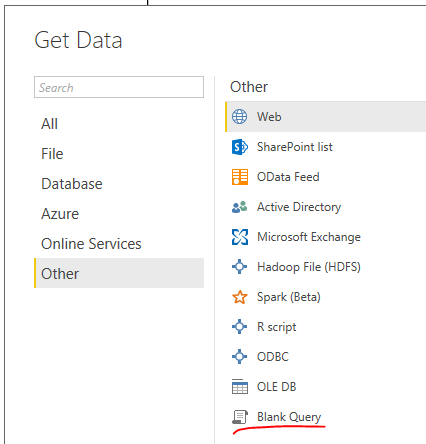
 

e1.PNG


2. Please enter the server name and click Invoke, it will return one table contains information when query executed on that specific server. You can invoke this function multiple times to return multiple tables.
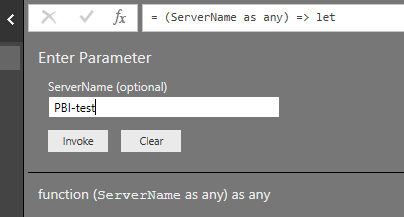
 

e2.PNG


3. Use Merge Query as New feature.

4. You can set those table generated by invoke function not load to table and only load append table by unchecking Enable Load.


e3.PNG


e4.PNG


Please see attached .pbix file.


Best Regards,
Qiuyun Yu

Community Support Team _ Qiuyun Yu
If this post helps, then please consider Accept it as the solution to help the other members find it more quickly.

This sorta worked, but I appended the query due to multiple servers that needed this query to run on and create a single table

Trying to do the same thing with MySQL. Getting this error:


Formula.Firewall: Query 'ENTMYSQLCC' (step 'Appended Query') references other queries or steps, so it may not directly access a data source. Please rebuild this data combination.

Helpful resources

Announcements
Power BI DataViz World Championships

Power BI Dataviz World Championships

The Power BI Data Visualization World Championships is back! Get ahead of the game and start preparing now!

December 2025 Power BI Update Carousel

Power BI Monthly Update - December 2025

Check out the December 2025 Power BI Holiday Recap!

FabCon Atlanta 2026 carousel

FabCon Atlanta 2026

Join us at FabCon Atlanta, March 16-20, for the ultimate Fabric, Power BI, AI and SQL community-led event. Save $200 with code FABCOMM.