cancel
Showing results for 
Search instead for 
Did you mean: 

The Power BI Data Visualization World Championships is back! Get ahead of the game and start preparing now! Learn more

Reply
nirrobi
Helper V
Helper V

Sales table with 2 CustomerID columns

Hi,


I have sales table with 2 customers column (actual + notify)

and client table - table below.


I need to show table with those 2 customers and the salesID + amount - table below.


I have 2 connection between the sales and customer table (nofity in active)


thanks in advenced.


SalesIDClientIDNotifyIDAmount

1001000100055
1011001100966
1021000100544
1031002100033
104100310102


And Customer table:

ClientIDClientName

1000AAA
1001BBB
1002CCC
1003DDD
1009EEE
1005FFF
1010GGG


I need to show one table as the one below:

SalesIDAmountClientNameNotifyName

10055AAAAAA
10166BBBEEE
10244AAAFFF
10333CCCAAA
1042DDDGGG


I have 2 connection between the sales and customer table (nofity in active)

11111.JPG

2 ACCEPTED SOLUTIONS

@nirrobi


As MEASURES


Notify_Name =
CALCULATE (
    FIRSTNONBLANK ( Customer[ClientName], 1 ),
    CROSSFILTER ( Sales[NotifyID], Customer[ClientID], BOTH ),
    USERELATIONSHIP ( Sales[NotifyID], Customer[ClientID] )
)

View solution in original post

4 REPLIES 4
Zubair_Muhammad
Community Champion
Community Champion

HI @nirrobi


You can use these calculated columns


ClientName =
RELATED ( Customer[ClientName] )
NotifyName =
CALCULATE (
    VALUES ( Customer[ClientName] ),
    FILTER ( Customer , Customer[ClientID] = Sales[NotifyID] )
)

@nirrobi


As MEASURES


Notify_Name =
CALCULATE (
    FIRSTNONBLANK ( Customer[ClientName], 1 ),
    CROSSFILTER ( Sales[NotifyID], Customer[ClientID], BOTH ),
    USERELATIONSHIP ( Sales[NotifyID], Customer[ClientID] )
)

Many thanks for your help!!!

Much appriciated.


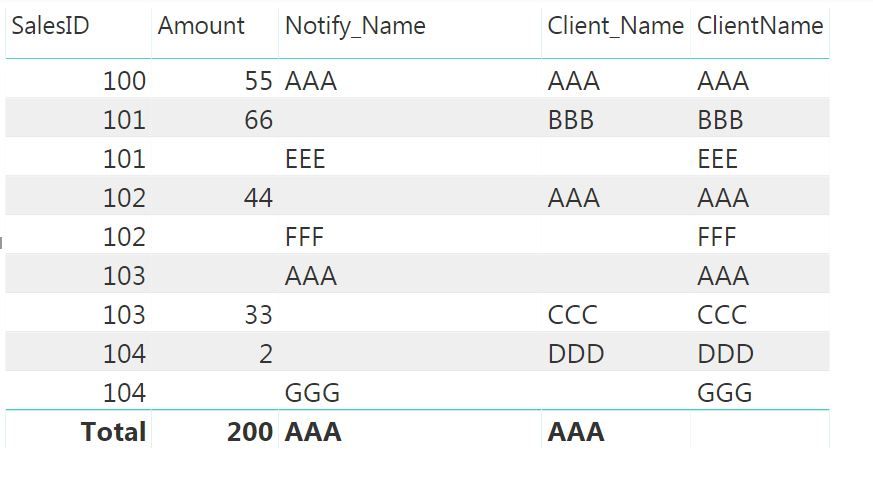
I notice that you can't use the ClientName from the Customer table - make all the row duplicare - see attached pic.


please correct me if I wrong.


thanks again.


Nir

1111.JPG

Helpful resources

Announcements
Power BI DataViz World Championships

Power BI Dataviz World Championships

The Power BI Data Visualization World Championships is back! Get ahead of the game and start preparing now!

December 2025 Power BI Update Carousel

Power BI Monthly Update - December 2025

Check out the December 2025 Power BI Holiday Recap!

FabCon Atlanta 2026 carousel

FabCon Atlanta 2026

Join us at FabCon Atlanta, March 16-20, for the ultimate Fabric, Power BI, AI and SQL community-led event. Save $200 with code FABCOMM.