Get certified for free when you join Fabric Data Days 2026 and dive into Fabric, Power BI, SQL, AI, and other essential data skills.
Join nowJuly 7 - July 17 | Round 2 of the Power BI Dataviz World Championships. Don't miss your chance! Learn more
Solved! Go to Solution.
Hi @lrdub,
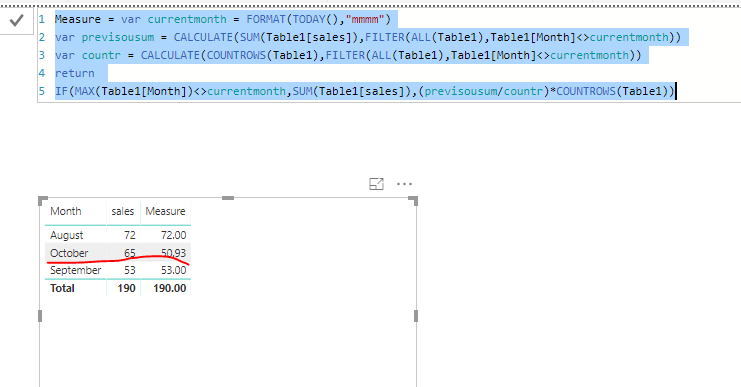
I made one sample for your reference, If it doesn't meet your requirement, kindly share your sample data and excepted result to me. Here we can create a measure to achieve your goal.
Measure = var currentmonth = FORMAT(TODAY(),"mmmm") var previsousum = CALCULATE(SUM(Table1[sales]),FILTER(ALL(Table1),Table1[Month]<>currentmonth)) var countr = CALCULATE(COUNTROWS(Table1),FILTER(ALL(Table1),Table1[Month]<>currentmonth)) return IF(MAX(Table1[Month])<>currentmonth,SUM(Table1[sales]),(previsousum/countr)*COUNTROWS(Table1))
For more details, please check the pbix as attached.
Regards,
Frank
Hi @lrdub,
I made one sample for your reference, If it doesn't meet your requirement, kindly share your sample data and excepted result to me. Here we can create a measure to achieve your goal.
Measure = var currentmonth = FORMAT(TODAY(),"mmmm") var previsousum = CALCULATE(SUM(Table1[sales]),FILTER(ALL(Table1),Table1[Month]<>currentmonth)) var countr = CALCULATE(COUNTROWS(Table1),FILTER(ALL(Table1),Table1[Month]<>currentmonth)) return IF(MAX(Table1[Month])<>currentmonth,SUM(Table1[sales]),(previsousum/countr)*COUNTROWS(Table1))
For more details, please check the pbix as attached.
Regards,
Frank
Hi @lrdub,
Does that make sense? If so, kindly mark my answer as a solution to close the case.
Regards,
Frank
Join us in Barcelona for FabCon and SQLCon, the Fabric, Power BI, SQL, and AI community event. Save €200 with code FABCMTY200.
Join Fabric Data Days 2026: 60 days of free live/on-demand sessions, challenges, study groups, and certification opportunities.
| User | Count |
|---|---|
| 22 | |
| 22 | |
| 18 | |
| 17 | |
| 13 |
| User | Count |
|---|---|
| 63 | |
| 50 | |
| 46 | |
| 41 | |
| 39 |