Join us at FabCon Atlanta from March 16 - 20, 2026, for the ultimate Fabric, Power BI, AI and SQL community-led event. Save $200 with code FABCOMM.
Register now!Vote for your favorite vizzies from the Power BI Dataviz World Championship submissions. Vote now!
Solved! Go to Solution.
Hi @lrdub,
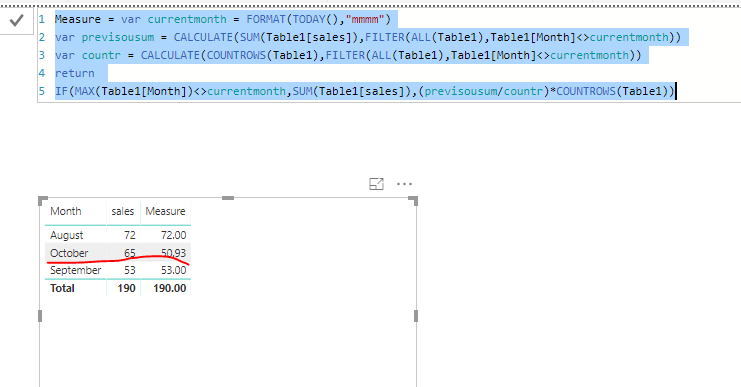
I made one sample for your reference, If it doesn't meet your requirement, kindly share your sample data and excepted result to me. Here we can create a measure to achieve your goal.
Measure = var currentmonth = FORMAT(TODAY(),"mmmm") var previsousum = CALCULATE(SUM(Table1[sales]),FILTER(ALL(Table1),Table1[Month]<>currentmonth)) var countr = CALCULATE(COUNTROWS(Table1),FILTER(ALL(Table1),Table1[Month]<>currentmonth)) return IF(MAX(Table1[Month])<>currentmonth,SUM(Table1[sales]),(previsousum/countr)*COUNTROWS(Table1))
For more details, please check the pbix as attached.
Regards,
Frank
Hi @lrdub,
I made one sample for your reference, If it doesn't meet your requirement, kindly share your sample data and excepted result to me. Here we can create a measure to achieve your goal.
Measure = var currentmonth = FORMAT(TODAY(),"mmmm") var previsousum = CALCULATE(SUM(Table1[sales]),FILTER(ALL(Table1),Table1[Month]<>currentmonth)) var countr = CALCULATE(COUNTROWS(Table1),FILTER(ALL(Table1),Table1[Month]<>currentmonth)) return IF(MAX(Table1[Month])<>currentmonth,SUM(Table1[sales]),(previsousum/countr)*COUNTROWS(Table1))
For more details, please check the pbix as attached.
Regards,
Frank
Hi @lrdub,
Does that make sense? If so, kindly mark my answer as a solution to close the case.
Regards,
Frank
Vote for your favorite vizzies from the Power BI World Championship submissions!
If you love stickers, then you will definitely want to check out our Community Sticker Challenge!
Check out the January 2026 Power BI update to learn about new features.
| User | Count |
|---|---|
| 56 | |
| 52 | |
| 45 | |
| 17 | |
| 16 |
| User | Count |
|---|---|
| 108 | |
| 108 | |
| 39 | |
| 33 | |
| 25 |