


Get certified for free when you join Fabric Data Days 2026 and dive into Fabric, Power BI, SQL, AI, and other essential data skills.
Join nowJuly 7 - July 17 | Round 2 of the Power BI Dataviz World Championships. Don't miss your chance! Learn more
Hello All,
I need some help in converting the following SQL query into a DAX measure
select [Booking Reference], [Sailing ID], [Sailing Date], [Category ID], c.[Category Group], Quantity, [Category Price], [Booking Currency Price]
from vw_PasF_BookingJourney bf
join vw_PasD_Category c on bf.[Category ID] = c.[Actual Category]
where [Booking Reference] = '21394547'
Thanks in advance!
Solved! Go to Solution.
Hi @Anonymous ,
Based on your description, I have create two sample tables in sql and in power bi desktop:
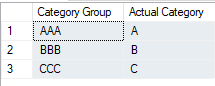
The sql query would result this result:
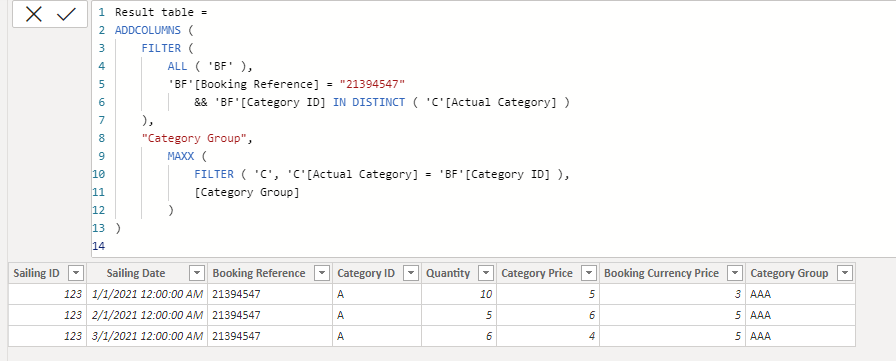
To get the same result table in power bi, you can create this caculated table:
Result table =
ADDCOLUMNS (
FILTER (
ALL ( 'BF' ),
'BF'[Booking Reference] = "21394547"
&& 'BF'[Category ID] IN DISTINCT ( 'C'[Actual Category] )
),
"Category Group",
MAXX (
FILTER ( 'C', 'C'[Actual Category] = 'BF'[Category ID] ),
[Category Group]
)
)
Attached the sample file in the below, hopes it could help.
Best Regards,
Community Support Team _ Yingjie Li
If this post helps, then please consider Accept it as the solution to help the other members find it more quickly.
Hi @Anonymous ,
Based on your description, I have create two sample tables in sql and in power bi desktop:
The sql query would result this result:
To get the same result table in power bi, you can create this caculated table:
Result table =
ADDCOLUMNS (
FILTER (
ALL ( 'BF' ),
'BF'[Booking Reference] = "21394547"
&& 'BF'[Category ID] IN DISTINCT ( 'C'[Actual Category] )
),
"Category Group",
MAXX (
FILTER ( 'C', 'C'[Actual Category] = 'BF'[Category ID] ),
[Category Group]
)
)
Attached the sample file in the below, hopes it could help.
Best Regards,
Community Support Team _ Yingjie Li
If this post helps, then please consider Accept it as the solution to help the other members find it more quickly.
Hi @v-yingjl ,
Thanks for the explanation. However, I am getting the following error when I try to create the calculated table.
Hi @Anonymous ,
Seems like your data type of [Booking Reference] is number type not text type while my sample file is the text type. You can modify it like this:
'BF'[Booking Reference] = 21394547
Best Regards,
Community Support Team _ Yingjie Li
If this post helps, then please consider Accept it as the solution to help the other members find it more quickly.
@Anonymous , In power bi , you need join two tables on vw_PasF_BookingJourney vw_PasD_Category using
[Category ID] and [Actual Category],
On slicer you can take filter of [Booking Reference] = "21394547"
Or add this measure with all un summarized columns
calculate(countrows(vw_PasF_BookingJourney ), filter(vw_PasD_Category , vw_PasD_Category[Booking Reference] = "21394547"))
refer my series DAX vs SQL -https://www.youtube.com/watch?v=WlvQ_SGy4iA&list=PLPaNVDMhUXGZNyKU0PgG2g3P0c6CPjMnj
Join us in Barcelona for FabCon and SQLCon, the Fabric, Power BI, SQL, and AI community event. Save €200 with code FABCMTY200.
Join Fabric Data Days 2026: 60 days of free live/on-demand sessions, challenges, study groups, and certification opportunities.
| User | Count |
|---|---|
| 22 | |
| 22 | |
| 18 | |
| 17 | |
| 13 |
| User | Count |
|---|---|
| 61 | |
| 52 | |
| 47 | |
| 41 | |
| 38 |