


Join us at FabCon Atlanta from March 16 - 20, 2026, for the ultimate Fabric, Power BI, AI and SQL community-led event. Save $200 with code FABCOMM.
Register now!Vote for your favorite vizzies from the Power BI Dataviz World Championship submissions. Vote now!
Hello All,
I need some help in converting the following SQL query into a DAX measure
select [Booking Reference], [Sailing ID], [Sailing Date], [Category ID], c.[Category Group], Quantity, [Category Price], [Booking Currency Price]
from vw_PasF_BookingJourney bf
join vw_PasD_Category c on bf.[Category ID] = c.[Actual Category]
where [Booking Reference] = '21394547'
Thanks in advance!
Solved! Go to Solution.
Hi @Anonymous ,
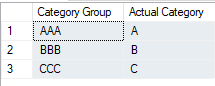
Based on your description, I have create two sample tables in sql and in power bi desktop:
The sql query would result this result:
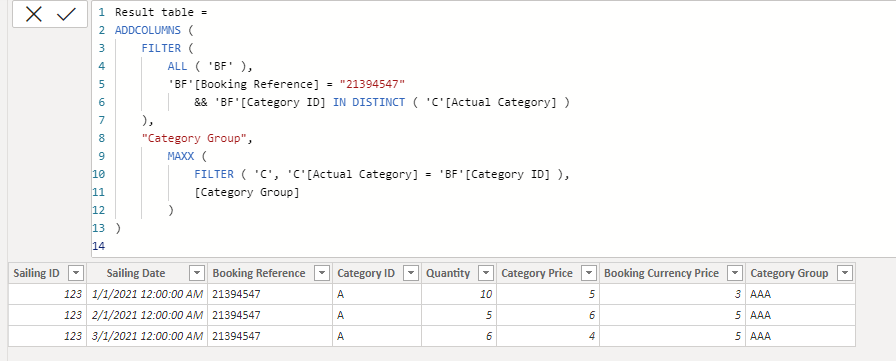
To get the same result table in power bi, you can create this caculated table:
Result table =
ADDCOLUMNS (
FILTER (
ALL ( 'BF' ),
'BF'[Booking Reference] = "21394547"
&& 'BF'[Category ID] IN DISTINCT ( 'C'[Actual Category] )
),
"Category Group",
MAXX (
FILTER ( 'C', 'C'[Actual Category] = 'BF'[Category ID] ),
[Category Group]
)
)
Attached the sample file in the below, hopes it could help.
Best Regards,
Community Support Team _ Yingjie Li
If this post helps, then please consider Accept it as the solution to help the other members find it more quickly.
Hi @Anonymous ,
Based on your description, I have create two sample tables in sql and in power bi desktop:
The sql query would result this result:
To get the same result table in power bi, you can create this caculated table:
Result table =
ADDCOLUMNS (
FILTER (
ALL ( 'BF' ),
'BF'[Booking Reference] = "21394547"
&& 'BF'[Category ID] IN DISTINCT ( 'C'[Actual Category] )
),
"Category Group",
MAXX (
FILTER ( 'C', 'C'[Actual Category] = 'BF'[Category ID] ),
[Category Group]
)
)
Attached the sample file in the below, hopes it could help.
Best Regards,
Community Support Team _ Yingjie Li
If this post helps, then please consider Accept it as the solution to help the other members find it more quickly.
Hi @v-yingjl ,
Thanks for the explanation. However, I am getting the following error when I try to create the calculated table.
Hi @Anonymous ,
Seems like your data type of [Booking Reference] is number type not text type while my sample file is the text type. You can modify it like this:
'BF'[Booking Reference] = 21394547
Best Regards,
Community Support Team _ Yingjie Li
If this post helps, then please consider Accept it as the solution to help the other members find it more quickly.
@Anonymous , In power bi , you need join two tables on vw_PasF_BookingJourney vw_PasD_Category using
[Category ID] and [Actual Category],
On slicer you can take filter of [Booking Reference] = "21394547"
Or add this measure with all un summarized columns
calculate(countrows(vw_PasF_BookingJourney ), filter(vw_PasD_Category , vw_PasD_Category[Booking Reference] = "21394547"))
refer my series DAX vs SQL -https://www.youtube.com/watch?v=WlvQ_SGy4iA&list=PLPaNVDMhUXGZNyKU0PgG2g3P0c6CPjMnj
Vote for your favorite vizzies from the Power BI World Championship submissions!
If you love stickers, then you will definitely want to check out our Community Sticker Challenge!
Check out the January 2026 Power BI update to learn about new features.
| User | Count |
|---|---|
| 65 | |
| 50 | |
| 42 | |
| 25 | |
| 22 |
| User | Count |
|---|---|
| 143 | |
| 117 | |
| 56 | |
| 37 | |
| 31 |