
cancel
Showing results for 
Search instead for 
Did you mean: 

We've captured the moments from FabCon & SQLCon that everyone is talking about, and we are bringing them to the community, live and on-demand. Starts on April 14th. Register now

Reply
Anonymous
Not applicable

Running total and adding rows

Hi. Thanks again for help! 

You guys helped me to solve a probelm with a running total by adding this measure which also adds 0 into the first row.

0.PNG

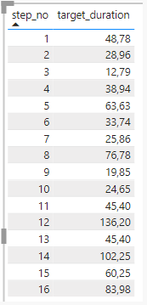
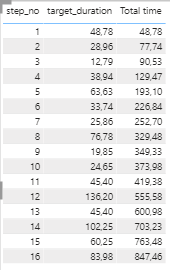
But I have a little issue here. It doesn't seem to add 0 into the first row:

1.PNG    2.PNG    4.PNG

1 ACCEPTED SOLUTION
amitchandak
Super User
Super User

@Anonymous , Try with < in place of


<= max(DM_WELL_PLAN_OP[Step_no])


< max(DM_WELL_PLAN_OP[Step_no])

Share with Power BI Enthusiasts: Full Power BI Video (20 Hours) YouTube
Microsoft Fabric Series 60+ Videos YouTube
Microsoft Fabric Hindi End to End YouTube

View solution in original post

4 REPLIES 4
amitchandak
Super User
Super User

@Anonymous , Try with < in place of


<= max(DM_WELL_PLAN_OP[Step_no])


< max(DM_WELL_PLAN_OP[Step_no])

Share with Power BI Enthusiasts: Full Power BI Video (20 Hours) YouTube
Microsoft Fabric Series 60+ Videos YouTube
Microsoft Fabric Hindi End to End YouTube
Pragati11
Super User
Super User

Hi @Anonymous ,


The dax expression what you are using is checks if there is a STEP_NO less than or equal to the STEP_NO at the current row.

So, if you take example of your 1st row where STEP_NO = 1, you don't have anything less than 1 in your data.

Also, adding 0 to it will not create a difference.


So, wanted to check why you are concerned with additon of 0 to your 1st row?


Thanks,

Pragati

Best Regards,

Pragati Jain


MVP logo


LinkedIn | Twitter | Blog YouTube 

Did I answer your question? Mark my post as a solution! This will help others on the forum!

Appreciate your Kudos!!

Proud to be a Super User!!

Anonymous
Not applicable

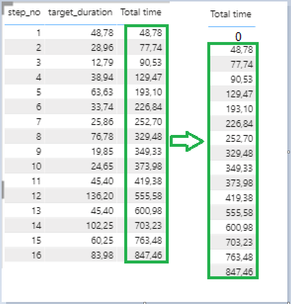
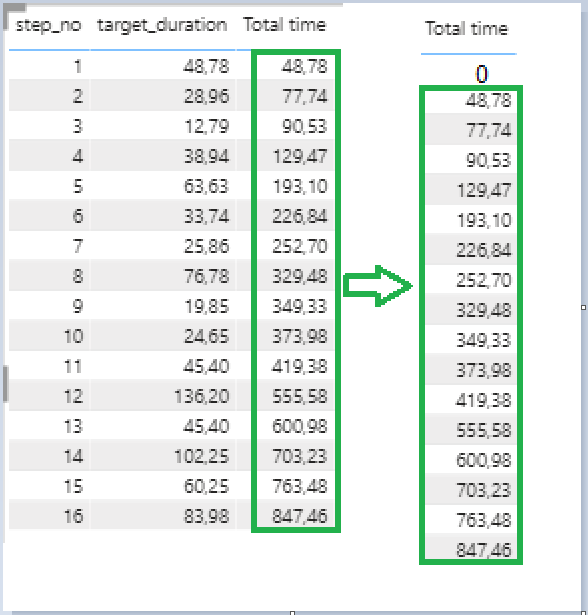
Hi @Pragati11 because I need to have 0 in the column Total time in the step_no 1. And move the hole column Total time down starting from the value 48. 

4.PNG

HI @Anonymous ,


In that case in your DAX, replace "<=" with "<" everywhere in the dax.


Thanks,

Pragati

Best Regards,

Pragati Jain


MVP logo


LinkedIn | Twitter | Blog YouTube 

Did I answer your question? Mark my post as a solution! This will help others on the forum!

Appreciate your Kudos!!

Proud to be a Super User!!

Helpful resources

Announcements
New to Fabric survey Carousel

New to Fabric Survey

If you have recently started exploring Fabric, we'd love to hear how it's going. Your feedback can help with product improvements.

Power BI DataViz World Championships carousel

Power BI DataViz World Championships - June 2026

A new Power BI DataViz World Championship is coming this June! Don't miss out on submitting your entry.

Join our Fabric User Panel

Join our Fabric User Panel

Share feedback directly with Fabric product managers, participate in targeted research studies and influence the Fabric roadmap.

March Power BI Update Carousel

Power BI Community Update - March 2026

Check out the March 2026 Power BI update to learn about new features.