
Get certified for free when you join Fabric Data Days 2026 and dive into Fabric, Power BI, SQL, AI, and other essential data skills.
Join nowJuly 7 - July 17 | Round 2 of the Power BI Dataviz World Championships. Don't miss your chance! Learn more
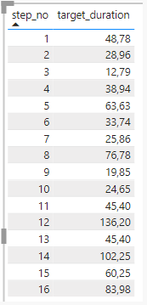
Hi. Thanks again for help!
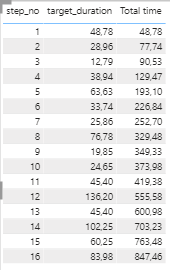
You guys helped me to solve a probelm with a running total by adding this measure which also adds 0 into the first row.
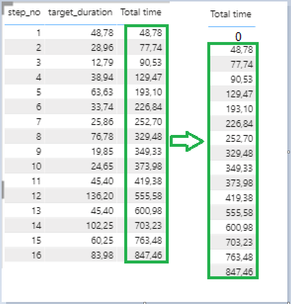
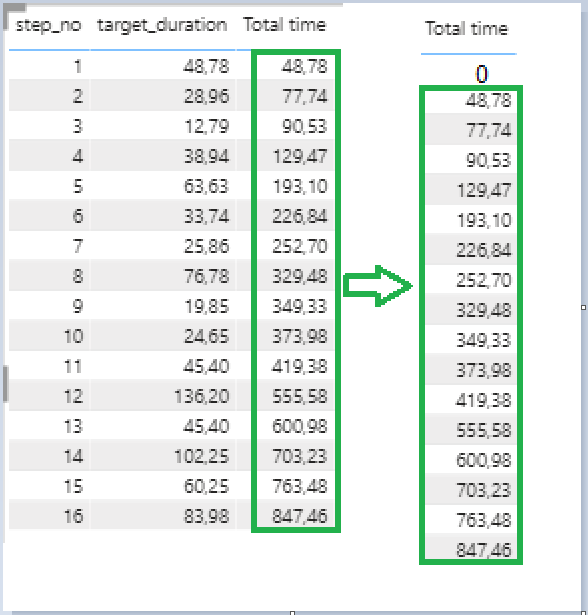
But I have a little issue here. It doesn't seem to add 0 into the first row:
Solved! Go to Solution.
@Anonymous , Try with < in place of
<= max(DM_WELL_PLAN_OP[Step_no])
< max(DM_WELL_PLAN_OP[Step_no])
Hi @Anonymous ,
The dax expression what you are using is checks if there is a STEP_NO less than or equal to the STEP_NO at the current row.
So, if you take example of your 1st row where STEP_NO = 1, you don't have anything less than 1 in your data.
Also, adding 0 to it will not create a difference.
So, wanted to check why you are concerned with additon of 0 to your 1st row?
Thanks,
Pragati
Hi @Pragati11 because I need to have 0 in the column Total time in the step_no 1. And move the hole column Total time down starting from the value 48.
HI @Anonymous ,
In that case in your DAX, replace "<=" with "<" everywhere in the dax.
Thanks,
Pragati
Join us in Barcelona for FabCon and SQLCon, the Fabric, Power BI, SQL, and AI community event. Save €200 with code FABCMTY200.
Join Fabric Data Days 2026: 60 days of free live/on-demand sessions, challenges, study groups, and certification opportunities.
| User | Count |
|---|---|
| 22 | |
| 22 | |
| 18 | |
| 17 | |
| 13 |
| User | Count |
|---|---|
| 63 | |
| 50 | |
| 46 | |
| 41 | |
| 39 |