cancel
Showing results for 
Search instead for 
Did you mean: 

Join the FabCon + SQLCon recap series. Up next: Power BI, Real-Time Intelligence, IQ and AI, and Data Factory take center stage. All sessions are available on-demand after the live show. Register now

Reply
Anonymous
Not applicable

Running Total

I have a simple data model recording accidents per month and want to create a bar graph showing month accidents and a running total.


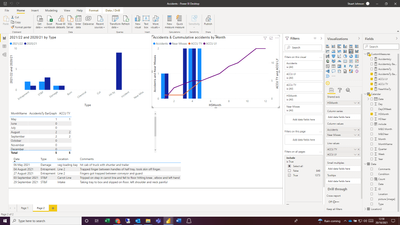
Normally this wouldn't be an issue but our Accidents data uses a start month of May i have a custom column to give a value of 1 to May, 2 to June etc. If i create the acumulative total on this value everything works fine:

joniemaximus_0-1634731116657.png

However i'd rather show the month names rather than number. If i chage the axis the date changes and only shows the actual figure:

joniemaximus_1-1634731187116.png


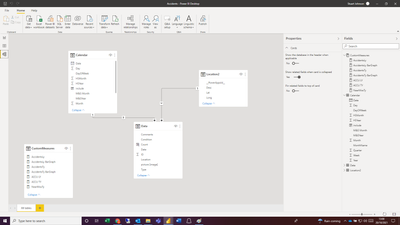
The month Name isn't a numerical fielf for me to use in the accumulation calulation. Is there a way to do this?

joniemaximus_2-1634731256964.png


My measure is:


ACCU TY =
VAR MaxW = calculate(max('Calendar'[HSMonth]),'Calendar'[HSYear] = 2021)
return CALCULATE(
    CustomMeasures[AccidentsTy],
    FILTER(
        ALLSELECTED('Calendar'[HSMonth]),
        ISONORAFTER('Calendar'[HSMonth], MaxW, DESC)
    )
)
4 REPLIES 4
VahidDM
Super User
Super User

Hi @Anonymous 


Try this:


Meausre=
CALCULATE(
    [AccidentsTy],
    FILTER(
        all(Calendar),Calendar(date)<=max(calendar(date)
)
)


If this post helps, please consider accepting it as the solution to help the other members find it more quickly.


Appreciate your Kudos!!


Anonymous
Not applicable

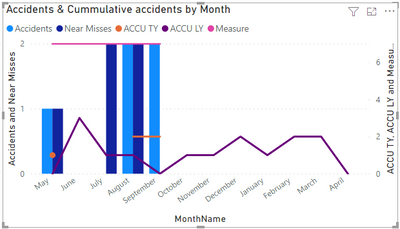
Thanks Vahid, that just gives me a complete total which is the same each month:

joniemaximus_0-1634731937405.png

It shows the total rather than a running total on both graphs (MonthName and HSMonth)

It would be better if you shared a sample of your data or the PBIX file.

BTE, try this:

Meausre=
CALCULATE(
    [AccidentsTy],
    FILTER(
        all(Data),Data(date)<=max(calendar(date)
)
)


If this post helps, please consider accepting it as the solution to help the other members find it more quickly.


Appreciate your Kudos!!


Anonymous
Not applicable

Thanks Vahid,


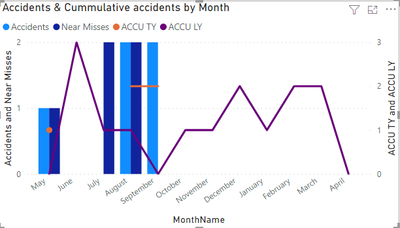
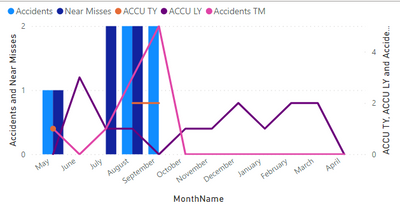
Almost there. is there a way to account for zero values. Currently it looks like this:

joniemaximus_0-1634733207803.png

If i use the measure that adds 0 values for the barchart i get the result below:

joniemaximus_1-1634733298744.png


Helpful resources

Announcements
April Power BI Update Carousel

Power BI Monthly Update - April 2026

Check out the April 2026 Power BI update to learn about new features.

New to Fabric survey Carousel

New to Fabric Survey

If you have recently started exploring Fabric, we'd love to hear how it's going. Your feedback can help with product improvements.

Power BI DataViz World Championships carousel

Power BI DataViz World Championships - June 2026

A new Power BI DataViz World Championship is coming this June! Don't miss out on submitting your entry.

FabCon and SQLCon Highlights Carousel

FabCon &SQLCon Highlights

Experience the highlights from FabCon & SQLCon, available live and on-demand starting April 14th.