Share feedback directly with Fabric product managers, participate in targeted research studies and influence the Fabric roadmap.
Sign up nowGet Fabric certified for FREE! Don't miss your chance! Learn more
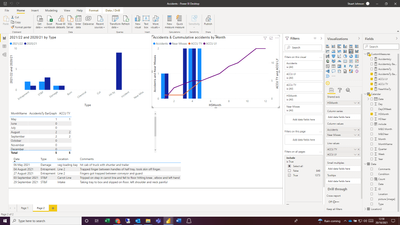
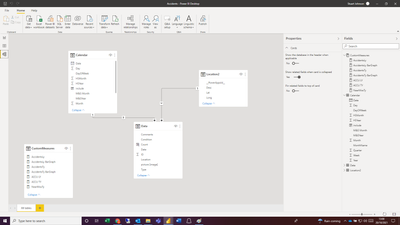
I have a simple data model recording accidents per month and want to create a bar graph showing month accidents and a running total.
Normally this wouldn't be an issue but our Accidents data uses a start month of May i have a custom column to give a value of 1 to May, 2 to June etc. If i create the acumulative total on this value everything works fine:
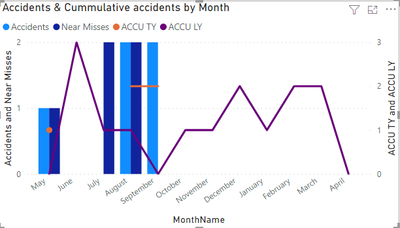
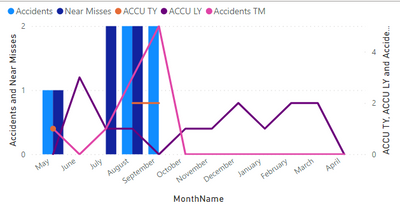
However i'd rather show the month names rather than number. If i chage the axis the date changes and only shows the actual figure:
The month Name isn't a numerical fielf for me to use in the accumulation calulation. Is there a way to do this?
My measure is:
Hi @Anonymous
Try this:
Meausre=
CALCULATE(
[AccidentsTy],
FILTER(
all(Calendar),Calendar(date)<=max(calendar(date)
)
)
If this post helps, please consider accepting it as the solution to help the other members find it more quickly.
Appreciate your Kudos!!
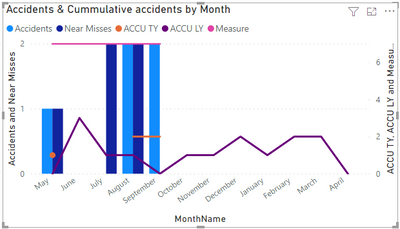
Thanks Vahid, that just gives me a complete total which is the same each month:
It shows the total rather than a running total on both graphs (MonthName and HSMonth)
It would be better if you shared a sample of your data or the PBIX file.
BTE, try this:
Meausre=
CALCULATE(
[AccidentsTy],
FILTER(
all(Data),Data(date)<=max(calendar(date)
)
)
If this post helps, please consider accepting it as the solution to help the other members find it more quickly.
Appreciate your Kudos!!
Thanks Vahid,
Almost there. is there a way to account for zero values. Currently it looks like this:
If i use the measure that adds 0 values for the barchart i get the result below:
If you love stickers, then you will definitely want to check out our Community Sticker Challenge!
Check out the January 2026 Power BI update to learn about new features.
| User | Count |
|---|---|
| 65 | |
| 65 | |
| 48 | |
| 21 | |
| 18 |
| User | Count |
|---|---|
| 119 | |
| 117 | |
| 38 | |
| 36 | |
| 27 |