Join us in Barcelona for FabCon and SQLCon, September 28 - October 1, 2026.
This is best Fabric, Power BI, SQL and AI community event. How do we know? The last event sold out! Save €200 with code FABCMTY200.
Register now- Power BI forums
- Get Help with Power BI
- Desktop
- Service
- Report Server
- Power Query
- Mobile Apps
- Developer
- DAX Commands and Tips
- Custom Visuals Development Discussion
- Health and Life Sciences
- Power BI Spanish forums
- Translated Spanish Desktop
- Training and Consulting
- Instructor Led Training
- Dashboard in a Day for Women, by Women
- Galleries
- Data Stories Gallery
- Themes Gallery
- Contests Gallery
- QuickViz Gallery
- Quick Measures Gallery
- Visual Calculations Gallery
- Fabric Apps Gallery
- Notebook Gallery
- Translytical Task Flow Gallery
- TMDL Gallery
- R Script Showcase
- Webinars and Video Gallery
- Ideas
- Custom Visuals Ideas (read-only)
- Issues
- Issues
- Events
- Upcoming Events
The Fabric community is upgrading! Read all of the details including the timeline and what you can expect. Learn more
- Power BI forums
- Forums
- Get Help with Power BI
- Desktop
- Re: thRe: Running Total Week Calculation
- Subscribe to RSS Feed
- Mark Topic as New
- Mark Topic as Read
- Float this Topic for Current User
- Bookmark
- Subscribe
- Printer Friendly Page


- Mark as New
- Bookmark
- Subscribe
- Mute
- Subscribe to RSS Feed
- Permalink
- Report Inappropriate Content
Running Total Week Calculation
Hi Community,
I hope this will be simple question, im trying to achieve what is calculation in column marked yellow:

So i have a table by Item number and by week both with supply and demand and i would like to write a measure showing me what is the stock level for each week (starting week should take Start Stock Value) and leter stock level should be calculated from previous week. is ist doable?


- Mark as New
- Bookmark
- Subscribe
- Mute
- Subscribe to RSS Feed
- Permalink
- Report Inappropriate Content
Hi @mhsk ,
Below is the solution of a calculated column based on your data here. Maybe you have other conditions. Please reply to this.
Column =
VAR currentWeek = [Week of Year]
RETURN
    [Start Stock]
        + CALCULATE (
            SUM ( Table1[SUPPLY] ) - SUM ( Table1[DEMAND] ),
            FILTER ( 'Table1', 'Table1'[Week of Year] <= currentWeek )
        )
Best Regards,
If this post helps, then please consider Accept it as the solution to help the other members find it more quickly.
- Mark as New
- Bookmark
- Subscribe
- Mute
- Subscribe to RSS Feed
- Permalink
- Report Inappropriate Content
OK, this will work pretty good while you have 1 item and week numbers dosnt duplicate. but what if table has many items and then many the same week's in column week of year. how can i tell power bi that im looking for this specific item context?
(if i apply this calculated column to data where more than one occurence of the same week exist then it crashes )


- Mark as New
- Bookmark
- Subscribe
- Mute
- Subscribe to RSS Feed
- Permalink
- Report Inappropriate Content
@mhsk Can you please provide a sample data ?
========================
Did I answer your question? Mark my post as a solution!
Proud to be a Super User
My Custom Visualization Projects
• Plotting Live Sound: Live Sound
• Beautiful News: Women in Parliament, Energy Mix, Shrinking Armies
• Visual Capitalist: Working Hrs
• Others: Easing Graph, Animated Calendar
MayViz Submissions
• Week 1: View
• Week 2: View
• Week 3: View
• Week 4: View
========================
- Mark as New
- Bookmark
- Subscribe
- Mute
- Subscribe to RSS Feed
- Permalink
- Report Inappropriate Content
Hi,
pbix file with expected outcome attached, it is a bit different than previously, i can merge demand and supply table on part and weekyear if needed.
- Mark as New
- Bookmark
- Subscribe
- Mute
- Subscribe to RSS Feed
- Permalink
- Report Inappropriate Content
any ideas?
- Mark as New
- Bookmark
- Subscribe
- Mute
- Subscribe to RSS Feed
- Permalink
- Report Inappropriate Content
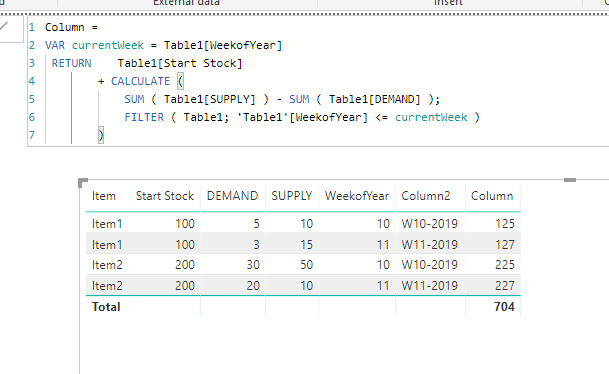
This is how it looks: So i would also need dax to know that we are looking at this item only and this week
- Mark as New
- Bookmark
- Subscribe
- Mute
- Subscribe to RSS Feed
- Permalink
- Report Inappropriate Content
Hi @mhsk ,
Can you share a new sample that can be more accurate to display your model? Please share the pbix file if you can. Please mask the sensitive parts first.
Best Regards,
If this post helps, then please consider Accept it as the solution to help the other members find it more quickly.

Helpful resources

FabCon & SQLCon – Barcelona 2026
Join us in Barcelona for FabCon and SQLCon, the Fabric, Power BI, SQL, and AI community event. Save €200 with code FABCMTY200.

Power BI DataViz World Championships - June 2026
A new Power BI DataViz World Championship is coming this June! Don't miss out on submitting your entry.

| User | Count |
|---|---|
| 24 | |
| 22 | |
| 20 | |
| 18 | |
| 14 |


| User | Count |
|---|---|
| 45 | |
| 38 | |
| 24 | |
| 21 | |
| 20 |


