Join us at FabCon Atlanta from March 16 - 20, 2026, for the ultimate Fabric, Power BI, AI and SQL community-led event. Save $200 with code FABCOMM.
Register now!Vote for your favorite vizzies from the Power BI Dataviz World Championship submissions. Vote now!
Hi All
I have data below
I need Running Total of VarFlag for Employee, Date, Day , kindly help
Hi @Anonymous ,
Please have a try.
Create a flag column.
flag =
IF ( 'Table'[START TIME] = "D/O", 0, 1 )
Then create a column group the date.
minflagdate =
CALCULATE (
MIN ( 'Table'[date] ),
FILTER (
ALLSELECTED ( 'Table' ),
'Table'[date] >= EARLIER ( 'Table'[date] )
&& 'Table'[flag] = 0
)
)
Then create a measure to get the answer.
result =
VAR _1 =
CALCULATE (
SUM ( 'Table'[flag] ),
FILTER (
ALL ( 'Table' ),
'Table'[date] <= SELECTEDVALUE ( 'Table'[date] )
&& 'Table'[minflagdate] = SELECTEDVALUE ( 'Table'[minflagdate] )
&& 'Table'[EMPLY ID] = SELECTEDVALUE ( 'Table'[EMPLY ID] )
&& 'Table'[Employee name] = SELECTEDVALUE ( 'Table'[Employee name] )
)
)
RETURN
IF ( MAX ( 'Table'[flag] ) = 0, 0, _1 )
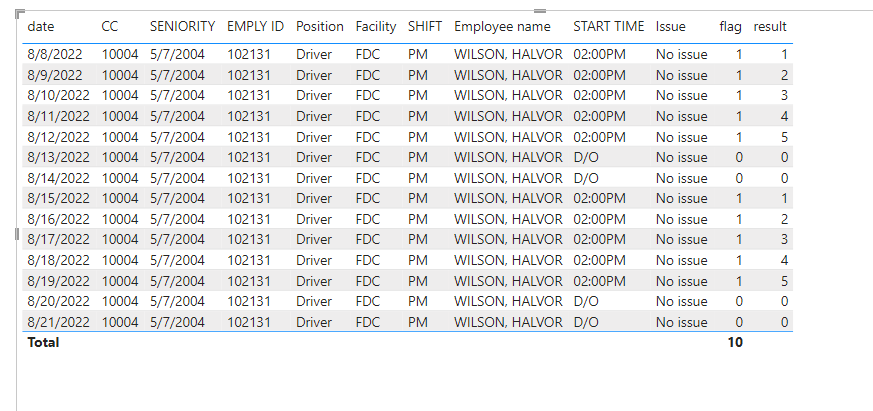
If I have misunderstood your meaning, please provide more details with your desired output.
Best Regards
Community Support Team _ Polly
If this post helps, then please consider Accept it as the solution to help the other members find it more quickly.
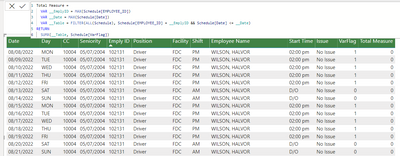
@Anonymous So maybe something like:
Running Total Measure =
VAR __EmplyID = MAX('Table'[Emply ID])
VAR __Date = MAX('Table'[Date])
VAR __Table = FILTER(ALL('Table'), [Emply ID] = __EmplyID && [Date] <= __Date)
RETURN
SUMX(__Table, [VarFlag])
Not working as showing below:
Hi @Anonymous ,
I don't know what the problem is. Could you please provide your pbix file without privacy information and desired output for me to test?
Best Regards
Community Support Team _ Polly
If this post helps, then please consider Accept it as the solution to help the other members find it more quickly.
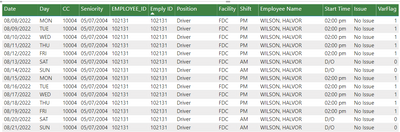
Its showing as below
While I need 1,2,3,4,5 and whenver there is 0 for "D/O " next row should restart from 1,2,3 and so on.
Actually I want to display the no of consecutive days an employee has worked. So if employee has value D/O is day off , then next day should start from 1, 2,3 4 and so on.
Vote for your favorite vizzies from the Power BI World Championship submissions!
If you love stickers, then you will definitely want to check out our Community Sticker Challenge!
Check out the January 2026 Power BI update to learn about new features.
| User | Count |
|---|---|
| 64 | |
| 53 | |
| 42 | |
| 20 | |
| 17 |
| User | Count |
|---|---|
| 121 | |
| 103 | |
| 47 | |
| 30 | |
| 24 |