Share feedback directly with Fabric product managers, participate in targeted research studies and influence the Fabric roadmap.
Sign up nowGet Fabric certified for FREE! Don't miss your chance! Learn more
Hi,
I am trying to create a stacked graph of a running total, but I am having great problems.
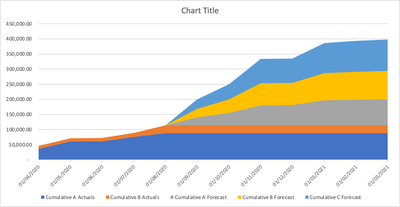
What i am trying to get is a graph like this:
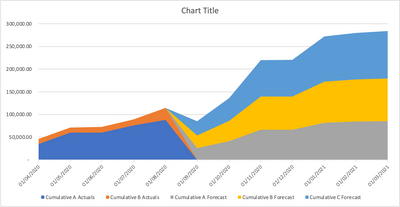
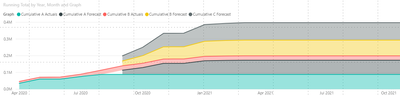
but i am getting this:
I have a sample PBIX file here:
Grateful if someone can help me please
Solved! Go to Solution.
Hi @timknox ,
Please try this:
Create a new date table:
Date = CALENDARAUTO()
Create a measure:
Running Total =
CALCULATE(
SUM(Sheet1[Value]),FILTER(ALL('Date'),'Date'[Date]<=MAX('Date'[Date])))
@timknox , try a measure like
CALCULATE(
SUM(Sheet1[Value]),FILTER(ALL(Sheet1),Sheet1[Date]<=MAX(Sheet1[Date])))
In case you want all only date. Move that to a separate table or use date table
CALCULATE(
SUM(Sheet1[Value]),FILTER(ALL(DAte),DAte[Date]<=MAX(DAte[Date])))
Hi @timknox ,
Please try this:
Create a new date table:
Date = CALENDARAUTO()
Create a measure:
Running Total =
CALCULATE(
SUM(Sheet1[Value]),FILTER(ALL('Date'),'Date'[Date]<=MAX('Date'[Date])))
Share feedback directly with Fabric product managers, participate in targeted research studies and influence the Fabric roadmap.
| User | Count |
|---|---|
| 63 | |
| 62 | |
| 42 | |
| 19 | |
| 16 |
| User | Count |
|---|---|
| 113 | |
| 105 | |
| 36 | |
| 28 | |
| 28 |