Don't miss your chance to take the Fabric Data Engineer (DP-600) exam for FREE! Find out how by attending the DP-600 session on April 23rd (pacific time), live or on-demand.
Learn moreNext up in the FabCon + SQLCon recap series: The roadmap for Microsoft SQL and Maximizing Developer experiences in Fabric. All sessions are available on-demand after the live show. Register now
Hello community,
I am parsing a free text field from a .xslx file (retrieved from database) using Python regular expressions. Indeed, I need to filter the free text and retrieve very specific data which can only be done using regular expressions, and then store the parsed data in new columns of the file. A sample of the code:
line_pattern = r'(?i)(line item\.*\s*\d+|line\.*\s*\d+|lines\.*\s*\d+|line items\.*\s*\d+)'
df['LINE'] = df['FMEA Assessment'].str.findall(line_pattern)
My company is using Power BI mostly for reporting purposes and implementing my script within the desktop to automatically parse the data would be great.
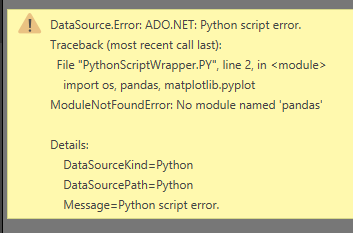
I have tried Get Data -> Load -> Edit Queries -> Run Python script, but I get the following error message.
Any help using Python scripts including regular expressions, or using only regular expressions to parse text and populate new columns would be greatly appreciated.
Thank you!
Solved! Go to Solution.
The error message mentioned that you haven't installed the site-package "pandas", please install pandas library using pip. For more details, you can refer to steps in blog below:
https://data-flair.training/blogs/install-pandas-on-windows/
Community Support Team _ Jimmy Tao
If this post helps, then please consider Accept it as the solution to help the other members find it more quickly.
The error message mentioned that you haven't installed the site-package "pandas", please install pandas library using pip. For more details, you can refer to steps in blog below:
https://data-flair.training/blogs/install-pandas-on-windows/
Community Support Team _ Jimmy Tao
If this post helps, then please consider Accept it as the solution to help the other members find it more quickly.
There seemed to be an internal issue with my anaconda environment. I uninstalled all packaged then installed them again and it worked!
Thanks again.
Good Morning,
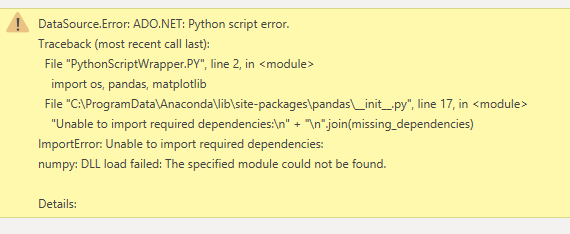
Thank you for your reply @v-yuta-msft. I double checked pandas and they are indeed installed so I am not sure what the problem might be. I installed them again just to be safe but I still get an error message.
Attached is the latest error message I get. Not sure what is ADO.NET?
Thank you again for your help.
If you have recently started exploring Fabric, we'd love to hear how it's going. Your feedback can help with product improvements.
A new Power BI DataViz World Championship is coming this June! Don't miss out on submitting your entry.
| User | Count |
|---|---|
| 46 | |
| 43 | |
| 39 | |
| 19 | |
| 15 |
| User | Count |
|---|---|
| 68 | |
| 65 | |
| 31 | |
| 28 | |
| 24 |