cancel
Showing results for 
Search instead for 
Did you mean: 

July 7 - July 17 | Round 2 of the Power BI Dataviz World Championships. Don't miss your chance! Learn more

Reply
brightcitrus
Frequent Visitor

Run Python script for parsing text including RegEx formulas?

Hello community,

I am parsing a free text field from a .xslx file (retrieved from database) using Python regular expressions. Indeed, I need to filter the free text and retrieve very specific data which can only be done using regular expressions, and then store the parsed data in new columns of the file. A sample of the code: 

line_pattern = r'(?i)(line item\.*\s*\d+|line\.*\s*\d+|lines\.*\s*\d+|line items\.*\s*\d+)'
df['LINE'] = df['FMEA Assessment'].str.findall(line_pattern)

My company is using Power BI mostly for reporting purposes and implementing my script within the desktop to automatically parse the data would be great.

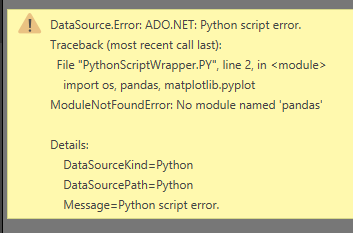
I have tried Get Data -> Load -> Edit Queries -> Run Python script, but I get the following error message.

Capture.PNG


Any help using Python scripts including regular expressions, or using only regular expressions to parse text and populate new columns would be greatly appreciated.

Thank you!


1 ACCEPTED SOLUTION
v-yuta-msft
Community Support
Community Support

@brightcitrus ,


The error message mentioned that you haven't installed the site-package "pandas", please install pandas library using pip. For more details, you can refer to steps in blog below:
https://data-flair.training/blogs/install-pandas-on-windows/


Community Support Team _ Jimmy Tao

If this post helps, then please consider Accept it as the solution to help the other members find it more quickly.

View solution in original post

3 REPLIES 3
v-yuta-msft
Community Support
Community Support

@brightcitrus ,


The error message mentioned that you haven't installed the site-package "pandas", please install pandas library using pip. For more details, you can refer to steps in blog below:
https://data-flair.training/blogs/install-pandas-on-windows/


Community Support Team _ Jimmy Tao

If this post helps, then please consider Accept it as the solution to help the other members find it more quickly.


Good Morning,


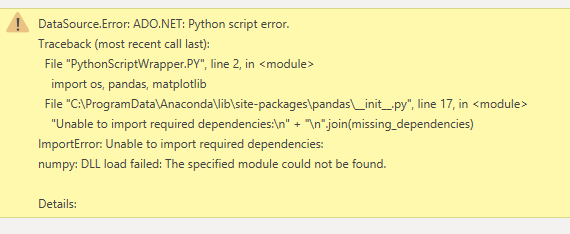
Thank you for your reply @. I double checked pandas and they are indeed installed so I am not sure what the problem might be. I installed them again just to be safe but I still get an error message.


Attached is the latest error message I get. Not sure what is ADO.NET?


Thank you again for your help.

Capture.PNG


Helpful resources

Announcements
FabCon and SQLCon Barcelona 2026

FabCon & SQLCon – Barcelona 2026

Join us in Barcelona for FabCon and SQLCon, the Fabric, Power BI, SQL, and AI community event. Save €200 with code FABCMTY200.

60 days of Data Days Carousel

Data Days 2026

Join Data Days 2026: 60 days of free live/on-demand sessions, challenges, study groups, and certification opportunities.

Power BI DataViz World Championships carousel

Power BI DataViz World Championships - June 2026

A new Power BI DataViz World Championship is coming this June! Don't miss out on submitting your entry.

Top Solution Authors