This time we’re going bigger than ever. Fabric, Power BI, SQL, AI and more. We're covering it all. You won't want to miss it.
Learn moreLevel up your Power BI skills this month - build one visual each week and tell better stories with data! Get started
This is my measure for row level security. I look up the username and match the manager should be able to see the employee IDs corresponding to the manager ID.
1 = var stock = LOOKUPVALUE(user_security_dynamic[employee_id]; user_security_dynamic[username]; USERNAME()) RETURN IF(
stock = table1[Manager ID]; 1; 0); but i get this error that a single value for column Manager ID cannot be determined. How can I change this? Thanks
Solved! Go to Solution.
Hi @Anonymous ,
You may refer to Row-level security (RLS) with Power BI.
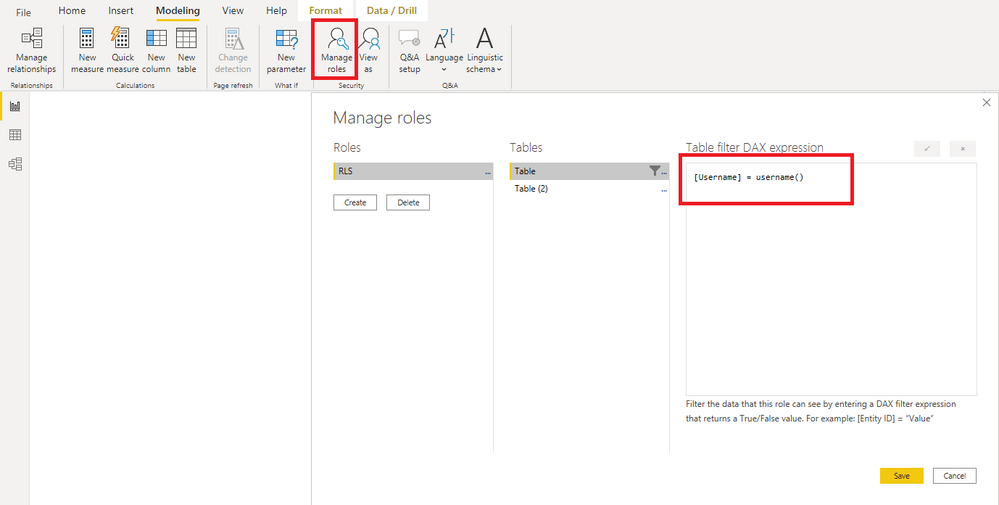
According to your sample data. I create a role in the Manage roles as follows.
[Username] = username()
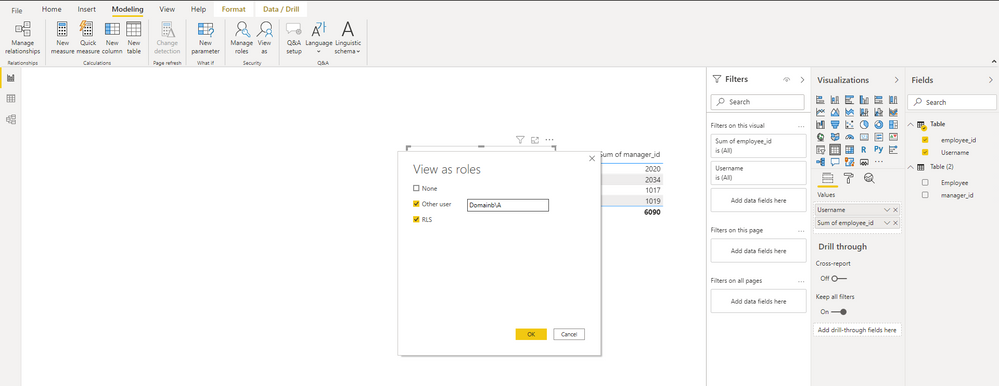
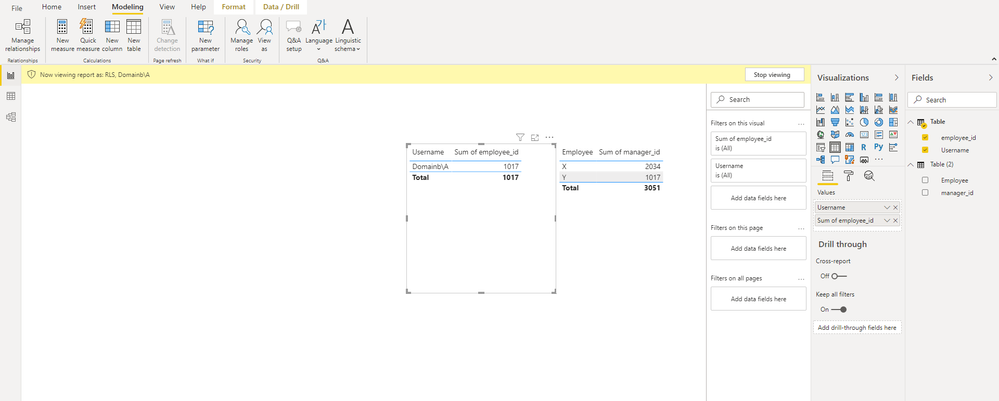
The test is this.
You can check more details from here.
Best Regards,
Stephen Tao
If this post helps, then please consider Accept it as the solution to help the other members find it more quickly.
Hi @Anonymous ,
You may refer to Row-level security (RLS) with Power BI.
According to your sample data. I create a role in the Manage roles as follows.
[Username] = username()
The test is this.
You can check more details from here.
Best Regards,
Stephen Tao
If this post helps, then please consider Accept it as the solution to help the other members find it more quickly.
@Anonymous , how is your data structured? Can you share sample data
In between see if these two can help
https://radacad.com/dynamic-row-level-security-with-organizational-hierarchy-power-bi
https://www.blue-granite.com/blog/using-dynamic-row-level-security-with-organizational-hierarchies
Hi thanks for the link; I did try to impelemnt the links you sent; but those are not for my case.
My user security dynamic looks like this. An employee ID can have multiple usernames.
| Username | employee_id |
| Domain\A | 1017 |
| Domainb\A | 1017 |
| Domain\B | 1019 |
| Domain\C | 2020 |
The rows Im trying to filter looks like this. If employee ID from above table matches with Manager_ID; then those rows should be seen.
| Employee | manager_id |
| X | 1017 |
| X | 1017 |
| Y | 1017 |
| Z | 1019 |
| E | 2020 |
@Anonymous That error regarding multiple values generally means you need to wrap a column reference in an aggregation function like MAX or MIN. This may help: https://community.powerbi.com/t5/Quick-Measures-Gallery/Dynamic-Hierarchical-Row-Level-Security/m-p/889567#M406
Create a calulated column with name "Flag"
FLAG=1
Now write the RLS code on Flag
Flag=IF(table1[employee_id] IN SELECTCOLUMNS(Filter('user_security_dynamic','user_security_dynamic'[UserName]=UserName()),"Id",[Emplyee_id]),1,0)
Check out the April 2026 Power BI update to learn about new features.
Sign up to receive a private message when registration opens and key events begin.
If you have recently started exploring Fabric, we'd love to hear how it's going. Your feedback can help with product improvements.
| User | Count |
|---|---|
| 36 | |
| 33 | |
| 27 | |
| 24 | |
| 18 |
| User | Count |
|---|---|
| 67 | |
| 49 | |
| 32 | |
| 27 | |
| 22 |