Join us in Barcelona for FabCon and SQLCon, September 28 - October 1, 2026.
This is best Fabric, Power BI, SQL and AI community event. How do we know? The last event sold out! Save €200 with code FABCMTY200.
Register now- Power BI forums
- Get Help with Power BI
- Desktop
- Service
- Report Server
- Power Query
- Mobile Apps
- Developer
- DAX Commands and Tips
- Custom Visuals Development Discussion
- Health and Life Sciences
- Power BI Spanish forums
- Translated Spanish Desktop
- Training and Consulting
- Instructor Led Training
- Dashboard in a Day for Women, by Women
- Galleries
- Data Stories Gallery
- Themes Gallery
- Contests Gallery
- QuickViz Gallery
- Quick Measures Gallery
- Visual Calculations Gallery
- Fabric Apps Gallery
- Notebook Gallery
- Translytical Task Flow Gallery
- TMDL Gallery
- R Script Showcase
- Webinars and Video Gallery
- Ideas
- Custom Visuals Ideas (read-only)
- Issues
- Issues
- Events
- Upcoming Events
July 28 - August 9 | Final Round of the Power BI Dataviz World Championships. This is your chance. Learn more
- Power BI forums
- Forums
- Get Help with Power BI
- Desktop
- Re: Row calculation
- Subscribe to RSS Feed
- Mark Topic as New
- Mark Topic as Read
- Float this Topic for Current User
- Bookmark
- Subscribe
- Printer Friendly Page

- Mark as New
- Bookmark
- Subscribe
- Mute
- Subscribe to RSS Feed
- Permalink
- Report Inappropriate Content
Row calculation
How to calculate rows on a table in Power BI? I want to create a column "started" as below, for each row of this column I need the result like this excel formula: =IF(AND(A3=A2;B3-B2<1);"No";"yes")
part | install date | started |
| PAU-0101 | 26/03/2019 05:17 | yes |
| PAU-0101 | 07/04/2019 18:56 | No |
| PAU-0101 | 07/04/2019 19:56 | yes |
| PAU-0102 | 26/03/2019 05:17 | yes |
| PAU-0102 | 07/04/2019 18:56 | No |
| PAU-0102 | 07/04/2019 19:56 | yes |
Solved! Go to Solution.
- Mark as New
- Bookmark
- Subscribe
- Mute
- Subscribe to RSS Feed
- Permalink
- Report Inappropriate Content
Can you try to change the datediff to minutes and change the less than condition.
Thanks.
- Mark as New
- Bookmark
- Subscribe
- Mute
- Subscribe to RSS Feed
- Permalink
- Report Inappropriate Content
JUST PERFECT!!!
started = VAR v_LagPart = CALCULATE( MAX( Data[part] ), FILTER( Data, Data[part] = EARLIER( Data[part] ) && Data[installdate] < EARLIER( Data[installdate] ) ) ) VAR v_LagDate = CALCULATE( MAX( Data[installdate] ), FILTER( Data, Data[part] = EARLIER( Data[part] ) && Data[installdate] < EARLIER( Data[installdate] ) ) ) RETURN IF( Data[part] = v_LagPart && ( DATEDIFF( v_LagDate, Data[installdate], MINUTE ) < 1440 ), "No", "Yes" )

- Mark as New
- Bookmark
- Subscribe
- Mute
- Subscribe to RSS Feed
- Permalink
- Report Inappropriate Content
Hi,
Can you try to use this:
started =
VAR v_LagPart = CALCULATE( MAX( Data[part] ),
          FILTER( Data, Data[part] = EARLIER( Data[part] ) &&
          Data[installdate] < EARLIER( Data[installdate] )
          )
)

VAR v_LagDate = CALCULATE( MAX( Data[installdate] ),
          FILTER( Data, Data[part] = EARLIER( Data[part] ) &&
          Data[installdate] < EARLIER( Data[installdate] )
          )
)
RETURN IF( Data[part] = v_LagPart && ( DATEDIFF( Data[installdate],v_LagDate, DAY ) < 1 && DATEDIFF( Data[installdate],v_LagDate, DAY ) <> 0 ), "No", "Yes" )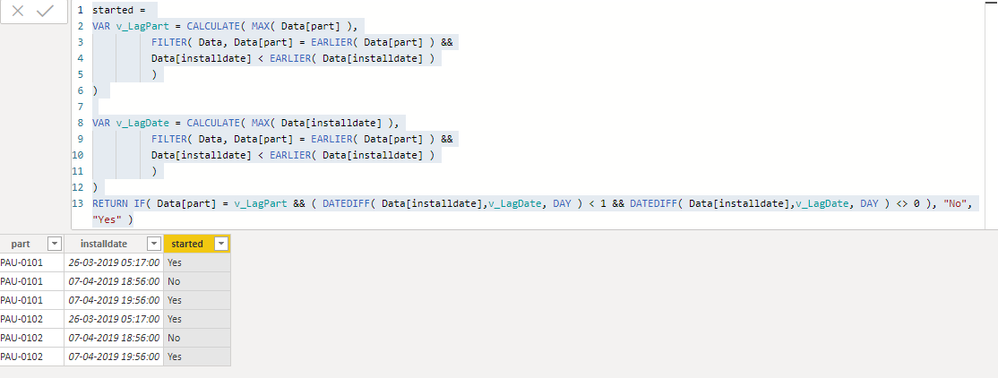
Thanks.
- Mark as New
- Bookmark
- Subscribe
- Mute
- Subscribe to RSS Feed
- Permalink
- Report Inappropriate Content
Thank you, elegant coding.
I tried your suggestion but it does not look right, see my results table:
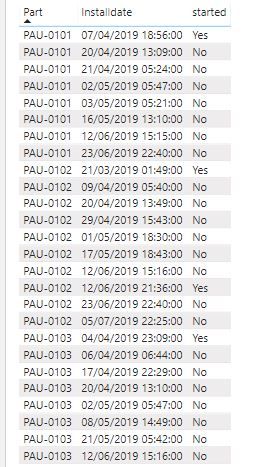

- Mark as New
- Bookmark
- Subscribe
- Mute
- Subscribe to RSS Feed
- Permalink
- Report Inappropriate Content
Could you please explain the if condition. I mean what are you trying to achieve using it, specifically the date comparison part.
Thanks.
- Mark as New
- Bookmark
- Subscribe
- Mute
- Subscribe to RSS Feed
- Permalink
- Report Inappropriate Content
Hi, thanks a lot for the help so far!!
First the table columns must be sorted, Column "Part" ascending and column "Installdate-time" also ascending.
the column "started" intents to return a "no" if:
the "Part" in row 2 is equal to the "Part" in row 1, and
if the "Installdate-time" of row 2 minus "Installdate-time" of row 1 is less than 1 day.
But, if the difference between the row 2 and row 1 "Installdate-time" is more than 1 day, it must return a "yes".
So for the same "Part", if it runs less than one day it did not started, but if it runs more than one day it is considered as successfully started.
- Mark as New
- Bookmark
- Subscribe
- Mute
- Subscribe to RSS Feed
- Permalink
- Report Inappropriate Content
Hi @edgarjb-68 ,
Can you try using this:
started =
VAR v_LagPart = CALCULATE( MAX( Data[part] ),
          FILTER( Data, Data[part] = EARLIER( Data[part] ) &&
          Data[installdate] < EARLIER( Data[installdate] )
          )
)

VAR v_LagDate = CALCULATE( MAX( Data[installdate] ),
          FILTER( Data, Data[part] = EARLIER( Data[part] ) &&
          Data[installdate] < EARLIER( Data[installdate] )
          )
)
RETURN IF( Data[part] = v_LagPart && ( DATEDIFF( v_LagDate, Data[installdate], DAY ) < 1 ), "No", "Yes" )
Thanks.
- Mark as New
- Bookmark
- Subscribe
- Mute
- Subscribe to RSS Feed
- Permalink
- Report Inappropriate Content
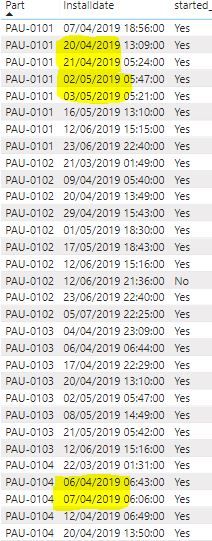
Hi!! Thanks a lot!! Almost there!!!
See that there are a few rows (highlighted) where the response should be "No", because the difference between rows 2 and 1 is less than 1 day (24 hours) for the "Installdate".
- Mark as New
- Bookmark
- Subscribe
- Mute
- Subscribe to RSS Feed
- Permalink
- Report Inappropriate Content
Hi @edgarjb-68 ,
This should work:
started =
VAR v_LagPart = CALCULATE( MAX( Data[part] ),
          FILTER( Data, Data[part] = EARLIER( Data[part] ) &&
          Data[installdate] < EARLIER( Data[installdate] )
          )
)

VAR v_LagDate = CALCULATE( MAX( Data[installdate] ),
          FILTER( Data, Data[part] = EARLIER( Data[part] ) &&
          Data[installdate] < EARLIER( Data[installdate] )
          )
)
RETURN IF( Data[part] = v_LagPart && ( DATEDIFF( v_LagDate, Data[installdate], HOUR ) < 24 ), "No", "Yes" )
Thanks.
Please accept this as a solution if it satisfies the requirement. Appreciate your Kudos. 🙂
- Mark as New
- Bookmark
- Subscribe
- Mute
- Subscribe to RSS Feed
- Permalink
- Report Inappropriate Content
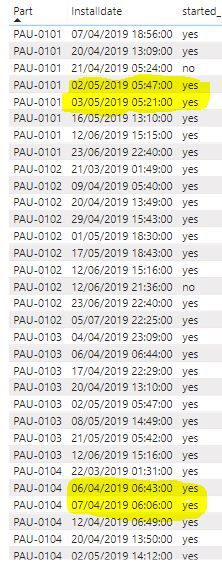
Wow, it is very, very close to it!!!
Though I still find only 5 instances where the response should be "No", see two examples highlighted.
One thing I noticed is that on those cases the "installdate" difference is very close to 24 hours, somthing like 23.5 or higher.
- Mark as New
- Bookmark
- Subscribe
- Mute
- Subscribe to RSS Feed
- Permalink
- Report Inappropriate Content
Can you try to change the datediff to minutes and change the less than condition.
Thanks.
- Mark as New
- Bookmark
- Subscribe
- Mute
- Subscribe to RSS Feed
- Permalink
- Report Inappropriate Content
JUST PERFECT!!!
started = VAR v_LagPart = CALCULATE( MAX( Data[part] ), FILTER( Data, Data[part] = EARLIER( Data[part] ) && Data[installdate] < EARLIER( Data[installdate] ) ) ) VAR v_LagDate = CALCULATE( MAX( Data[installdate] ), FILTER( Data, Data[part] = EARLIER( Data[part] ) && Data[installdate] < EARLIER( Data[installdate] ) ) ) RETURN IF( Data[part] = v_LagPart && ( DATEDIFF( v_LagDate, Data[installdate], MINUTE ) < 1440 ), "No", "Yes" )
Helpful resources

FabCon & SQLCon – Barcelona 2026
Join us in Barcelona for FabCon and SQLCon, the Fabric, Power BI, SQL, and AI community event. Save €200 with code FABCMTY200.

Fabric Community Sticker Challenge - Barcelona 2026
If you love stickers, then you will definitely want to check out our community sticker challenge, Barcelona edition!

Power BI Monthly Update - July 2026
Check out the July 2026 Power BI update to learn about new features.

Power BI DataViz World Championships - June 2026
A new Power BI DataViz World Championship is coming this June! Don't miss out on submitting your entry.

| User | Count |
|---|---|
| 25 | |
| 23 | |
| 19 | |
| 17 | |
| 14 |


| User | Count |
|---|---|
| 24 | |
| 20 | |
| 20 | |
| 19 | |
| 19 |


