Get Fabric or SQL Certified for Free.
Get certified for free when you join Fabric Data Days 2026 and dive into Fabric, Power BI, SQL, AI, and other essential data skills.
Join now- Power BI forums
- Get Help with Power BI
- Desktop
- Service
- Report Server
- Power Query
- Mobile Apps
- Developer
- DAX Commands and Tips
- Custom Visuals Development Discussion
- Health and Life Sciences
- Power BI Spanish forums
- Translated Spanish Desktop
- Training and Consulting
- Instructor Led Training
- Dashboard in a Day for Women, by Women
- Galleries
- Data Stories Gallery
- Themes Gallery
- Contests Gallery
- QuickViz Gallery
- Quick Measures Gallery
- Visual Calculations Gallery
- Fabric Apps Gallery
- Notebook Gallery
- Translytical Task Flow Gallery
- TMDL Gallery
- R Script Showcase
- Webinars and Video Gallery
- Ideas
- Custom Visuals Ideas (read-only)
- Issues
- Issues
- Events
- Upcoming Events
July 7 - July 17 | Round 2 of the Power BI Dataviz World Championships. Don't miss your chance! Learn more
- Power BI forums
- Forums
- Get Help with Power BI
- Desktop
- Re: Row calculation
- Subscribe to RSS Feed
- Mark Topic as New
- Mark Topic as Read
- Float this Topic for Current User
- Bookmark
- Subscribe
- Printer Friendly Page

- Mark as New
- Bookmark
- Subscribe
- Mute
- Subscribe to RSS Feed
- Permalink
- Report Inappropriate Content
Row calculation
How to calculate rows on a table in Power BI? I want to create a column "started" as below, for each row of this column I need the result like this excel formula: =IF(AND(A3=A2;B3-B2<1);"No";"yes")
part | install date | started |
| PAU-0101 | 26/03/2019 05:17 | yes |
| PAU-0101 | 07/04/2019 18:56 | No |
| PAU-0101 | 07/04/2019 19:56 | yes |
| PAU-0102 | 26/03/2019 05:17 | yes |
| PAU-0102 | 07/04/2019 18:56 | No |
| PAU-0102 | 07/04/2019 19:56 | yes |
Solved! Go to Solution.
- Mark as New
- Bookmark
- Subscribe
- Mute
- Subscribe to RSS Feed
- Permalink
- Report Inappropriate Content
Can you try to change the datediff to minutes and change the less than condition.
Thanks.
- Mark as New
- Bookmark
- Subscribe
- Mute
- Subscribe to RSS Feed
- Permalink
- Report Inappropriate Content
JUST PERFECT!!!
started = VAR v_LagPart = CALCULATE( MAX( Data[part] ), FILTER( Data, Data[part] = EARLIER( Data[part] ) && Data[installdate] < EARLIER( Data[installdate] ) ) ) VAR v_LagDate = CALCULATE( MAX( Data[installdate] ), FILTER( Data, Data[part] = EARLIER( Data[part] ) && Data[installdate] < EARLIER( Data[installdate] ) ) ) RETURN IF( Data[part] = v_LagPart && ( DATEDIFF( v_LagDate, Data[installdate], MINUTE ) < 1440 ), "No", "Yes" )

- Mark as New
- Bookmark
- Subscribe
- Mute
- Subscribe to RSS Feed
- Permalink
- Report Inappropriate Content
Hi,
Can you try to use this:
started =
VAR v_LagPart = CALCULATE( MAX( Data[part] ),
          FILTER( Data, Data[part] = EARLIER( Data[part] ) &&
          Data[installdate] < EARLIER( Data[installdate] )
          )
)

VAR v_LagDate = CALCULATE( MAX( Data[installdate] ),
          FILTER( Data, Data[part] = EARLIER( Data[part] ) &&
          Data[installdate] < EARLIER( Data[installdate] )
          )
)
RETURN IF( Data[part] = v_LagPart && ( DATEDIFF( Data[installdate],v_LagDate, DAY ) < 1 && DATEDIFF( Data[installdate],v_LagDate, DAY ) <> 0 ), "No", "Yes" )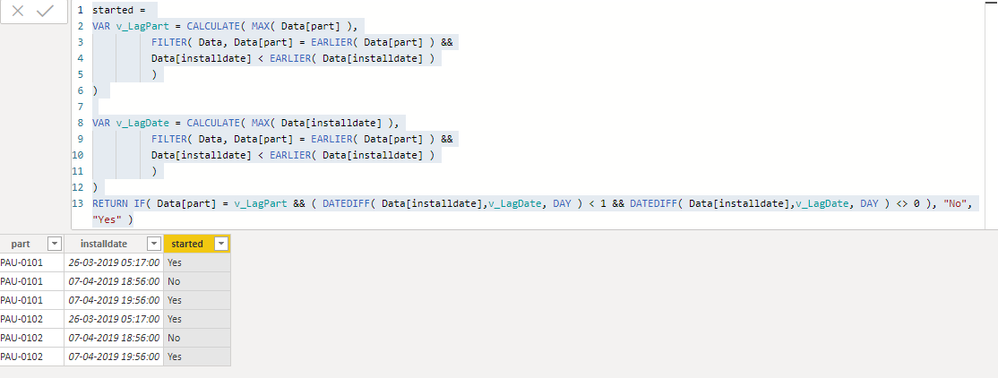
Thanks.
- Mark as New
- Bookmark
- Subscribe
- Mute
- Subscribe to RSS Feed
- Permalink
- Report Inappropriate Content
Thank you, elegant coding.
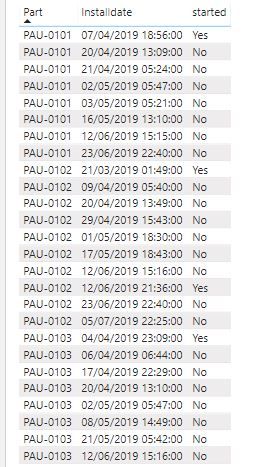
I tried your suggestion but it does not look right, see my results table:

- Mark as New
- Bookmark
- Subscribe
- Mute
- Subscribe to RSS Feed
- Permalink
- Report Inappropriate Content
Could you please explain the if condition. I mean what are you trying to achieve using it, specifically the date comparison part.
Thanks.
- Mark as New
- Bookmark
- Subscribe
- Mute
- Subscribe to RSS Feed
- Permalink
- Report Inappropriate Content
Hi, thanks a lot for the help so far!!
First the table columns must be sorted, Column "Part" ascending and column "Installdate-time" also ascending.
the column "started" intents to return a "no" if:
the "Part" in row 2 is equal to the "Part" in row 1, and
if the "Installdate-time" of row 2 minus "Installdate-time" of row 1 is less than 1 day.
But, if the difference between the row 2 and row 1 "Installdate-time" is more than 1 day, it must return a "yes".
So for the same "Part", if it runs less than one day it did not started, but if it runs more than one day it is considered as successfully started.
- Mark as New
- Bookmark
- Subscribe
- Mute
- Subscribe to RSS Feed
- Permalink
- Report Inappropriate Content
Hi @edgarjb-68 ,
Can you try using this:
started =
VAR v_LagPart = CALCULATE( MAX( Data[part] ),
          FILTER( Data, Data[part] = EARLIER( Data[part] ) &&
          Data[installdate] < EARLIER( Data[installdate] )
          )
)

VAR v_LagDate = CALCULATE( MAX( Data[installdate] ),
          FILTER( Data, Data[part] = EARLIER( Data[part] ) &&
          Data[installdate] < EARLIER( Data[installdate] )
          )
)
RETURN IF( Data[part] = v_LagPart && ( DATEDIFF( v_LagDate, Data[installdate], DAY ) < 1 ), "No", "Yes" )
Thanks.
- Mark as New
- Bookmark
- Subscribe
- Mute
- Subscribe to RSS Feed
- Permalink
- Report Inappropriate Content
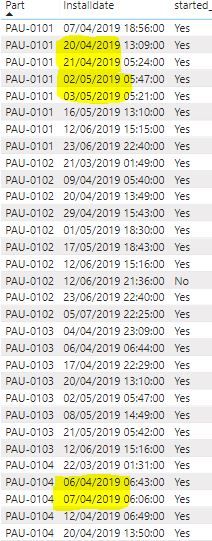
Hi!! Thanks a lot!! Almost there!!!
See that there are a few rows (highlighted) where the response should be "No", because the difference between rows 2 and 1 is less than 1 day (24 hours) for the "Installdate".
- Mark as New
- Bookmark
- Subscribe
- Mute
- Subscribe to RSS Feed
- Permalink
- Report Inappropriate Content
Hi @edgarjb-68 ,
This should work:
started =
VAR v_LagPart = CALCULATE( MAX( Data[part] ),
          FILTER( Data, Data[part] = EARLIER( Data[part] ) &&
          Data[installdate] < EARLIER( Data[installdate] )
          )
)

VAR v_LagDate = CALCULATE( MAX( Data[installdate] ),
          FILTER( Data, Data[part] = EARLIER( Data[part] ) &&
          Data[installdate] < EARLIER( Data[installdate] )
          )
)
RETURN IF( Data[part] = v_LagPart && ( DATEDIFF( v_LagDate, Data[installdate], HOUR ) < 24 ), "No", "Yes" )
Thanks.
Please accept this as a solution if it satisfies the requirement. Appreciate your Kudos. 🙂
- Mark as New
- Bookmark
- Subscribe
- Mute
- Subscribe to RSS Feed
- Permalink
- Report Inappropriate Content
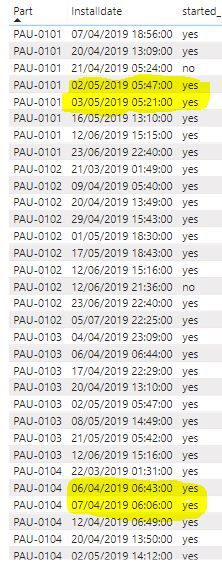
Wow, it is very, very close to it!!!
Though I still find only 5 instances where the response should be "No", see two examples highlighted.
One thing I noticed is that on those cases the "installdate" difference is very close to 24 hours, somthing like 23.5 or higher.
- Mark as New
- Bookmark
- Subscribe
- Mute
- Subscribe to RSS Feed
- Permalink
- Report Inappropriate Content
Can you try to change the datediff to minutes and change the less than condition.
Thanks.
- Mark as New
- Bookmark
- Subscribe
- Mute
- Subscribe to RSS Feed
- Permalink
- Report Inappropriate Content
JUST PERFECT!!!
started = VAR v_LagPart = CALCULATE( MAX( Data[part] ), FILTER( Data, Data[part] = EARLIER( Data[part] ) && Data[installdate] < EARLIER( Data[installdate] ) ) ) VAR v_LagDate = CALCULATE( MAX( Data[installdate] ), FILTER( Data, Data[part] = EARLIER( Data[part] ) && Data[installdate] < EARLIER( Data[installdate] ) ) ) RETURN IF( Data[part] = v_LagPart && ( DATEDIFF( v_LagDate, Data[installdate], MINUTE ) < 1440 ), "No", "Yes" )
Helpful resources

FabCon & SQLCon – Barcelona 2026
Join us in Barcelona for FabCon and SQLCon, the Fabric, Power BI, SQL, and AI community event. Save €200 with code FABCMTY200.

Power BI Monthly Update - July 2026
Check out the July 2026 Power BI update to learn about new features.

Data Days 2026
Join Data Days 2026: 60 days of free live/on-demand sessions, challenges, study groups, and certification opportunities.

Power BI DataViz World Championships - June 2026
A new Power BI DataViz World Championship is coming this June! Don't miss out on submitting your entry.

| User | Count |
|---|---|
| 30 | |
| 25 | |
| 23 | |
| 22 | |
| 13 |


| User | Count |
|---|---|
| 49 | |
| 32 | |
| 19 | |
| 19 | |
| 17 |


