cancel
Showing results for 
Search instead for 
Did you mean: 

Data Days is here! Join us now for 60+ days of learning, challenges, and connection. Learn more

Reply
javier-martinez
New Member

Row Level Security Issue

Hi everyone,


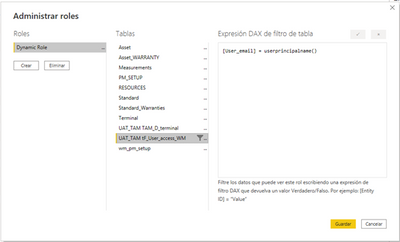
I'm facing a problem applying a Row Level Security to my report. I have create a Rol where I filter the Countries depend on the user email.

javiermartinez_0-1668006913687.png

And when I click on test a role it works.

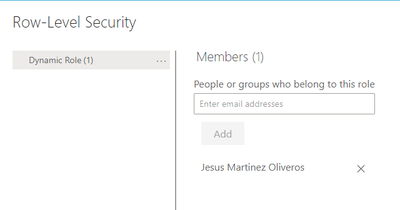
Then when I publish the report on the workspace I can see the Role created.

javiermartinez_1-1668007518216.png


But the issue comes when anyone opens it and It is not filtered by the country of the person who is watching it. It is as if the role had not been applied.


Do you know if i have to change anything on my workspace/report/database settings?


Thank you,

Regards.

1 ACCEPTED SOLUTION
v-yalanwu-msft
Community Support
Community Support

Hi, @javier-martinez ;

This is probably happening because the user (test user) has access to the workspace as either an Admin, Member or Contributor. These Workspace users are NOT subject to RLS so will see all data. You need to user to be a "Viewer" in the Workspace to be subject to RLS. Go to the Access options in the workspace and set the test user to "Viewer".
if not right,can you share your simple data and result what you want to output?


Best Regards,
Community Support Team _ Yalan Wu
If this post helps, then please consider Accept it as the solution to help the other members find it more quickly.

View solution in original post

1 REPLY 1
v-yalanwu-msft
Community Support
Community Support

Hi, @javier-martinez ;

This is probably happening because the user (test user) has access to the workspace as either an Admin, Member or Contributor. These Workspace users are NOT subject to RLS so will see all data. You need to user to be a "Viewer" in the Workspace to be subject to RLS. Go to the Access options in the workspace and set the test user to "Viewer".
if not right,can you share your simple data and result what you want to output?


Best Regards,
Community Support Team _ Yalan Wu
If this post helps, then please consider Accept it as the solution to help the other members find it more quickly.

Helpful resources

Announcements
Fabric Data Days is here Carousel

Fabric Data Days 2026

Don't miss out on Data Days, June 15 through August 7. Learn Fabric, Power BI, SQL, AI and more.

May Power BI Update Carousel

Power BI Monthly Update - May 2026

Check out the May 2026 Power BI update to learn about new features.

Power BI DataViz World Championships carousel

Power BI DataViz World Championships - June 2026

A new Power BI DataViz World Championship is coming this June! Don't miss out on submitting your entry.