cancel
Showing results for 
Search instead for 
Did you mean: 

The Power BI Data Visualization World Championships is back! It's time to submit your entry. Live now!

Reply
MarioCadena
Helper II
Helper II

Rounding Off Automatically

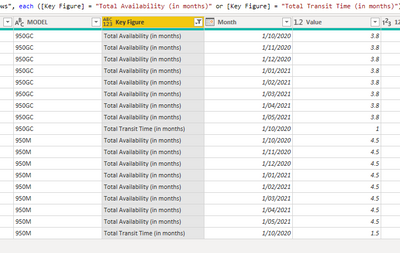
I have the following list in power query


MarioCadena_0-1602206745265.png


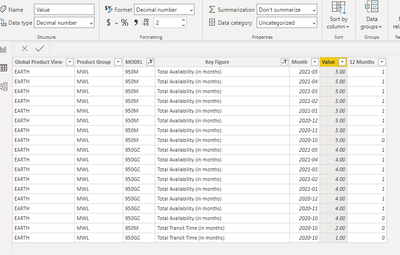
When it is exported to the desktop, it is rounded up automatically; even though, the format is decimal.

MarioCadena_1-1602206806834.png


Any ideas about why this is happening.


Regards,


1 ACCEPTED SOLUTION
amitchandak
Super User
Super User

@MarioCadena ,Open Data Transformation/Edit Query. Check The data Type there It should number/decimal not int.


Or Right click on the table and open Advance Editor. And Check for this column. This should Number/numeric. Not INT64. If it is int change it to number.


Please keep a backup file, before doing this.


To get the best of the time intelligence function. Make sure you have a date calendar and it has been marked as the date in model view. Also, join it with the date column of your fact/s. Refer :radacad sqlbi My Video Series Appreciate your Kudos.

Share with Power BI Enthusiasts: Full Power BI Video (20 Hours) YouTube
Microsoft Fabric Series 60+ Videos YouTube
Microsoft Fabric Hindi End to End YouTube

View solution in original post

3 REPLIES 3
negi007
Community Champion
Community Champion

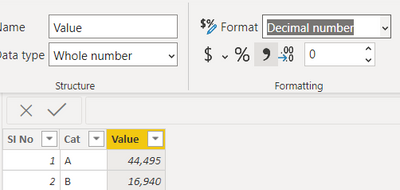
@MarioCadena Change the data type to decimal number in the power query window like below


negi007_0-1602207903295.png


You can refer to below links as well 

https://docs.microsoft.com/en-us/power-bi/connect-data/desktop-data-types#:~:text=Power%20BI%20Deskt....


Did I answer your question? Mark my post as a solution!
Appreciate your Kudos


Proud to be a Super User!


Follow me on linkedin

amitchandak
Super User
Super User

@MarioCadena ,Open Data Transformation/Edit Query. Check The data Type there It should number/decimal not int.


Or Right click on the table and open Advance Editor. And Check for this column. This should Number/numeric. Not INT64. If it is int change it to number.


Please keep a backup file, before doing this.


To get the best of the time intelligence function. Make sure you have a date calendar and it has been marked as the date in model view. Also, join it with the date column of your fact/s. Refer :radacad sqlbi My Video Series Appreciate your Kudos.

Share with Power BI Enthusiasts: Full Power BI Video (20 Hours) YouTube
Microsoft Fabric Series 60+ Videos YouTube
Microsoft Fabric Hindi End to End YouTube
Anonymous
Not applicable

@amitchandak @MarioCadena 


Hi all, I have the same problem with round off the values, however this numbers coming from a measure, column it is in number format as you explain  above. What i am doing wrong?


Thank you in advance

Helpful resources

Announcements
FabCon Atlanta 2026 carousel

FabCon Atlanta 2026

Join us at FabCon Atlanta, March 16-20, for the ultimate Fabric, Power BI, AI and SQL community-led event. Save $200 with code FABCOMM.