This time we’re going bigger than ever. Fabric, Power BI, SQL, AI and more. We're covering it all. You won't want to miss it.
Learn moreDid you hear? There's a new SQL AI Developer certification (DP-800). Start preparing now and be one of the first to get certified. Register now
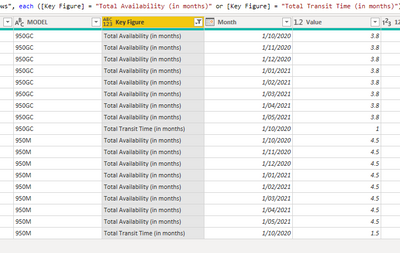
I have the following list in power query
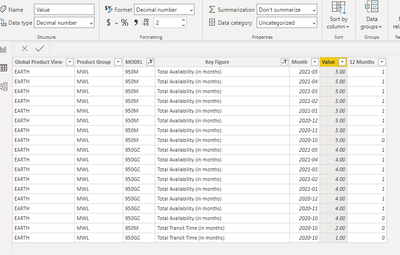
When it is exported to the desktop, it is rounded up automatically; even though, the format is decimal.
Any ideas about why this is happening.
Regards,
Solved! Go to Solution.
@MarioCadena ,Open Data Transformation/Edit Query. Check The data Type there It should number/decimal not int.
Or Right click on the table and open Advance Editor. And Check for this column. This should Number/numeric. Not INT64. If it is int change it to number.
Please keep a backup file, before doing this.
To get the best of the time intelligence function. Make sure you have a date calendar and it has been marked as the date in model view. Also, join it with the date column of your fact/s. Refer :radacad sqlbi My Video Series Appreciate your Kudos.
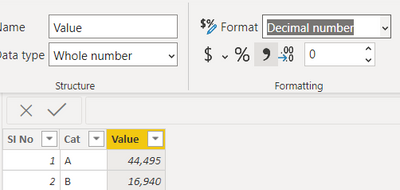
@MarioCadena Change the data type to decimal number in the power query window like below
You can refer to below links as well
Proud to be a Super User!
@MarioCadena ,Open Data Transformation/Edit Query. Check The data Type there It should number/decimal not int.
Or Right click on the table and open Advance Editor. And Check for this column. This should Number/numeric. Not INT64. If it is int change it to number.
Please keep a backup file, before doing this.
To get the best of the time intelligence function. Make sure you have a date calendar and it has been marked as the date in model view. Also, join it with the date column of your fact/s. Refer :radacad sqlbi My Video Series Appreciate your Kudos.
Hi all, I have the same problem with round off the values, however this numbers coming from a measure, column it is in number format as you explain above. What i am doing wrong?
Thank you in advance
Check out the April 2026 Power BI update to learn about new features.
Sign up to receive a private message when registration opens and key events begin.
If you have recently started exploring Fabric, we'd love to hear how it's going. Your feedback can help with product improvements.
| User | Count |
|---|---|
| 34 | |
| 31 | |
| 30 | |
| 21 | |
| 16 |
| User | Count |
|---|---|
| 65 | |
| 53 | |
| 31 | |
| 23 | |
| 23 |