Don't miss your chance to take the Fabric Data Engineer (DP-600) exam for FREE! Find out how by watching the DP-600 session on-demand now through April 28th.
Learn moreJoin the FabCon + SQLCon recap series. Up next: Power BI, Real-Time Intelligence, IQ and AI, and Data Factory take center stage. All sessions are available on-demand after the live show. Register now
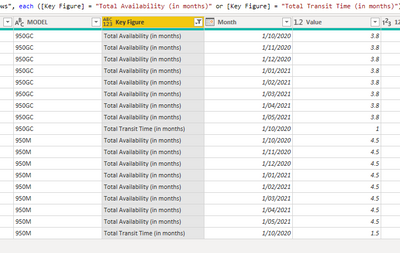
I have the following list in power query
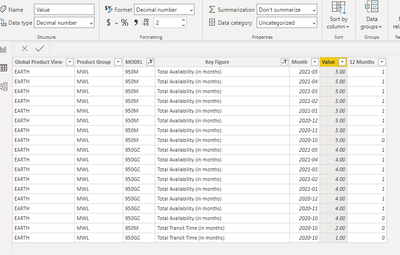
When it is exported to the desktop, it is rounded up automatically; even though, the format is decimal.
Any ideas about why this is happening.
Regards,
Solved! Go to Solution.
@MarioCadena ,Open Data Transformation/Edit Query. Check The data Type there It should number/decimal not int.
Or Right click on the table and open Advance Editor. And Check for this column. This should Number/numeric. Not INT64. If it is int change it to number.
Please keep a backup file, before doing this.
To get the best of the time intelligence function. Make sure you have a date calendar and it has been marked as the date in model view. Also, join it with the date column of your fact/s. Refer :radacad sqlbi My Video Series Appreciate your Kudos.
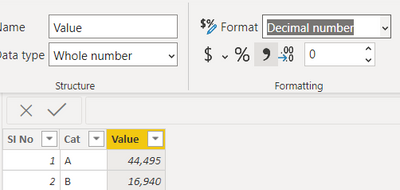
@MarioCadena Change the data type to decimal number in the power query window like below
You can refer to below links as well
Proud to be a Super User!
@MarioCadena ,Open Data Transformation/Edit Query. Check The data Type there It should number/decimal not int.
Or Right click on the table and open Advance Editor. And Check for this column. This should Number/numeric. Not INT64. If it is int change it to number.
Please keep a backup file, before doing this.
To get the best of the time intelligence function. Make sure you have a date calendar and it has been marked as the date in model view. Also, join it with the date column of your fact/s. Refer :radacad sqlbi My Video Series Appreciate your Kudos.
Hi all, I have the same problem with round off the values, however this numbers coming from a measure, column it is in number format as you explain above. What i am doing wrong?
Thank you in advance
Check out the April 2026 Power BI update to learn about new features.
If you have recently started exploring Fabric, we'd love to hear how it's going. Your feedback can help with product improvements.
A new Power BI DataViz World Championship is coming this June! Don't miss out on submitting your entry.
| User | Count |
|---|---|
| 41 | |
| 37 | |
| 34 | |
| 21 | |
| 16 |
| User | Count |
|---|---|
| 65 | |
| 62 | |
| 31 | |
| 26 | |
| 25 |