cancel
Showing results for 
Search instead for 
Did you mean: 

The Power BI Data Visualization World Championships is back! It's time to submit your entry. Live now!

Reply
MarioCadena
Helper II
Helper II

Rounding Off Automatically

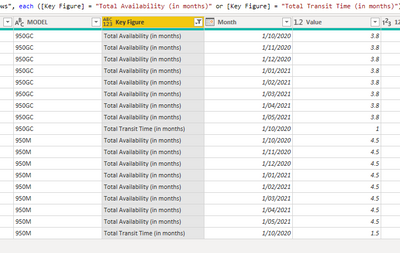
I have the following list in power query


MarioCadena_0-1602206745265.png


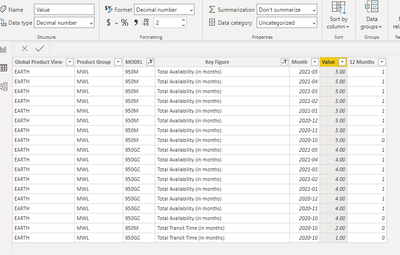
When it is exported to the desktop, it is rounded up automatically; even though, the format is decimal.

MarioCadena_1-1602206806834.png


Any ideas about why this is happening.


Regards,


1 ACCEPTED SOLUTION
amitchandak
Super User
Super User

@MarioCadena ,Open Data Transformation/Edit Query. Check The data Type there It should number/decimal not int.


Or Right click on the table and open Advance Editor. And Check for this column. This should Number/numeric. Not INT64. If it is int change it to number.


Please keep a backup file, before doing this.


To get the best of the time intelligence function. Make sure you have a date calendar and it has been marked as the date in model view. Also, join it with the date column of your fact/s. Refer :radacad sqlbi My Video Series Appreciate your Kudos.

Share with Power BI Enthusiasts: Full Power BI Video (20 Hours) YouTube
Microsoft Fabric Series 60+ Videos YouTube
Microsoft Fabric Hindi End to End YouTube

View solution in original post

3 REPLIES 3
negi007
Community Champion
Community Champion

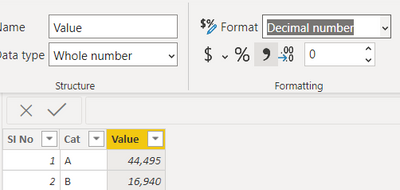
@MarioCadena Change the data type to decimal number in the power query window like below


negi007_0-1602207903295.png


You can refer to below links as well 

https://docs.microsoft.com/en-us/power-bi/connect-data/desktop-data-types#:~:text=Power%20BI%20Deskt....


Did I answer your question? Mark my post as a solution!
Appreciate your Kudos


Proud to be a Super User!


Follow me on linkedin

amitchandak
Super User
Super User

@MarioCadena ,Open Data Transformation/Edit Query. Check The data Type there It should number/decimal not int.


Or Right click on the table and open Advance Editor. And Check for this column. This should Number/numeric. Not INT64. If it is int change it to number.


Please keep a backup file, before doing this.


To get the best of the time intelligence function. Make sure you have a date calendar and it has been marked as the date in model view. Also, join it with the date column of your fact/s. Refer :radacad sqlbi My Video Series Appreciate your Kudos.

Share with Power BI Enthusiasts: Full Power BI Video (20 Hours) YouTube
Microsoft Fabric Series 60+ Videos YouTube
Microsoft Fabric Hindi End to End YouTube
Anonymous
Not applicable

@amitchandak @MarioCadena 


Hi all, I have the same problem with round off the values, however this numbers coming from a measure, column it is in number format as you explain  above. What i am doing wrong?


Thank you in advance

Helpful resources

Announcements
Power BI DataViz World Championships

Power BI Dataviz World Championships

The Power BI Data Visualization World Championships is back! It's time to submit your entry.

January Power BI Update Carousel

Power BI Monthly Update - January 2026

Check out the January 2026 Power BI update to learn about new features.

FabCon Atlanta 2026 carousel

FabCon Atlanta 2026

Join us at FabCon Atlanta, March 16-20, for the ultimate Fabric, Power BI, AI and SQL community-led event. Save $200 with code FABCOMM.