Join us at FabCon Atlanta from March 16 - 20, 2026, for the ultimate Fabric, Power BI, AI and SQL community-led event. Save $200 with code FABCOMM.
Register now!Learn from the best! Meet the four finalists headed to the FINALS of the Power BI Dataviz World Championships! Register now
Hi,
I have a table with sales and I want to be able to plot the rolloing average in a chart. I now have a DAX measure for average last 3 years but only as a number seen from today and I can't use that for a chart with time on the x-axis.
What I use for non dynamic average:
Average last 3 years =
AVERAGEX(
FILTER(
'table1',
'table1'[id] > MAX('table1'[id]) -6 &&
'table1'[id] <= MAX('table1'[id])
), 'table1'[sales]
)
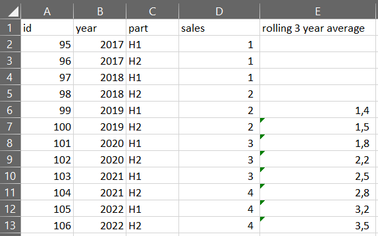
My table (table1):
What I need so that I can plot in chart:
Thanks in advance!
Br
Johannes
Solved! Go to Solution.
Hi @JohannesM ,
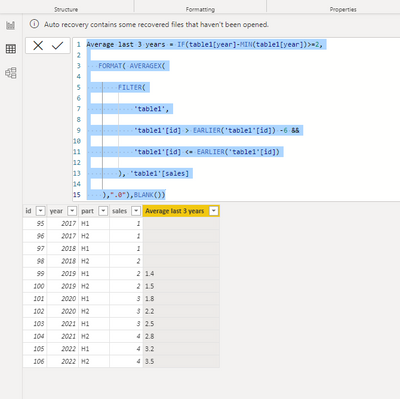
Pls use the below dax to create a new column:
Average last 3 years = IF(table1[year]-MIN(table1[year])>=2,
FORMAT( AVERAGEX(
FILTER(
'table1',
'table1'[id] > EARLIER('table1'[id]) -6 &&
'table1'[id] <= EARLIER('table1'[id])
), 'table1'[sales]
),".0"),BLANK())
Output result:
Best Regards
Lucien
Hi @JohannesM ,
Pls use the below dax to create a new column:
Average last 3 years = IF(table1[year]-MIN(table1[year])>=2,
FORMAT( AVERAGEX(
FILTER(
'table1',
'table1'[id] > EARLIER('table1'[id]) -6 &&
'table1'[id] <= EARLIER('table1'[id])
), 'table1'[sales]
),".0"),BLANK())
Output result:
Best Regards
Lucien
Thanks a lot! That did it.
Br
Johannes
Share feedback directly with Fabric product managers, participate in targeted research studies and influence the Fabric roadmap.
Check out the February 2026 Power BI update to learn about new features.
| User | Count |
|---|---|
| 50 | |
| 49 | |
| 35 | |
| 15 | |
| 14 |
| User | Count |
|---|---|
| 91 | |
| 75 | |
| 41 | |
| 26 | |
| 25 |