This time we’re going bigger than ever. Fabric, Power BI, SQL, AI and more. We're covering it all. You won't want to miss it.
Learn moreLevel up your Power BI skills this month - build one visual each week and tell better stories with data! Get started
Hi All,
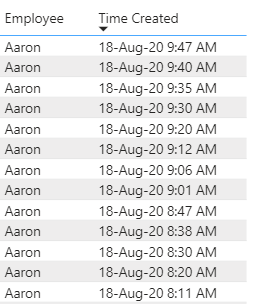
I am trying to show the time difference between 'Time Created' by Employee. I have found solutions that use a calculated column, but I am using a direct query to a SQL server and this seems to prevent me from being able to use calculated columns.
The new column will show 7 min, 5 min, 5 min, etc.
Any help would be appreciated!
Solved! Go to Solution.
@Anonymous , You will not be able to create a column as earlier is not supported.
Try a measure like this
diff =
maxx(summarize(Table, Table[Employee], Table[time created],"_1",
max(Table[time created]) -maxx(filter(allselected(Table), Table[employee] =max(Table[employee]) && Table[time created] <max(Table[time created])),Table[time created])
),[_1])
This should work with the employee and time created. See if this can work for you
Few supported column I covered in playlist - https://www.youtube.com/watch?v=My0bLn9voo4&list=PLPaNVDMhUXGbKatyDdOhGbTL3xW2Xy6pA
@Anonymous
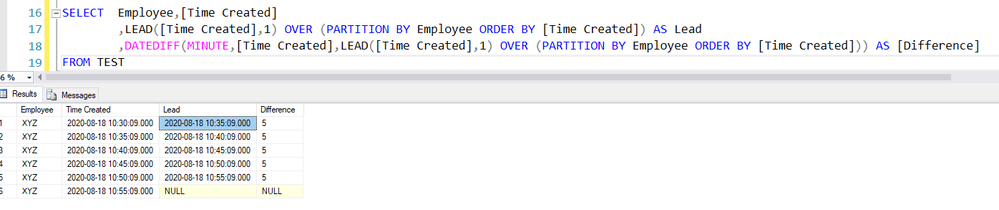
Alternate Solution in SQL using the Lead function and later Date Difference as follows
1. LEAD([Time Created],1) OVER (PARTITION BY Employee ORDER BY [Time Created]) AS Lead
2. DATEDIFF(MINUTE,[Time Created],LEAD([Time Created],1) OVER (PARTITION BY Employee ORDER BY [Time Created])) AS [Difference]
@Anonymous , You will not be able to create a column as earlier is not supported.
Try a measure like this
diff =
maxx(summarize(Table, Table[Employee], Table[time created],"_1",
max(Table[time created]) -maxx(filter(allselected(Table), Table[employee] =max(Table[employee]) && Table[time created] <max(Table[time created])),Table[time created])
),[_1])
This should work with the employee and time created. See if this can work for you
Few supported column I covered in playlist - https://www.youtube.com/watch?v=My0bLn9voo4&list=PLPaNVDMhUXGbKatyDdOhGbTL3xW2Xy6pA
Check out the April 2026 Power BI update to learn about new features.
Sign up to receive a private message when registration opens and key events begin.
If you have recently started exploring Fabric, we'd love to hear how it's going. Your feedback can help with product improvements.
| User | Count |
|---|---|
| 38 | |
| 29 | |
| 28 | |
| 20 | |
| 18 |
| User | Count |
|---|---|
| 66 | |
| 36 | |
| 30 | |
| 25 | |
| 24 |