Don't miss your chance to take the Fabric Data Engineer (DP-700) exam on us!
Learn moreWe've captured the moments from FabCon & SQLCon that everyone is talking about, and we are bringing them to the community, live and on-demand. Starts on April 14th. Register now
Hi,
I'm very beginner in using Power BI and I'm facing an issue which I cannot resolve on my side.
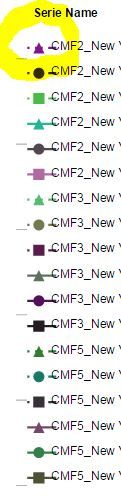
I have plotted a scatter plot where I'm displaying the legend. Relative to my data I have to use different line and marker types. So I choose to see in my legend window both line and marker. But when choosing this my legend data label is overlapped with Marker and line shape (as shwon into the attached picture). Beginning of each label is strike by the line. I'm using the little font size I can.
I found a lot of different parameters you can modify but not the size of legend. Is it possible?
Thanks and regards,
Nicolas
I want to make the legend label size to lower than 8 and also make its box smaller. However, it is not possible to do that.
Can we have more freedom in such adjustments? That will be great!
Hi @NicolasNXP,
Sure you can.
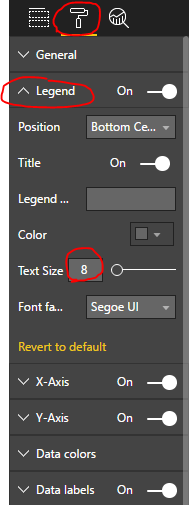
Select you visual and go to Visualization pane and under FORMAT (brush icon)
Regards
Abduvali
Hi,
Is someone already faced such issue and solved it?
Here picture of what I'm talking about:
Thanks,
Nicolas
I am having the same issue. Any updates?
Hi Abduvali,
I don't want to change text size but legend area size because line and marker representation is overwritting the legend label.
Thanks and regards,
Nicolas
If you have recently started exploring Fabric, we'd love to hear how it's going. Your feedback can help with product improvements.
A new Power BI DataViz World Championship is coming this June! Don't miss out on submitting your entry.
Share feedback directly with Fabric product managers, participate in targeted research studies and influence the Fabric roadmap.
| User | Count |
|---|---|
| 57 | |
| 37 | |
| 34 | |
| 19 | |
| 17 |
| User | Count |
|---|---|
| 74 | |
| 71 | |
| 37 | |
| 35 | |
| 25 |