cancel
Showing results for 
Search instead for 
Did you mean: 

Get Fabric Certified for FREE during Fabric Data Days. Don't miss your chance! Request now

Reply
MaxDKM
New Member

Reset slicer calendar to monday-sunday

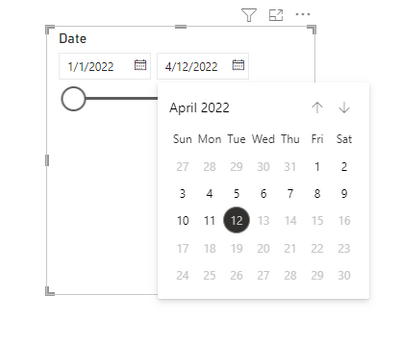
As of this week the calendar that is displayed for date slicers assumes weeks start on sundays. It's inconvenient when selecting dates that the calendar is ordered Su-Mo instead of Mo-Su. How can we reset the calendar so weeks start on monday again?


We've already checked the language setting of the browser, dataset and BI, which are all set to Dutch.

5 REPLIES 5
Anonymous
Not applicable

Hi @MaxDKM ,


If my post above helps you, please consider Accept it as the solution to help the other members find it more quickly.


Best Regards,
Eyelyn Qin

Anonymous
Not applicable

Hi @MaxDKM ,


To my knowledge, the calendar slicer set Sunday as the first day of week by default.Your requirement ——Change such settings could not be realized currently.

Eyelyn9_0-1649732118550.png

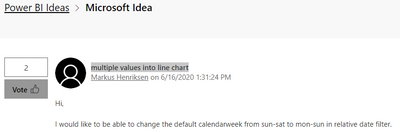
An idea similar with what you expect has been submitted in the following link: multiple values into line chart

Eyelyn9_1-1649732175659.png


Please vote it up and you can add comments.Hopes Power Bi will implement this in nearby future.


Best Regards,
Eyelyn Qin
If this post helps, then please consider Accept it as the solution to help the other members find it more quickly.

MaxDKM
New Member

Hi Hans,


Thanks for your reply. Unfortunately I do not feel confident in editing the data in this way, I would much prefer finding a solution by changing the settings.


Kind regards,


Max

amitchandak
Super User
Super User

@MaxDKM , Are taking of standard calendar in the slicer, I doubt there is the setting for that

Share with Power BI Enthusiasts: Full Power BI Video (20 Hours) YouTube
Microsoft Fabric Series 60+ Videos YouTube
Microsoft Fabric Hindi End to End YouTube
Anonymous
Not applicable

Hey MaxDKM,

Can you share a prinscreen of the date table you are using?

Maybe we can add an ID number to the days and then sort on this ID:

So Monday is 1, Tuesday is 2 etc.

Regards,
Hans

Helpful resources

Announcements
November Power BI Update Carousel

Power BI Monthly Update - November 2025

Check out the November 2025 Power BI update to learn about new features.

Fabric Data Days Carousel

Fabric Data Days

Advance your Data & AI career with 50 days of live learning, contests, hands-on challenges, study groups & certifications and more!

FabCon Atlanta 2026 carousel

FabCon Atlanta 2026

Join us at FabCon Atlanta, March 16-20, for the ultimate Fabric, Power BI, AI and SQL community-led event. Save $200 with code FABCOMM.

Top Solution Authors
Top Kudoed Authors