We've captured the moments from FabCon & SQLCon that everyone is talking about, and we are bringing them to the community, live and on-demand. Starts on April 14th. Register now
Hello,
I was hoping to get an answer to this problem both in DAX and M.
I am trying to replicate LAG T-SQL function below and return number of days since the last order
SELECT CustomerID , SalesOrderID , CAST(OrderDate as DATE) AS OrderDate , DATEDIFF(d,LAG(OrderDate) OVER (PARTITION BY CustomerID ORDER BY SalesOrderID), OrderDate) as DaysSinceLastOrder FROM Sales.SalesOrderHeader;
We are trying to get here is the number of days since the last order.
e.g. 7/22/2005 to 7/22/2007 is 730 days and
7/22/2007 to 11/4/2007 is 105 days
| CustomerID | SalesOrderID | OrderDate | DaysSinceLastOrder |
| 11000 | 43793 | 7/22/2005 | NULL |
| 11000 | 51522 | 7/22/2007 | 730 |
| 11000 | 57418 | 11/4/2007 | 105 |
| 11001 | 43767 | 7/18/2005 | NULL |
| 11001 | 51493 | 7/20/2007 | 732 |
| 11001 | 72773 | 6/12/2008 | 328 |
| 11002 | 43736 | 7/10/2005 | NULL |
| 11002 | 51238 | 7/4/2007 | 724 |
| 11002 | 53237 | 8/27/2007 | 54 |
| 11003 | 43701 | 7/1/2005 | NULL |
| 11003 | 51315 | 7/9/2007 | 738 |
| 11003 | 57783 | 11/11/2007 | 125 |
| 11004 | 43810 | 7/26/2005 | NULL |
| 11004 | 51595 | 7/26/2007 | 730 |
| 11004 | 57293 | 11/2/2007 | 99 |
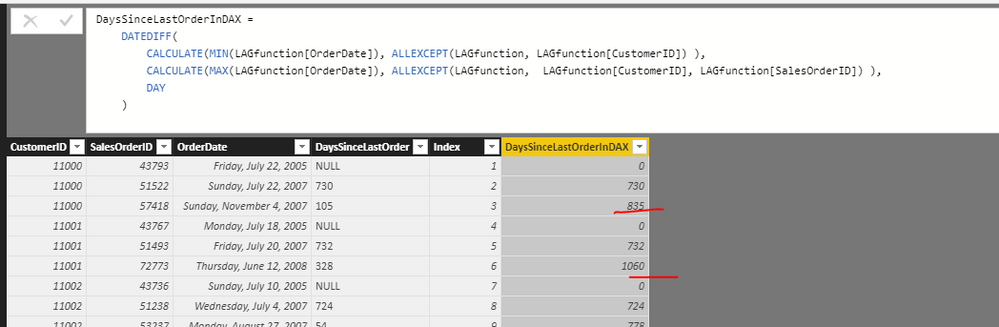
I started putting together a DAX code but it returns total number of days which for the exaple above for the 3 row instead of 105 return 835 (730+105).
= DATEDIFF(
CALCULATE(MIN(LAGfunction[OrderDate]), ALLEXCEPT(LAGfunction, LAGfunction[CustomerID]) ),
CALCULATE(MAX(LAGfunction[OrderDate]), ALLEXCEPT(LAGfunction, LAGfunction[CustomerID], LAGfunction[SalesOrderID]) ),
DAY
)
Thank you
Solved! Go to Solution.
hi, @Anonymous
After my research, you can do these follow my steps as below:
Step1:
use rankx function to add a group rank column
group rank = RANKX(FILTER(LAGfunction,LAGfunction[CustomerID]=EARLIER(LAGfunction[CustomerID])),LAGfunction[SalesOrderID],,ASC)
Step2:
use eralier function to add the result column
Column = DATEDIFF(CALCULATE(MAX(LAGfunction[OrderDate]),FILTER(LAGfunction,LAGfunction[CustomerID]=EARLIER(LAGfunction[CustomerID])&&LAGfunction[group rank]=EARLIER(LAGfunction[group rank])-1)),LAGfunction[OrderDate],DAY)
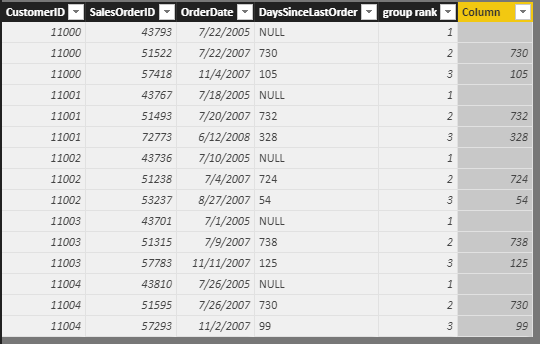
Result:
here is pbix, please try it.
https://www.dropbox.com/s/8ivwqgzxqmk7byg/Replicate%20LAG%20T-SQL%20function%20logic.pbix?dl=0
Best Regards,
Lin
Hi,
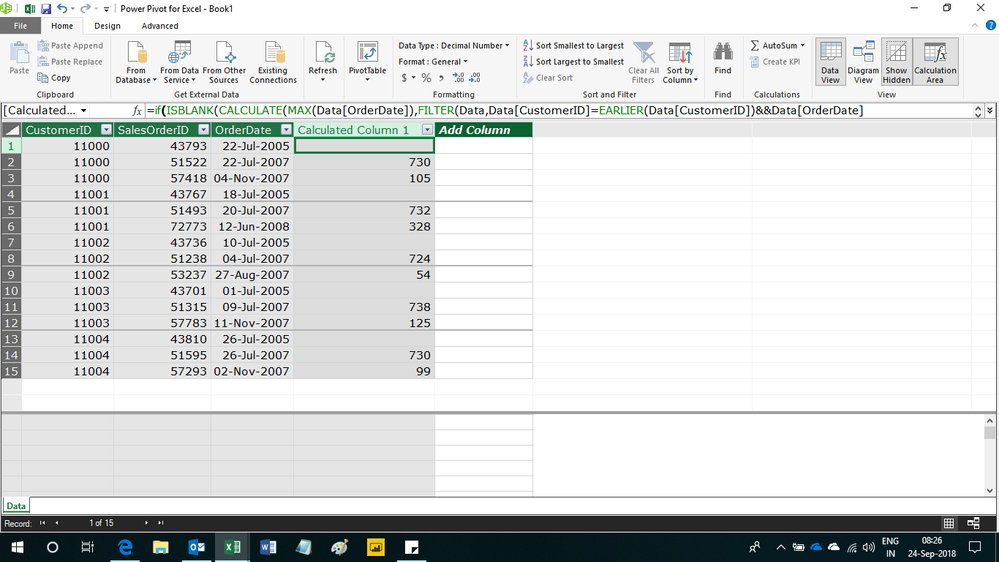
Try this calculated column formula
=if(ISBLANK(CALCULATE(MAX(Data[OrderDate]),FILTER(Data,Data[CustomerID]=EARLIER(Data[CustomerID])&&Data[OrderDate]<EARLIER(Data[OrderDate])))),BLANK(),[OrderDate]-CALCULATE(MAX(Data[OrderDate]),FILTER(Data,Data[CustomerID]=EARLIER(Data[CustomerID])&&Data[OrderDate]<EARLIER(Data[OrderDate]))))
Hope this helps.
Hi,
Try this calculated column formula
=if(ISBLANK(CALCULATE(MAX(Data[OrderDate]),FILTER(Data,Data[CustomerID]=EARLIER(Data[CustomerID])&&Data[OrderDate]<EARLIER(Data[OrderDate])))),BLANK(),[OrderDate]-CALCULATE(MAX(Data[OrderDate]),FILTER(Data,Data[CustomerID]=EARLIER(Data[CustomerID])&&Data[OrderDate]<EARLIER(Data[OrderDate]))))
Hope this helps.
hi, @Anonymous
After my research, you can do these follow my steps as below:
Step1:
use rankx function to add a group rank column
group rank = RANKX(FILTER(LAGfunction,LAGfunction[CustomerID]=EARLIER(LAGfunction[CustomerID])),LAGfunction[SalesOrderID],,ASC)
Step2:
use eralier function to add the result column
Column = DATEDIFF(CALCULATE(MAX(LAGfunction[OrderDate]),FILTER(LAGfunction,LAGfunction[CustomerID]=EARLIER(LAGfunction[CustomerID])&&LAGfunction[group rank]=EARLIER(LAGfunction[group rank])-1)),LAGfunction[OrderDate],DAY)
Result:
here is pbix, please try it.
https://www.dropbox.com/s/8ivwqgzxqmk7byg/Replicate%20LAG%20T-SQL%20function%20logic.pbix?dl=0
Best Regards,
Lin
If you have recently started exploring Fabric, we'd love to hear how it's going. Your feedback can help with product improvements.
A new Power BI DataViz World Championship is coming this June! Don't miss out on submitting your entry.
Share feedback directly with Fabric product managers, participate in targeted research studies and influence the Fabric roadmap.
| User | Count |
|---|---|
| 53 | |
| 38 | |
| 33 | |
| 15 | |
| 15 |
| User | Count |
|---|---|
| 64 | |
| 63 | |
| 37 | |
| 36 | |
| 22 |