cancel
Showing results for 
Search instead for 
Did you mean: 

Data Days is here! Join us now for 60+ days of learning, challenges, and connection. Learn more

Reply
Skemaz
Advocate II
Advocate II

Repeating Conditional Index

Hi

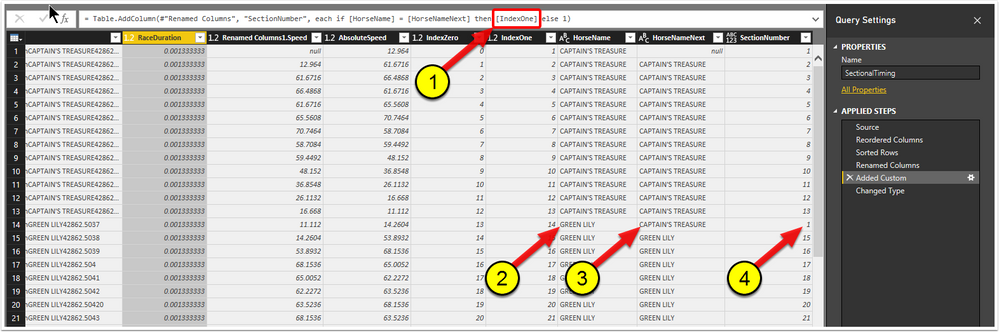
I have the following (incomplete) DAX code shown in (1) in the screen-shot below).


= Table.AddColumn(#"Renamed Columns", "SectionNumber", each if [HorseName] = [HorseNameNext] then [IndexOne] else 1)


What I want to happen is that each time (2 in the screen-shot below) and (3 in the screen-shot below) differ, for the index shown in (4 in the screen-shot below) to be reset to 1 and then incremented by 1 in each row thereafter until the next miss-match between (2) and (3).

Any assitance will be greatly appreciated.

Thanks, Mark.

Picture1.png


1 ACCEPTED SOLUTION
MarcelBeug
Community Champion
Community Champion

First: your screen shot is clearly from the query editor, so it's not DAX, but Power Query (a.k.a. M).


You can simply group by horsename, with operation "All Rows", next adjust the generated code to have an index added to each table for each group, and then expand the nested tables (excluding column "Horsename").


Generated/adjusted code as follows (I used just 1 column for "OtherColumns", next to HorseName):


let
    Source = Table1,
    #"Grouped Rows" = Table.Group(Source, {"HorseName"}, {{"AllData", each Table.AddIndexColumn(_,"SectionNumber",1,1), type table}}),
    #"Expanded AllData" = Table.ExpandTableColumn(#"Grouped Rows", "AllData", {"OtherColumns", "SectionNumber"}, {"OtherColumns", "SectionNumber"})
in
    #"Expanded AllData"


Specializing in Power Query Formula Language (M)

View solution in original post

3 REPLIES 3
MarcelBeug
Community Champion
Community Champion

First: your screen shot is clearly from the query editor, so it's not DAX, but Power Query (a.k.a. M).


You can simply group by horsename, with operation "All Rows", next adjust the generated code to have an index added to each table for each group, and then expand the nested tables (excluding column "Horsename").


Generated/adjusted code as follows (I used just 1 column for "OtherColumns", next to HorseName):


let
    Source = Table1,
    #"Grouped Rows" = Table.Group(Source, {"HorseName"}, {{"AllData", each Table.AddIndexColumn(_,"SectionNumber",1,1), type table}}),
    #"Expanded AllData" = Table.ExpandTableColumn(#"Grouped Rows", "AllData", {"OtherColumns", "SectionNumber"}, {"OtherColumns", "SectionNumber"})
in
    #"Expanded AllData"


Specializing in Power Query Formula Language (M)

Thanks,  This helped me when I was trying to manipulate a dataset.  

To add a little more for anyone else that might come across this,  you have to manually edit the M code either in Advanced Editor, or the 'formula bar'. You can't "just" use the buttons at the top of Power BI


You'll need to manually type in the new Index column you generated.  When you try to "expand" the column via the tool bar it will not give you access to the new Index column you created.


Thanks Marcel

Hi Marcel

Thank you very much for your solution.

I'm finally starting to get my head around how to transform data.

Your solution was a great learning experience.

Thanks and best regards, Mark.

Helpful resources

Announcements
Fabric Data Days is here Carousel

Fabric Data Days 2026

Don't miss out on Data Days, June 15 through August 7. Learn Fabric, Power BI, SQL, AI and more.

May Power BI Update Carousel

Power BI Monthly Update - May 2026

Check out the May 2026 Power BI update to learn about new features.

Power BI DataViz World Championships carousel

Power BI DataViz World Championships - June 2026

A new Power BI DataViz World Championship is coming this June! Don't miss out on submitting your entry.