cancel
Showing results for 
Search instead for 
Did you mean: 

We've captured the moments from FabCon & SQLCon that everyone is talking about, and we are bringing them to the community, live and on-demand. Starts on April 14th. Register now

Reply
adriano321souza
Frequent Visitor

Reorder rows

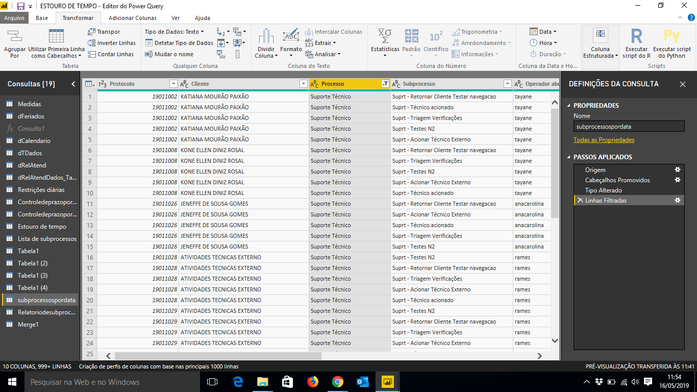
Good Morning, I have a database where the protocol number is repeated in multiple lines according to the subprocesses of the service, so I would like each protocol to appear in only one line and its processes be shown in different columns. How can I do thisCaptura de tela 2019-05-16 11.54.56.png


1 ACCEPTED SOLUTION

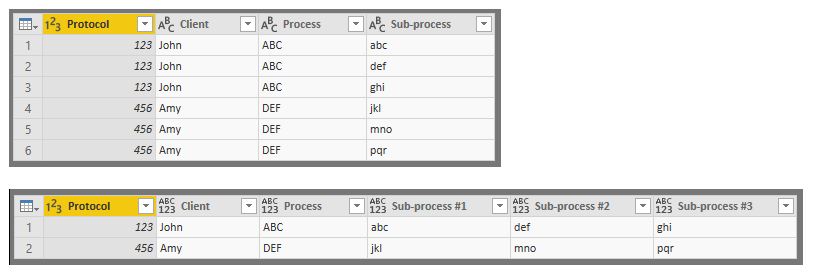
Try this:


let
    Source = Excel.Workbook(File.Contents("C:\Users\rlosurdo\Desktop\SampleData_Process.xlsx"), null, true),
    Process_Sheet = Source{[Item="Process",Kind="Sheet"]}[Data],
    #"Promoted Headers" = Table.PromoteHeaders(Process_Sheet, [PromoteAllScalars=true]),
    #"Changed Type" = Table.TransformColumnTypes(#"Promoted Headers",{{"Protocol", Int64.Type}, {"Client", type text}, {"Process", type text}, {"Sub-process", type text}}),
    #"Grouped Rows" = Table.Group(#"Changed Type", {"Protocol"}, {{"All", each Table.AddIndexColumn(_, "Sub-processQty",1,1)}}, GroupKind.Local),
    #"Expanded All" = Table.ExpandTableColumn(#"Grouped Rows", "All", {"Client", "Process", "Sub-process", "Sub-processQty"}, {"Client", "Process", "Sub-process", "Sub-processQty"}),
    #"Added Custom" = Table.AddColumn(#"Expanded All", "ColumnHeaders", each "Sub-process #" & Number.ToText([#"Sub-processQty"])),
    #"Removed Columns" = Table.RemoveColumns(#"Added Custom",{"Sub-processQty"}),
    #"Pivoted Column" = Table.Pivot(#"Removed Columns", List.Distinct(#"Removed Columns"[ColumnHeaders]), "ColumnHeaders", "Sub-process")
in
    #"Pivoted Column"

Process2.PNG

View solution in original post

4 REPLIES 4
BekahLoSurdo
Resolver IV
Resolver IV

Hi @adriano321souza,

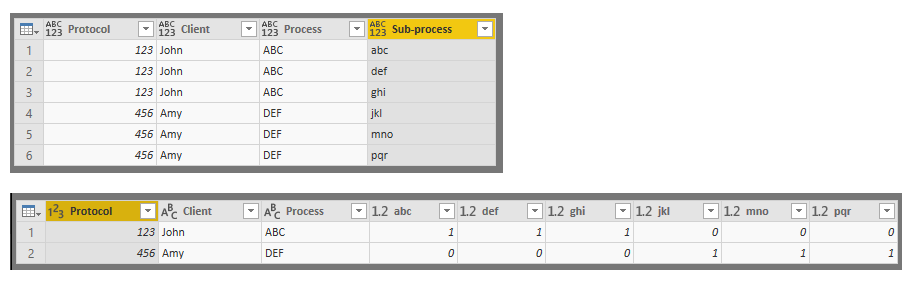
Can you confirm that what you're looking for is to have a column header for each possible sub-process? If that is the case, the intersections between each row (protocol number) and each sub-process column would show a binary TRUE-FALSE value depending on whether that protocol had that sub-process: 


Process.PNG

Let me know if that's what you'd like or if you're looking for something else. 

Hello,


@BekahLoSurdo wrote:

Hi @adriano321souza,

Can you confirm that what you're looking for is to have a column header for each possible sub-process? If that is the case, the intersections between each row (protocol number) and each sub-process column would show a binary TRUE-FALSE value depending on whether that protocol had that sub-process: 


Process.PNG

Let me know if that's what you'd like or if you're looking for something else. 


the subprocesses should appear in the same line as the protocol and the client.

Try this:


let
    Source = Excel.Workbook(File.Contents("C:\Users\rlosurdo\Desktop\SampleData_Process.xlsx"), null, true),
    Process_Sheet = Source{[Item="Process",Kind="Sheet"]}[Data],
    #"Promoted Headers" = Table.PromoteHeaders(Process_Sheet, [PromoteAllScalars=true]),
    #"Changed Type" = Table.TransformColumnTypes(#"Promoted Headers",{{"Protocol", Int64.Type}, {"Client", type text}, {"Process", type text}, {"Sub-process", type text}}),
    #"Grouped Rows" = Table.Group(#"Changed Type", {"Protocol"}, {{"All", each Table.AddIndexColumn(_, "Sub-processQty",1,1)}}, GroupKind.Local),
    #"Expanded All" = Table.ExpandTableColumn(#"Grouped Rows", "All", {"Client", "Process", "Sub-process", "Sub-processQty"}, {"Client", "Process", "Sub-process", "Sub-processQty"}),
    #"Added Custom" = Table.AddColumn(#"Expanded All", "ColumnHeaders", each "Sub-process #" & Number.ToText([#"Sub-processQty"])),
    #"Removed Columns" = Table.RemoveColumns(#"Added Custom",{"Sub-processQty"}),
    #"Pivoted Column" = Table.Pivot(#"Removed Columns", List.Distinct(#"Removed Columns"[ColumnHeaders]), "ColumnHeaders", "Sub-process")
in
    #"Pivoted Column"

Process2.PNG

Hi @adriano321souza,


Was that what you were looking for or did you need something else?

Helpful resources

Announcements
New to Fabric survey Carousel

New to Fabric Survey

If you have recently started exploring Fabric, we'd love to hear how it's going. Your feedback can help with product improvements.

Power BI DataViz World Championships carousel

Power BI DataViz World Championships - June 2026

A new Power BI DataViz World Championship is coming this June! Don't miss out on submitting your entry.

Join our Fabric User Panel

Join our Fabric User Panel

Share feedback directly with Fabric product managers, participate in targeted research studies and influence the Fabric roadmap.

March Power BI Update Carousel

Power BI Community Update - March 2026

Check out the March 2026 Power BI update to learn about new features.