Learn from the best! Meet the four finalists headed to the FINALS of the Power BI Dataviz World Championships! Register now
Dear Community,
Hope this message finds you well and healthy!
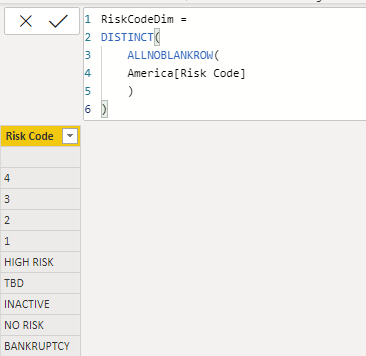
I would like to have a dimension table based on 1 column in my fact table as shown below:
The deal is i know there are empty cells in that column, but i don't need them.
My DAX formula seems to not work as well.
Can you help me please to get rid of the empty values in this calculated table?
All due respect,
Atanas
Solved! Go to Solution.
@Anonymous
Please try any of the options below:
Option 1:
FILTER( SUMMARIZE('America', 'America'[Risk Code]), 'America'[Risk Code]<>BLANK() )
Option 2:
FILTER( DISTINCT('America'[Risk Code]), 'America'[Risk Code]<>BLANK() )
Option 3:
CALCULATETABLE( DISTINCT('America'[Risk Code]), 'America'[Risk Code]<>BLANK() )
Option 4:
Filter (SUMMARIZE ( America, America[Risk Code] ) , NOT ( ISBLANK ( [Risk Code] ) ) )
@Anonymous
Please try any of the options below:
Option 1:
FILTER( SUMMARIZE('America', 'America'[Risk Code]), 'America'[Risk Code]<>BLANK() )
Option 2:
FILTER( DISTINCT('America'[Risk Code]), 'America'[Risk Code]<>BLANK() )
Option 3:
CALCULATETABLE( DISTINCT('America'[Risk Code]), 'America'[Risk Code]<>BLANK() )
Option 4:
Filter (SUMMARIZE ( America, America[Risk Code] ) , NOT ( ISBLANK ( [Risk Code] ) ) )
Thank you! All of them worked!
I chose that one as i don't want to use iterators:
Copying DAX from this post? Click here for a hack to quickly replace it with your own table names
Has this post solved your problem? Please Accept as Solution so that others can find it quickly and to let the community know your problem has been solved.
If you found this post helpful, please give Kudos C
I work as a Microsoft trainer and consultant, specialising in Power BI and Power Query.
www.excelwithallison.com
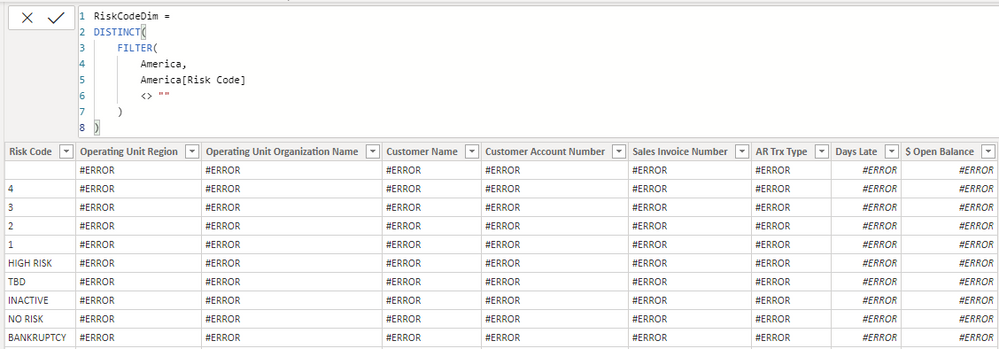
Thank you very much for your swift reply, but when i added it i get the following table, which is kinda different:
Also, i agree the dimension tables must be created in Power Query, but i really like to try and do it with DAX for the sake of this task,
Atanas
A new Power BI DataViz World Championship is coming this June! Don't miss out on submitting your entry.
Share feedback directly with Fabric product managers, participate in targeted research studies and influence the Fabric roadmap.
| User | Count |
|---|---|
| 47 | |
| 35 | |
| 27 | |
| 15 | |
| 15 |
| User | Count |
|---|---|
| 58 | |
| 56 | |
| 38 | |
| 21 | |
| 21 |