cancel
Showing results for 
Search instead for 
Did you mean: 

The Power BI Data Visualization World Championships is back! Get ahead of the game and start preparing now! Learn more

Reply
rosscortb
Post Patron
Post Patron

Remove zero values from graphs

Hello


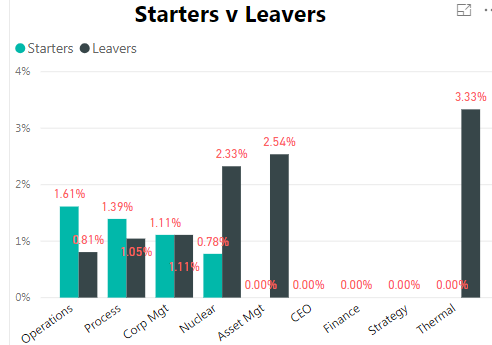
I am trying for 0.00% values not to be shown in the graph.

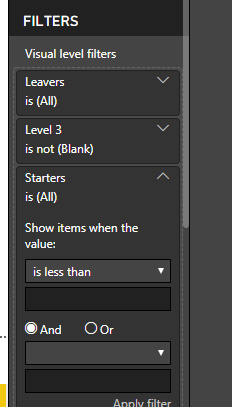
In the visalisation filters I have put Starters - show items greater than zero and same for Leavers.

However, that only works if each department has starters and leavers with a value greater than zero. So for Asset Mgt it wouldn't show anything even though leavers is 2.54%.


Is there any way round this?

ss45.PNGssam.PNG

1 ACCEPTED SOLUTION
Stachu
Community Champion
Community Champion

if you remove +0 at the end the values will not be shown
I'd use DIVIDE to have division by 0 not showing with error

Starters Rate Level 3 = 
CALCULATE(
    DIVIDE(
        COUNTROWS(Starters),
        [Headcount Minus Weekly Level 3], -- I assume this is a measure
        BLANK() -- value for DIV/0 error
    )
)

is there some specific reason why you added 0 at the end of the formula?


Did I answer your question? Mark my post as a solution!
Thank you for the kudos 🙂

View solution in original post

5 REPLIES 5
Stachu
Community Champion
Community Champion

what's the syntax for your % measure?
normally if you use DIVIDE blanks should not be shown

otherwise you can create a separate masure that would be just used for the filter 


Did I answer your question? Mark my post as a solution!
Thank you for the kudos 🙂

Hi 


Thanks for replying


I am using this measure - 

Starters Rate Level 3 = CALCULATE(Countrows(Starters)/'DB Headcount'[Headcount Minus Weekly Level 3])+0
 
Ross
Stachu
Community Champion
Community Champion

if you remove +0 at the end the values will not be shown
I'd use DIVIDE to have division by 0 not showing with error

Starters Rate Level 3 = 
CALCULATE(
    DIVIDE(
        COUNTROWS(Starters),
        [Headcount Minus Weekly Level 3], -- I assume this is a measure
        BLANK() -- value for DIV/0 error
    )
)

is there some specific reason why you added 0 at the end of the formula?


Did I answer your question? Mark my post as a solution!
Thank you for the kudos 🙂

Ok that works. Thanks very much for your help

Just because I read on a forum that if you didn't want blank to show then add a zero at the end. At this point is was trying to find a a solution for that when using a Card.

Helpful resources

Announcements
Power BI DataViz World Championships

Power BI Dataviz World Championships

The Power BI Data Visualization World Championships is back! Get ahead of the game and start preparing now!

December 2025 Power BI Update Carousel

Power BI Monthly Update - December 2025

Check out the December 2025 Power BI Holiday Recap!

FabCon Atlanta 2026 carousel

FabCon Atlanta 2026

Join us at FabCon Atlanta, March 16-20, for the ultimate Fabric, Power BI, AI and SQL community-led event. Save $200 with code FABCOMM.