Don't miss your chance to take exam DP-600 or DP-700 on us!
Request nowLearn from the best! Meet the four finalists headed to the FINALS of the Power BI Dataviz World Championships! Register now
Hi all,
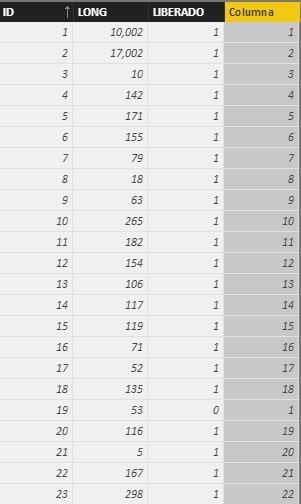
I wonder if any of you could help me with this. I've got the following table:
The last column was supposed to be a count of "LONG" column, but i need it to be "reseted" to zero everytime the "LIBERADO" Value changes.
I've used the following DAX function:
Columna = COUNTX ( FILTER ( ALL (Lineal); Lineal[ID] <= EARLIER(Lineal[ID]) && Lineal[LIBERADO] = EARLIER(Lineal[LIBERADO])); Lineal[LONG])
A you may find, the count is working till row 18 .
Row 19 comes to 1 because "LIBERADO" value changes from 1 to 0. Perfect.
Row 20 should also be 1 because "LIBERADO" Value changes from 0 to 1, but it doesn't. Instead, it continues with the count of eache value of "LIBERADO".
Is there any way of doing this?
Thanks
Solved! Go to Solution.
Hi @jmartinezp,
It seems that "ID" is unique and continuous. We could add an index if it's not. So we can do this in two steps.
1. Add an ChangeIndex:
ChangeIndex =
VAR Previous =
CALCULATE (
VALUES ( 'Lineal'[Liberado] ),
FILTER ( ALL ( 'Lineal' ), 'Lineal'[ID] = EARLIER ( Lineal[ID] ) - 1 )
)
RETURN
IF ( ISBLANK ( Previous ) || Previous = 'Lineal'[Liberado], 0, 1 )2. Add a column for "Columna":
Columna =
VAR MaxID =
CALCULATE (
MAX ( 'Lineal'[ID] ),
FILTER (
'Lineal',
Lineal[ID] <= EARLIER ( Lineal[ID] )
&& 'Lineal'[ChangeIndex] = 1
)
)
RETURN
IF ( ISBLANK ( MaxID ), Lineal[ID], 'Lineal'[ID] - MaxID + 1 )@cs_skit, thank you for your "lookupvalue", which makes the formula simple and clear. I will use it next time.
Best Regards!
Dale
Hi @jmartinezp,
Could you please mark the proper answer if it's convenient for you? That will be a help to the others.
Best Regards!
Dale
Hi @jmartinezp,
It seems that "ID" is unique and continuous. We could add an index if it's not. So we can do this in two steps.
1. Add an ChangeIndex:
ChangeIndex =
VAR Previous =
CALCULATE (
VALUES ( 'Lineal'[Liberado] ),
FILTER ( ALL ( 'Lineal' ), 'Lineal'[ID] = EARLIER ( Lineal[ID] ) - 1 )
)
RETURN
IF ( ISBLANK ( Previous ) || Previous = 'Lineal'[Liberado], 0, 1 )2. Add a column for "Columna":
Columna =
VAR MaxID =
CALCULATE (
MAX ( 'Lineal'[ID] ),
FILTER (
'Lineal',
Lineal[ID] <= EARLIER ( Lineal[ID] )
&& 'Lineal'[ChangeIndex] = 1
)
)
RETURN
IF ( ISBLANK ( MaxID ), Lineal[ID], 'Lineal'[ID] - MaxID + 1 )@cs_skit, thank you for your "lookupvalue", which makes the formula simple and clear. I will use it next time.
Best Regards!
Dale
**bleep** I somehow thought I was able to do this but I am messing up the counter... maybe this helps:
I did it but I feel dirty because I wasn't able to do it in one slick beautiful expression but used 3 columns and such
should be possible way easier if you figure that out tell me please
here the columns I used
ChangeStatus = IF(lineal[LIBERADO]=LOOKUPVALUE(lineal[LIBERADO];lineal[ID];lineal[ID]-1);"";"changed")
ChangeIndex = COUNTX ( FILTER ( ALL (Lineal); Lineal[ID] <= EARLIER(Lineal[ID]) && lineal[ChangeStatus] <> ""); lineal[ID])
RowCounter = CALCULATE(COUNT([ID]); ALL(lineal[ID]); FILTER(lineal; lineal[ID]<=EARLIER(lineal[ID]));FILTER(lineal; lineal[ChangeIndex]=EARLIER(lineal[ChangeIndex])))
I have a similar problem. Unfortunately, the "ChangeStatus" column does not work. After LOOKUPVALUE it shows me the error message "Parameter is not the correct type" in the formula.
EDIT: Ok the problem is solved by using a comma instead of a semicolon.
ChangeStatus = IF(lineal[LIBERADO]=LOOKUPVALUE(lineal[LIBERADO],lineal[ID],lineal[ID]-1),"","changed")
This works fine, thank you!
Share feedback directly with Fabric product managers, participate in targeted research studies and influence the Fabric roadmap.
Check out the February 2026 Power BI update to learn about new features.
| User | Count |
|---|---|
| 51 | |
| 40 | |
| 37 | |
| 14 | |
| 14 |
| User | Count |
|---|---|
| 85 | |
| 69 | |
| 38 | |
| 29 | |
| 27 |