cancel
Showing results for 
Search instead for 
Did you mean: 

The Power BI Data Visualization World Championships is back! Get ahead of the game and start preparing now! Learn more

Reply
jmartinezp
Regular Visitor

Reinit count when value changes


Hi all,

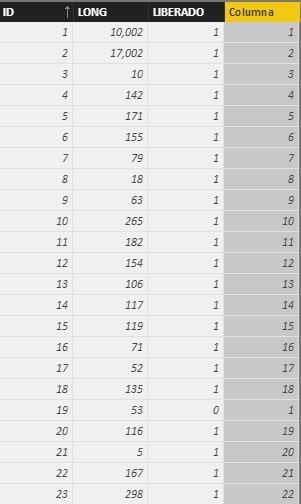
I wonder if any of you could help me with this. I've got the following table:


Captura.JPG


The last column was supposed to be a count of "LONG" column, but i need it to be "reseted" to zero everytime the "LIBERADO" Value changes.

I've used the following DAX function:
Columna = COUNTX ( FILTER ( ALL (Lineal); Lineal[ID] <= EARLIER(Lineal[ID])  && Lineal[LIBERADO] = EARLIER(Lineal[LIBERADO])); Lineal[LONG])


A you may find, the count is working till row 18 .

Row 19 comes to 1 because "LIBERADO" value changes from 1 to 0. Perfect.

Row 20 should also be 1 because "LIBERADO" Value changes from 0 to 1, but it doesn't. Instead, it continues with the count of eache value of "LIBERADO".


Is there any way of doing this?


Thanks


1 ACCEPTED SOLUTION
v-jiascu-msft
Microsoft Employee
Microsoft Employee

Hi @jmartinezp,


It seems that "ID" is unique and continuous. We could add an index if it's not. So we can do this in two steps.

1. Add an ChangeIndex:

ChangeIndex =
VAR Previous =
    CALCULATE (
        VALUES ( 'Lineal'[Liberado] ),
        FILTER ( ALL ( 'Lineal' ), 'Lineal'[ID] = EARLIER ( Lineal[ID] ) - 1 )
    )
RETURN
    IF ( ISBLANK ( Previous ) || Previous = 'Lineal'[Liberado], 0, 1 )

2. Add a column for "Columna":

Columna =
VAR MaxID =
    CALCULATE (
        MAX ( 'Lineal'[ID] ),
        FILTER (
            'Lineal',
            Lineal[ID] <= EARLIER ( Lineal[ID] )
                && 'Lineal'[ChangeIndex] = 1
        )
    )
RETURN
    IF ( ISBLANK ( MaxID ), Lineal[ID], 'Lineal'[ID] - MaxID + 1 )

@cs_skit, thank you for your "lookupvalue", which makes the formula simple and clear. I will use it next time.

Reinit count when value changes.JPG


Best Regards!

Dale

Community Support Team _ Dale
If this post helps, then please consider Accept it as the solution to help the other members find it more quickly.

View solution in original post

5 REPLIES 5
v-jiascu-msft
Microsoft Employee
Microsoft Employee

Hi @jmartinezp,


Could you please mark the proper answer if it's convenient for you? That will be a help to the others.


Best Regards!
Dale

Community Support Team _ Dale
If this post helps, then please consider Accept it as the solution to help the other members find it more quickly.
v-jiascu-msft
Microsoft Employee
Microsoft Employee

Hi @jmartinezp,


It seems that "ID" is unique and continuous. We could add an index if it's not. So we can do this in two steps.

1. Add an ChangeIndex:

ChangeIndex =
VAR Previous =
    CALCULATE (
        VALUES ( 'Lineal'[Liberado] ),
        FILTER ( ALL ( 'Lineal' ), 'Lineal'[ID] = EARLIER ( Lineal[ID] ) - 1 )
    )
RETURN
    IF ( ISBLANK ( Previous ) || Previous = 'Lineal'[Liberado], 0, 1 )

2. Add a column for "Columna":

Columna =
VAR MaxID =
    CALCULATE (
        MAX ( 'Lineal'[ID] ),
        FILTER (
            'Lineal',
            Lineal[ID] <= EARLIER ( Lineal[ID] )
                && 'Lineal'[ChangeIndex] = 1
        )
    )
RETURN
    IF ( ISBLANK ( MaxID ), Lineal[ID], 'Lineal'[ID] - MaxID + 1 )

@cs_skit, thank you for your "lookupvalue", which makes the formula simple and clear. I will use it next time.

Reinit count when value changes.JPG


Best Regards!

Dale

Community Support Team _ Dale
If this post helps, then please consider Accept it as the solution to help the other members find it more quickly.
cs_skit
Resolver IV
Resolver IV

**bleep** I somehow thought I was able to do this but I am messing up the counter... maybe this helps:

I did it but I feel dirty because I wasn't able to do it in one slick beautiful expression but used 3 columns and such

should be possible way easier if you figure that out tell me please


here the columns I used

ChangeStatus = IF(lineal[LIBERADO]=LOOKUPVALUE(lineal[LIBERADO];lineal[ID];lineal[ID]-1);"";"changed")

ChangeIndex = COUNTX ( FILTER ( ALL (Lineal); Lineal[ID] <= EARLIER(Lineal[ID])  && lineal[ChangeStatus] <> ""); lineal[ID])

RowCounter = CALCULATE(COUNT([ID]); ALL(lineal[ID]); FILTER(lineal; lineal[ID]<=EARLIER(lineal[ID]));FILTER(lineal; lineal[ChangeIndex]=EARLIER(lineal[ChangeIndex])))

Anonymous
Not applicable

I have a similar problem. Unfortunately, the "ChangeStatus" column does not work. After LOOKUPVALUE it shows me the error message "Parameter is not the correct type" in the formula.


EDIT: Ok the problem is solved by using a comma instead of a semicolon. 


ChangeStatus = IF(lineal[LIBERADO]=LOOKUPVALUE(lineal[LIBERADO],lineal[ID],lineal[ID]-1),"","changed")


This works fine, thank you!

Helpful resources

Announcements
Power BI DataViz World Championships

Power BI Dataviz World Championships

The Power BI Data Visualization World Championships is back! Get ahead of the game and start preparing now!

December 2025 Power BI Update Carousel

Power BI Monthly Update - December 2025

Check out the December 2025 Power BI Holiday Recap!

FabCon Atlanta 2026 carousel

FabCon Atlanta 2026

Join us at FabCon Atlanta, March 16-20, for the ultimate Fabric, Power BI, AI and SQL community-led event. Save $200 with code FABCOMM.