cancel
Showing results for 
Search instead for 
Did you mean: 

July 7 - July 17 | Round 2 of the Power BI Dataviz World Championships. Don't miss your chance! Learn more

Reply
Uma_Dhandpani
Helper I
Helper I

Regarding retrieving data

Actually, in matrix table, I used slicer to filter.When I click certain filter ,its corresponding values(i.e)column 1 value want to be displayed, if selecting all in filter want a value which is apart (i.e)column 2 value want to be display

2 ACCEPTED SOLUTIONS

Hi @Uma_Dhandpani ,


You are referring to dynamically changing column displayed by slicer selection, please check below similar posts:

https://community.powerbi.com/t5/Desktop/Column-Displayed-in-a-table-Based-on-Slicer-Selection/m-p/4...


Community Support Team _ Dina Ye
If this post helps, then please consider Accept it as the solution to help the other members find it more
quickly.

View solution in original post

Hi @Uma_Dhandpani ,


It seems your description is a little bit different with above post, I've created a pbix based on your question:

Measure = 
IF (
    HASONEVALUE ( 'Table 2'[Currency Mode] ),
    IF (
        SELECTEDVALUE ( 'Table'[Attribute] ) = "BaseAmount",
        CALCULATE (
            MAX ( 'Table'[Value] ),
            FILTER ( 'Table', [Attribute] = "BaseAmount" )
        )
    ),
    IF (
        SELECTEDVALUE ( 'Table'[Attribute] ) = "Total amount",
        CALCULATE (
            MAX ( 'Table'[Value] ),
            FILTER ( 'Table', [Attribute] = "Total amount" )
        )
    )
)

6.PNG7.PNG

pbix attached.

Community Support Team _ Dina Ye
If this post helps, then please consider Accept it as the solution to help the other members find it more
quickly.

View solution in original post

4 REPLIES 4
Uma_Dhandpani
Helper I
Helper I

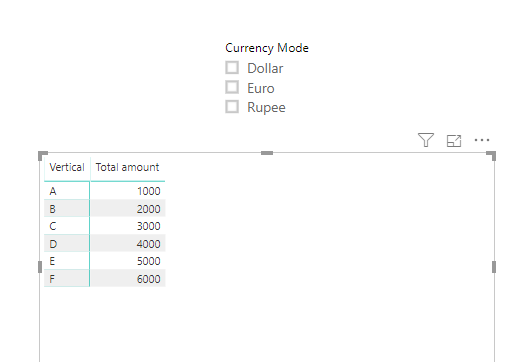
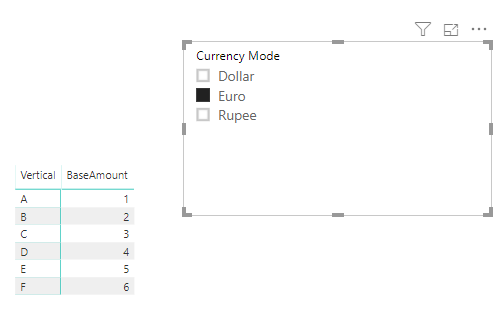
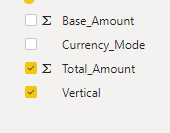
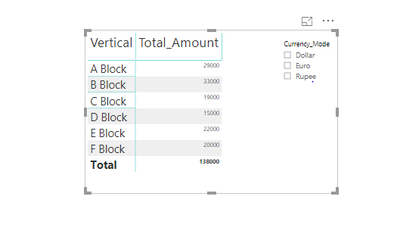
The first image denotes the field I have and second , the report to be .Default, it should display the Total_Amount value, when I click on the filter (i.e) dollar/euro/rupee, it should display the Base_Amount Capture2.PNGvalueCapture1.PNG

Hi @Uma_Dhandpani ,


It seems your description is a little bit different with above post, I've created a pbix based on your question:

Measure = 
IF (
    HASONEVALUE ( 'Table 2'[Currency Mode] ),
    IF (
        SELECTEDVALUE ( 'Table'[Attribute] ) = "BaseAmount",
        CALCULATE (
            MAX ( 'Table'[Value] ),
            FILTER ( 'Table', [Attribute] = "BaseAmount" )
        )
    ),
    IF (
        SELECTEDVALUE ( 'Table'[Attribute] ) = "Total amount",
        CALCULATE (
            MAX ( 'Table'[Value] ),
            FILTER ( 'Table', [Attribute] = "Total amount" )
        )
    )
)

6.PNG7.PNG

pbix attached.

Community Support Team _ Dina Ye
If this post helps, then please consider Accept it as the solution to help the other members find it more
quickly.

Hi @Uma_Dhandpani ,


You are referring to dynamically changing column displayed by slicer selection, please check below similar posts:

https://community.powerbi.com/t5/Desktop/Column-Displayed-in-a-table-Based-on-Slicer-Selection/m-p/4...


Community Support Team _ Dina Ye
If this post helps, then please consider Accept it as the solution to help the other members find it more
quickly.
v-diye-msft
Community Support
Community Support

Hi @Uma_Dhandpani ,


Could you please show more details with expected data?


Community Support Team _ Dina Ye
If this post helps, then please consider Accept it as the solution to help the other members find it more
quickly.

Helpful resources

Announcements
FabCon and SQLCon Barcelona 2026

FabCon & SQLCon – Barcelona 2026

Join us in Barcelona for FabCon and SQLCon, the Fabric, Power BI, SQL, and AI community event. Save €200 with code FABCMTY200.

60 days of Data Days Carousel

Data Days 2026

Join Fabric Data Days 2026: 60 days of free live/on-demand sessions, challenges, study groups, and certification opportunities.

Power BI DataViz World Championships carousel

Power BI DataViz World Championships - June 2026

A new Power BI DataViz World Championship is coming this June! Don't miss out on submitting your entry.