Join us at FabCon Atlanta from March 16 - 20, 2026, for the ultimate Fabric, Power BI, AI and SQL community-led event. Save $200 with code FABCOMM.
Register now!The Power BI Data Visualization World Championships is back! It's time to submit your entry. Live now!
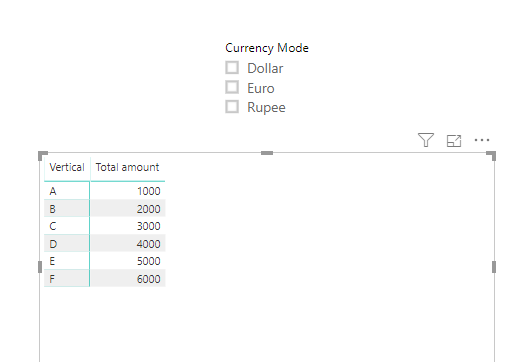
Actually, in matrix table, I used slicer to filter.When I click certain filter ,its corresponding values(i.e)column 1 value want to be displayed, if selecting all in filter want a value which is apart (i.e)column 2 value want to be display
Solved! Go to Solution.
Hi @Uma_Dhandpani ,
You are referring to dynamically changing column displayed by slicer selection, please check below similar posts:
Hi @Uma_Dhandpani ,
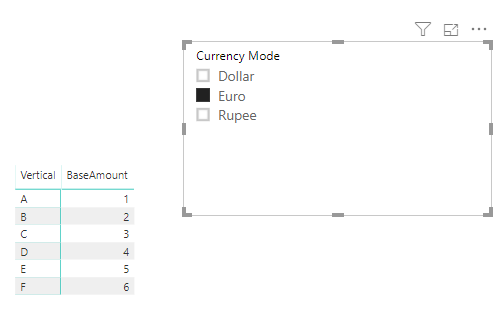
It seems your description is a little bit different with above post, I've created a pbix based on your question:
Measure =
IF (
HASONEVALUE ( 'Table 2'[Currency Mode] ),
IF (
SELECTEDVALUE ( 'Table'[Attribute] ) = "BaseAmount",
CALCULATE (
MAX ( 'Table'[Value] ),
FILTER ( 'Table', [Attribute] = "BaseAmount" )
)
),
IF (
SELECTEDVALUE ( 'Table'[Attribute] ) = "Total amount",
CALCULATE (
MAX ( 'Table'[Value] ),
FILTER ( 'Table', [Attribute] = "Total amount" )
)
)
)
pbix attached.
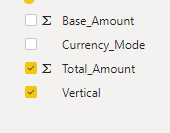
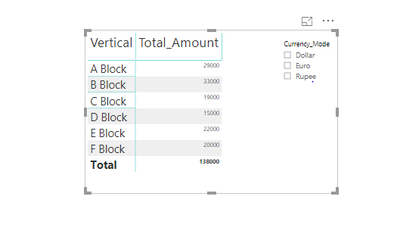
The first image denotes the field I have and second , the report to be .Default, it should display the Total_Amount value, when I click on the filter (i.e) dollar/euro/rupee, it should display the Base_Amount value
Hi @Uma_Dhandpani ,
It seems your description is a little bit different with above post, I've created a pbix based on your question:
Measure =
IF (
HASONEVALUE ( 'Table 2'[Currency Mode] ),
IF (
SELECTEDVALUE ( 'Table'[Attribute] ) = "BaseAmount",
CALCULATE (
MAX ( 'Table'[Value] ),
FILTER ( 'Table', [Attribute] = "BaseAmount" )
)
),
IF (
SELECTEDVALUE ( 'Table'[Attribute] ) = "Total amount",
CALCULATE (
MAX ( 'Table'[Value] ),
FILTER ( 'Table', [Attribute] = "Total amount" )
)
)
)
pbix attached.
Hi @Uma_Dhandpani ,
You are referring to dynamically changing column displayed by slicer selection, please check below similar posts:
Hi @Uma_Dhandpani ,
Could you please show more details with expected data?
The Power BI Data Visualization World Championships is back! It's time to submit your entry.
Check out the January 2026 Power BI update to learn about new features.
| User | Count |
|---|---|
| 61 | |
| 48 | |
| 35 | |
| 25 | |
| 23 |
| User | Count |
|---|---|
| 134 | |
| 110 | |
| 59 | |
| 39 | |
| 32 |