cancel
Showing results for 
Search instead for 
Did you mean: 

July 7 - July 17 | Round 2 of the Power BI Dataviz World Championships. Don't miss your chance! Learn more

Reply
Anonymous
Not applicable

Refreshing a table from Excel source

Hi Commnity


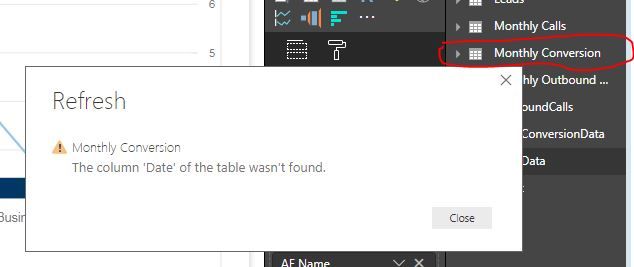
I have a table (Monthly Conversion) that is created from an Excel input. I then added a new column (Date) which I'm using to link to a SQL table but I now want to refresh the table (Monthly Conversion) and I get : The column 'Date' of the table wasn't found. error. This is a column I created on Power BI because it wasn't in the original dataset. 

What does this error mean and how do I correct this?


Any help would be appreciated.


Thanks

Matlotlo

1 ACCEPTED SOLUTION
Anonymous
Not applicable

Hi,


It looks like it was in your original table when you first imported it and now Power Bi expects it. if you run the query editor it might show you the error more clearly. you might just have to add it back in to your original data.

View solution in original post

6 REPLIES 6
Anonymous
Not applicable

Hi @Anonymous 


Could you add some screenshots please?

Anonymous
Not applicable

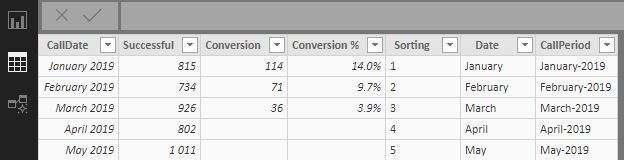
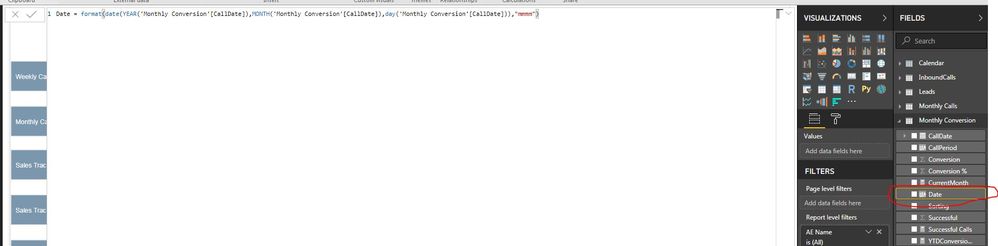
@Anonymous  I've uploaded the screenshot. So basically all I'm trying to do is refresh the data. CallDate, CallPeriod, Conversion%  were all created in PowerBI.


Thanks

Matlotlo

table.JPGscreenshot1.JPGscreenshot.JPG

Anonymous
Not applicable

Hi @Anonymous 


It looks like that column (Date) should be loaded from your original data, is it still present in the excel table/sheet you are importing from?

Anonymous
Not applicable

Hi @Anonymous 

I created it on Power BI as well. It is not part of the Excel data.  So should I create it on the excel file? I was just avoiding doing this manually every month since my source is excel file unfortunately.


Anonymous
Not applicable

Hi,


It looks like it was in your original table when you first imported it and now Power Bi expects it. if you run the query editor it might show you the error more clearly. you might just have to add it back in to your original data.

Anonymous
Not applicable

@Anonymous  I went back to the steps and deleted some of them and it worked. Thank you

Helpful resources

Announcements
FabCon and SQLCon Barcelona 2026

FabCon & SQLCon – Barcelona 2026

Join us in Barcelona for FabCon and SQLCon, the Fabric, Power BI, SQL, and AI community event. Save €200 with code FABCMTY200.

60 days of Data Days Carousel

Data Days 2026

Join Data Days 2026: 60 days of free live/on-demand sessions, challenges, study groups, and certification opportunities.

Power BI DataViz World Championships carousel

Power BI DataViz World Championships - June 2026

A new Power BI DataViz World Championship is coming this June! Don't miss out on submitting your entry.

Top Solution Authors