This time we’re going bigger than ever. Fabric, Power BI, SQL, AI and more. We're covering it all. You won't want to miss it.
Learn moreDid you hear? There's a new SQL AI Developer certification (DP-800). Start preparing now and be one of the first to get certified. Register now
Hi Commnity
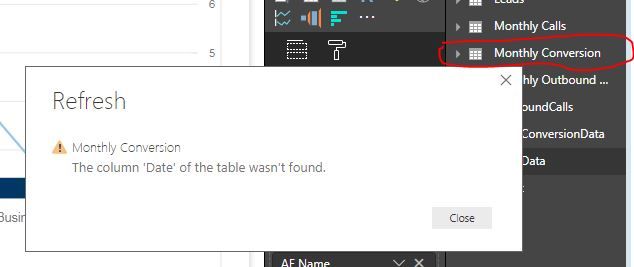
I have a table (Monthly Conversion) that is created from an Excel input. I then added a new column (Date) which I'm using to link to a SQL table but I now want to refresh the table (Monthly Conversion) and I get : The column 'Date' of the table wasn't found. error. This is a column I created on Power BI because it wasn't in the original dataset.
What does this error mean and how do I correct this?
Any help would be appreciated.
Thanks
Matlotlo
Solved! Go to Solution.
Hi,
It looks like it was in your original table when you first imported it and now Power Bi expects it. if you run the query editor it might show you the error more clearly. you might just have to add it back in to your original data.
Hi @Anonymous
Could you add some screenshots please?
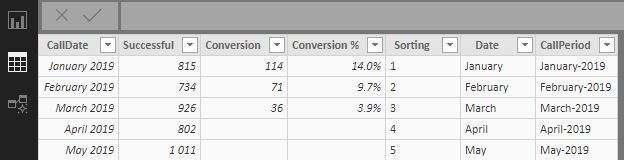
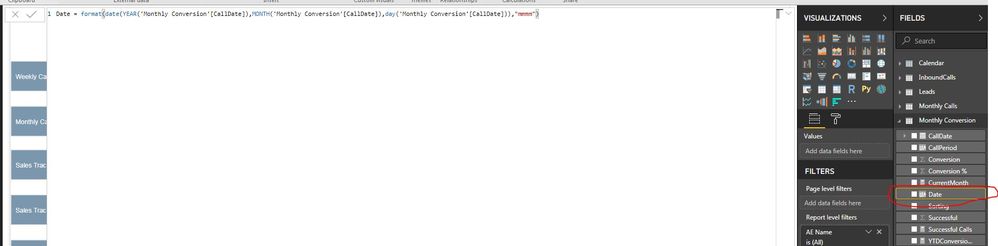
@Anonymous I've uploaded the screenshot. So basically all I'm trying to do is refresh the data. CallDate, CallPeriod, Conversion% were all created in PowerBI.
Thanks
Matlotlo
Hi @Anonymous
It looks like that column (Date) should be loaded from your original data, is it still present in the excel table/sheet you are importing from?
Hi @Anonymous
I created it on Power BI as well. It is not part of the Excel data. So should I create it on the excel file? I was just avoiding doing this manually every month since my source is excel file unfortunately.
Hi,
It looks like it was in your original table when you first imported it and now Power Bi expects it. if you run the query editor it might show you the error more clearly. you might just have to add it back in to your original data.
@Anonymous I went back to the steps and deleted some of them and it worked. Thank you
Check out the April 2026 Power BI update to learn about new features.
If you have recently started exploring Fabric, we'd love to hear how it's going. Your feedback can help with product improvements.
| User | Count |
|---|---|
| 37 | |
| 37 | |
| 31 | |
| 21 | |
| 16 |
| User | Count |
|---|---|
| 66 | |
| 56 | |
| 31 | |
| 26 | |
| 23 |