This is best Fabric, Power BI, SQL and AI community event. How do we know? The last event sold out! Save €200 with code FABCMTY200.
Register nowA new Data Days event is coming soon! This time we’re going bigger than ever. Fabric, Power BI, SQL, AI and more. Don't miss out.
Is it possible to refresh data in Power BI Desktop without showing the Refresh pop-up? Every time a user presses the Refresh button the window with "Refresh" caption is shown. The window is visible until the refresh is finished. Is it possible to suppress this pop-up window? I have found no such an option in the Options menu but there may be some other possibility.
Hi @pesikj
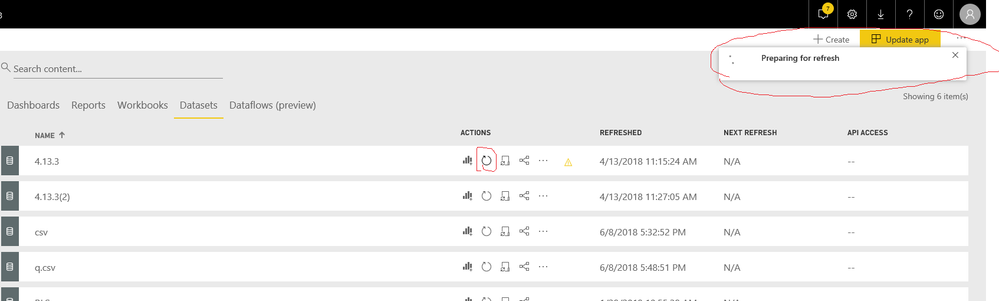
When i hit the "refresh" button, it shows an window on the top right corner which indicates the refresh progress.
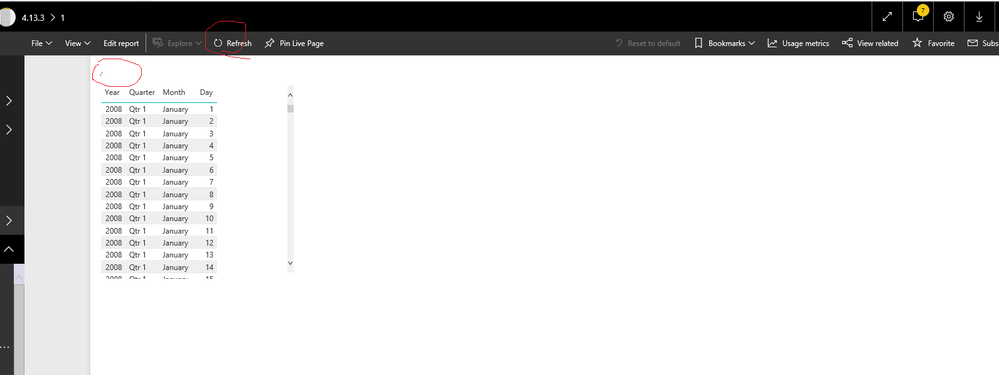
When i open a report or a dashboard and hit the "refresh" button on the page, it doesn't show the window as above, but i can see a revolving "circle" on the visual.
Best Regards
Maggie
thank you for your reply. My question was focused on the desktop version because we are deploying the desktop version to our customer.
I found out the pop-up is shown only when using the imported data set. We are going to use a live connection which is similar to web visual. A user sees only small circles in left up corners of visuals. I believe this will be acceptable to our customer.
Thanks again
Jiří
Check out the May 2026 Power BI update to learn about new features.
Sign up to receive a private message when registration opens and key events begin.
If you have recently started exploring Fabric, we'd love to hear how it's going. Your feedback can help with product improvements.
| User | Count |
|---|---|
| 29 | |
| 28 | |
| 25 | |
| 19 | |
| 14 |
| User | Count |
|---|---|
| 53 | |
| 47 | |
| 27 | |
| 20 | |
| 19 |