Get certified for free when you join Fabric Data Days 2026 and dive into Fabric, Power BI, SQL, AI, and other essential data skills.
Join nowJuly 7 - July 17 | Round 2 of the Power BI Dataviz World Championships. Don't miss your chance! Learn more
Refresh failed:
CSTV - Fastest TTR Today has failed to refresh.
Failure details: The last refresh attempt failed because of an internal service error. This is usually a transient issue. If you try again later and still see this message, contact support.
The 'Age (Days)' column does not exist in the rowset. Table: CSTV: Fastest TTR Today.
Next refresh for CSTV - Fastest TTR Today is scheduled for October 1, 2019 3:00 UTC.
Hi @HeenaPat
Since manual refresh works but scheduled refresh fails, I would not treat this as a simple missing-column issue.
The error means that during Service refresh, Power BI receives a rowset that does not contain Age (Days), even if the column appears in the Salesforce report UI. I would check:
Whether the column label changed slightly, including spaces or capitalization.
Whether Age (Days) is a formula or calculated field that may behave differently through the Reports connector.
Whether Power BI Service uses the same Salesforce user and permissions as Desktop.
Power Query steps such as Changed Type, Renamed Columns, Removed Columns, or Reordered Columns that reference Age (Days).
Salesforce credentials, gateway settings, and refresh history in Power BI Service.
The native Salesforce Reports connector can be sensitive to report schema and also has the frustrating 2,000-row limit.
Another option is to prepare the Salesforce dataset before it reaches Power BI.
Power BI Connector for Salesforce by Metrica Software can help: https://appexchange.salesforce.com/appxListingDetail?listingId=31526f0e-abd8-4cb5-bd1a-3bd56b5c0577
It lets you select Salesforce objects and fields, apply filters, preview the output, and use SOQL mode when needed. This can help create a more controlled Salesforce-to-Power BI source instead of depending on a report schema that may behave differently during scheduled refresh.
Docs and support:
https://metricasoftware.com/docs/salesforce/
https://metricasoftware.com/docs/salesforce/contact-support/
Cheers,
Metrica Team
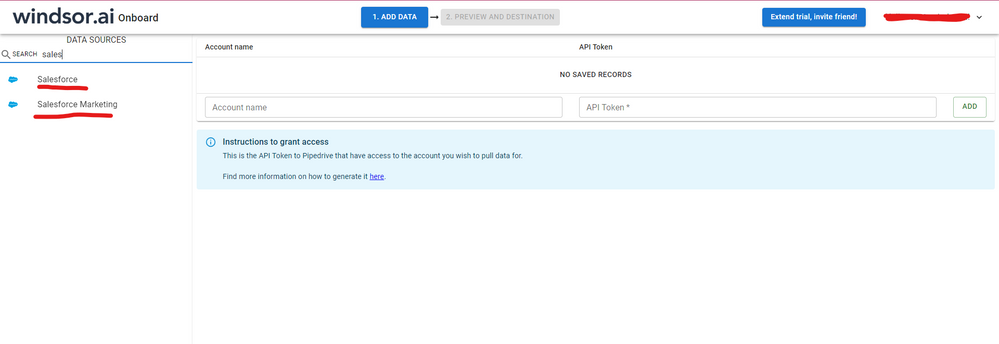
Hi @HeenaPat were you able to find a solution? I've used the Salesforce connector but I had some issues with my data. As a workaround, maybe you can try to test your connection with a 3rd party connector. I've tried windsor.ai, supermetrics and funnel.io. I stayed with windsor because it is much cheaper so just to let you know other options. In case you wonder, to make the connection first search for the Salesforce connector in the data sources list:
After that, just grant access to your Salesforce account using your credentials, then on preview and destination page you will see a preview of your Salesforce fields:
There just select the fields you need. It is also compatible with custom fields and custom objects, so you'll be able to export them through windsor. Finally, just select PBI as your data destination and finally just copy and paste the url on PBI --> Get Data --> Web --> Paste the url.
Hello-
When you pulled this data set in, it caches your table. So if anything changes from your source data, it will cause an error. In this case, its telling you that the column Age(days) was removed from the Salesforce report you are pulling. You need to either hit refresh preview in PowerQuery to remove it, or add that column back in to your Salesforce report.
Jared
Thank you. There has been no change to the source data and no columns have been removed. When we perform a manual refresh it is fine. It is just the autorefresh that is not working. Thanks
Has there been any change to your gateway or credentials in PBI Service?
Jared
Hello Jared,
No there has not been any change to the gateway or credentials in PBI Service.
Thank you
Join us in Barcelona for FabCon and SQLCon, the Fabric, Power BI, SQL, and AI community event. Save €200 with code FABCMTY200.
Join Data Days 2026: 60 days of free live/on-demand sessions, challenges, study groups, and certification opportunities.
| User | Count |
|---|---|
| 28 | |
| 23 | |
| 18 | |
| 18 | |
| 15 |
| User | Count |
|---|---|
| 47 | |
| 44 | |
| 43 | |
| 35 | |
| 30 |