cancel
Showing results for 
Search instead for 
Did you mean: 

The Power BI Data Visualization World Championships is back! Get ahead of the game and start preparing now! Learn more

Reply
Selwynster
Helper II
Helper II

Refresh does not work for data

My understanding is that when i click on Refresh, it should refersh both the visuals AND data?

When i edit my Query, it says Data may be old (and suggests i refresh the data)

Please help 

6 REPLIES 6
amitchandak
Super User
Super User

On Desktop it should referesh both. On app it will only refresh visual.

Share with Power BI Enthusiasts: Full Power BI Video (20 Hours) YouTube
Microsoft Fabric Series 60+ Videos YouTube
Microsoft Fabric Hindi End to End YouTube

Any idea why it is not refreshing both on Desktop?

Hi @Selwynster ,

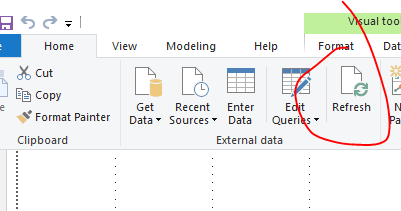
What is your data source? And does the refresh feature you describe refer to the refresh in the edit query, like this?

gg1.PNG

(As tested, the refresh feature in the Edit Query can only refresh the data.)


Or does the refresh feature you describe refer to the refresh in the data view, like this?

gg2.PNG


(As tested, the refresh feature in the data view can refresh both visuals and data.)


Please tell me what's your data source and which refresh feature had you used, I will do more tests.


Best regards,
Lionel Chen

If this post helps, then please consider Accept it as the solution to help the other members find it more quickly.


Hi @v-lionel-msft I am using the Refresh button on the data view (your second screenshot). My data source is a website...maybe the issue is Permissions? But if that were the case, i shouldnt be able to refresh in the Edit query as well. Ps. I have enabled "Include in Report refresh" and "Enable Load", but it doesn't help Regards Selwyn

Hi @Selwynster ,

" My data source is a website..."

Is it possible that the data of your data source is not updated, so there is no change after clicking refresh?😂

Also which Power BI Desktop version are you using? Please update to the newest version then try again.


Maybe you can connect to a web page whose data changes in real time, such as a basketball text live broadcast, and then test whether the refresh feature works.


Data cannot be refreshed even after updating the version, please Create a ticket .


Best regards,
Lionel Chen

If this post helps, then please consider Accept it as the solution to help the other members find it more quickly.

My Version is December 2019. (I assume thats the latest)

I am able to refresh from the website when clicking the Refresh button in the Query editor.

I even increased the Timeout...didnt help


Helpful resources

Announcements
Power BI DataViz World Championships

Power BI Dataviz World Championships

The Power BI Data Visualization World Championships is back! Get ahead of the game and start preparing now!

November Power BI Update Carousel

Power BI Monthly Update - November 2025

Check out the November 2025 Power BI update to learn about new features.

FabCon Atlanta 2026 carousel

FabCon Atlanta 2026

Join us at FabCon Atlanta, March 16-20, for the ultimate Fabric, Power BI, AI and SQL community-led event. Save $200 with code FABCOMM.