Join us in Barcelona for FabCon and SQLCon, September 28 - October 1, 2026.
This is best Fabric, Power BI, SQL and AI community event. How do we know? The last event sold out! Save €200 with code FABCMTY200.
Register now- Power BI forums
- Get Help with Power BI
- Desktop
- Service
- Report Server
- Power Query
- Mobile Apps
- Developer
- DAX Commands and Tips
- Custom Visuals Development Discussion
- Health and Life Sciences
- Power BI Spanish forums
- Translated Spanish Desktop
- Training and Consulting
- Instructor Led Training
- Dashboard in a Day for Women, by Women
- Galleries
- Data Stories Gallery
- Themes Gallery
- Contests Gallery
- QuickViz Gallery
- Quick Measures Gallery
- Visual Calculations Gallery
- Fabric Apps Gallery
- Notebook Gallery
- Translytical Task Flow Gallery
- TMDL Gallery
- R Script Showcase
- Webinars and Video Gallery
- Ideas
- Custom Visuals Ideas (read-only)
- Issues
- Issues
- Events
- Upcoming Events
The Fabric community is now in read-only for platform upgrade. Learn more
- Power BI forums
- Forums
- Get Help with Power BI
- Desktop
- Recursive Calculation current Month different
- Subscribe to RSS Feed
- Mark Topic as New
- Mark Topic as Read
- Float this Topic for Current User
- Bookmark
- Subscribe
- Printer Friendly Page


- Mark as New
- Bookmark
- Subscribe
- Mute
- Subscribe to RSS Feed
- Permalink
Recursive Calculation current Month different
Hello,
I need your help.
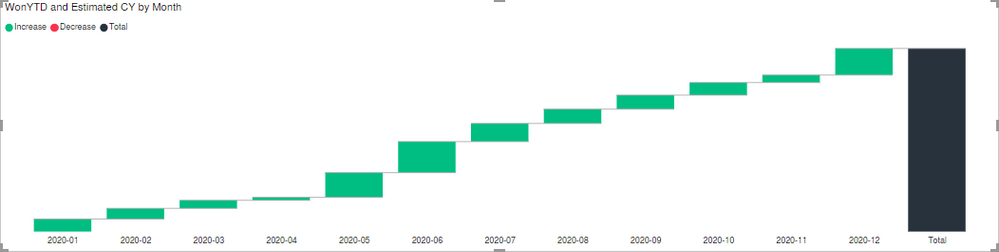
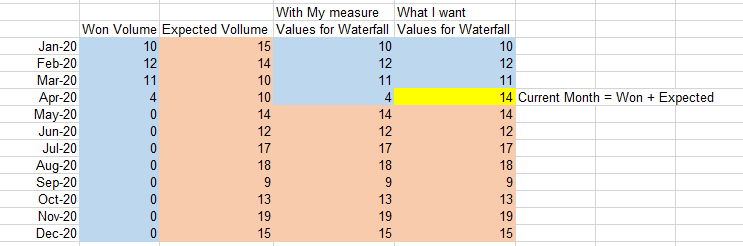
I want to calculate YTD "Won" Volume + expected Volume for next months until 12/20. But the current month should include Won Volume and the expected Volume.
My Dax Code for this measure is:
As visual I use the Waterfall:
Thanks in advance.
Cheers
Imex197
Solved! Go to Solution.
- Mark as New
- Bookmark
- Subscribe
- Mute
- Subscribe to RSS Feed
- Permalink
Hi @Imex197
I have tried to make the below solution which I believe works just fine. I assume you have a calendar table which you should also use on the axis.
Measure =
IF(
    -- VALUES(Calendar[Date]) returns all seletected days in a given context
    TODAY() in VALUES( 'Calendar'[Date]);
    SUM( 'Fact'[Expected]) + SUM( 'Fact'[Won]); -- current month
    IF(
        -- If today is larger than the largest date in the filter context then we are looking at previous months thus use [Won] else [Expected]
        TODAY() > MAXX( VALUES( 'Calendar'[Date]); [Date]);
        SUM( 'Fact'[Won]);
        SUM( 'Fact'[Expected])
    )
)
If this works then please mark it as the accepted solution. Kudos is also appreciated.
BR


- Mark as New
- Bookmark
- Subscribe
- Mute
- Subscribe to RSS Feed
- Permalink
Not Sure I got it completely. Can you share sample data and sample output?
You can use time intelligence for YTD with date calendar
YTD Sales = CALCULATE(SUM(Sales[Sales Amount]),DATESYTD(('Date'[Date]),"12/31"))
This Sales = CALCULATE(SUM(Sales[Sales Amount]),DATESYTD((ENDOFYEAR('Date'[Date])),"12/31"))
To get the best of the time intelligence function. Make sure you have a date calendar and it has been marked as the date in model view. Also, join it with the date column of your fact/s. Refer :
https://radacad.com/creating-calendar-table-in-power-bi-using-dax-functions
https://www.archerpoint.com/blog/Posts/creating-date-table-power-bi
https://www.sqlbi.com/articles/creating-a-simple-date-table-in-dax/
- Mark as New
- Bookmark
- Subscribe
- Mute
- Subscribe to RSS Feed
- Permalink
Hi amitchandak,
thanks for your fast reply. I Can´t share any data.
let me try again:


- Mark as New
- Bookmark
- Subscribe
- Mute
- Subscribe to RSS Feed
- Permalink
Hi @Imex197
Try something like below
Measure =
VAR __dates = DATESYTD( 'Calendar'[Date] )
VAR __endOfMonth =
CALCULATE(
    MAX( 'Calendar'[Date] ),
    FORMAT( 'Calendar'[Date], "YYYYMM" ) = FORMAT( TODAY(), "YYYYMM" )
)
VAR __before = CALCULATE(
    SUM( 'Table'[Value] ),
    FILTER( __dates, 'Calendar'[Date] <= __endOfMonth )
)
VAR __after = CALCULATE(
    SUM( 'Table'[Value] ),
    FILTER( __dates, 'Calendar'[Date] > __endOfMonth )
)
RETURN
__before + __after
Mariusz
If this post helps, then please consider Accepting it as the solution.
Please feel free to connect with me.
- Mark as New
- Bookmark
- Subscribe
- Mute
- Subscribe to RSS Feed
- Permalink
Hi @Mariusz
thanks for your help.
I changed the Format to "YYYYMMDD" now it suits better 🙂
But I wanted to have isolated values.
Is there a chance to have these value isolated per month and not cumulative?
Cheers
Imex197
- Mark as New
- Bookmark
- Subscribe
- Mute
- Subscribe to RSS Feed
- Permalink
Hi @Imex197
I have tried to make the below solution which I believe works just fine. I assume you have a calendar table which you should also use on the axis.
Measure =
IF(
    -- VALUES(Calendar[Date]) returns all seletected days in a given context
    TODAY() in VALUES( 'Calendar'[Date]);
    SUM( 'Fact'[Expected]) + SUM( 'Fact'[Won]); -- current month
    IF(
        -- If today is larger than the largest date in the filter context then we are looking at previous months thus use [Won] else [Expected]
        TODAY() > MAXX( VALUES( 'Calendar'[Date]); [Date]);
        SUM( 'Fact'[Won]);
        SUM( 'Fact'[Expected])
    )
)
If this works then please mark it as the accepted solution. Kudos is also appreciated.
BR
- Mark as New
- Bookmark
- Subscribe
- Mute
- Subscribe to RSS Feed
- Permalink
Hi @Anonymous ,
this is perfect! Thank you!

Helpful resources

FabCon & SQLCon – Barcelona 2026
Join us in Barcelona for FabCon and SQLCon, the Fabric, Power BI, SQL, and AI community event. Save €200 with code FABCMTY200.

Power BI DataViz World Championships - June 2026
A new Power BI DataViz World Championship is coming this June! Don't miss out on submitting your entry.

| User | Count |
|---|---|
| 23 | |
| 22 | |
| 14 | |
| 14 | |
| 13 |


| User | Count |
|---|---|
| 47 | |
| 39 | |
| 24 | |
| 20 | |
| 20 |


